EA Red Dragon MT5

110 USD
Versione demo scaricata:
2 602
Pubblicato:
27 aprile 2019
Versione attuale:
3.44
Non hai trovato un robot adatto?
Ordina il tuo
su Freelance
Vai alla sezione Freelance
Ordina il tuo
su Freelance
Come acquistare un Robot di Trading o un indicatore
Esegui il tuo EA
hosting virtuale
hosting virtuale
Prova un indicatore/robot di trading prima di acquistarlo
Vuoi guadagnare nel Market?
Come presentare un prodotto per venderlo con successo

Ti stai perdendo delle opportunità di trading:
- App di trading gratuite
- Oltre 8.000 segnali per il copy trading
- Notizie economiche per esplorare i mercati finanziari
Registrazione
Accedi
Accetti la politica del sito e le condizioni d’uso
Se non hai un account, registrati
-----------------------------------------------------------------------------------------------------------------------------------------------------------------------------------------
EA can show to you not suitable trading cost, so you can save money before you start trading on high volume with not suitable broker.
The path to the file using MT5:
File \ Open Date Folder \ MQL5 \ Files \ EA Red Dragon MT5 [Slippages] \ "name your server".
-----------------------------------------------------------------------------------------------------------------------------------------------------------
Здравствуйте, Руслан!
Спасибо за советника, тестирую вторую неделю на рельном счете, после некоторой оптимизации.
Не могу нигде найти описания параметров (проверил также описание для MT4 - тоже выглядит как будто они сделано для предыдщей версии советника).
Могли бы вы пояснить:
1) Логику работы Trailing Mod 1 - 6, в чем отличие режимов?
2) Параметры для Adaptive TRailing? Наблюдения в тестах почему-то показывают гораздо худшие результаты, когда защита включена, приницип работы не очевиден.
На что влияет Change Correction Coefficient? Что значит Adaptive by time и Time Scale?
Спасибо
Здравствуйте, Руслан!
Спасибо за советника, тестирую вторую неделю на рельном счете, после некоторой оптимизации.
Не могу нигде найти описания параметров (проверил также описание для MT4 - тоже выглядит как будто они сделано для предыдщей версии советника).
Могли бы вы пояснить:
1) Логику работы Trailing Mod 1 - 6, в чем отличие режимов?
2) Параметры для Adaptive TRailing? Наблюдения в тестах почему-то показывают гораздо худшие результаты, когда защита включена, приницип работы не очевиден.
На что влияет Change Correction Coefficient? Что значит Adaptive by time и Time Scale?
Спасибо
Здравствуйте,
Не могу нигде найти описания параметров (проверил также описание для MT4 - тоже выглядит как будто они сделано для предыдщей версии советника).
Это немного разные виды трейлинг стопа: например некоторые моды не используют параметр STEP ,и трейлинг стоп модифицируется каждый тик если позиция в профите.
Bid = текущая цена.
1) mod = Трейлинг стоп(10) по шаговый(5) , Пример: Bid - СЛ >= 10 + 5, СЛ перемещается на уровень цены Bid - 10.
2) mod = Трейлинг стоп(10) стандартный с шагом(5) , Пример: Bid - цена открытия >= 10 + 5 и Bid - СЛ >= 10 + 5, СЛ перемещается на уровень цены Bid - 10.
3) mod = Трейлинг стоп(10) с форой N пунктов, Пример: Bid - цена открытия >= 10 + 10 и Bid - СЛ >= 10 + 10, СЛ перемещается на уровень цены Bid - 10.
4) mod = Трейлинг стоп(20) по шаговый(10) ( 20 и 10, от цены открытия ), Пример: Bid - цена открытия >= 10, и Bid - СЛ >= 10, СЛ перемещается на уровень цены Bid - 10.
5) mod = Трейлинг стоп(10) по шаговый(5) , Пример: Bid - СЛ >= 10, СЛ перемещается на уровень цены Bid - 5.
6) mod = Трейлинг стоп(10) по шаговый(5) , Пример: Bid - СЛ >= 10, СЛ перемещается на уровень цены Bid - 5.(СЛ перемещается даже если он равен нолю).
Параметры для Adaptive TRailing? Наблюдения в тестах почему-то показывают гораздо худшие результаты, когда защита включена, приницип работы не очевиден.
Эти параметры чувствительные к тикам и в реальной торговли результаты могут значительно отличаться от тестера стратегий:
На что влияет Change Correction Coefficient? Что значит Adaptive by time и Time Scale?
Категорически не хочет в плюс работать, брокер RoboForex-Pro, с какими можно поиграть настройками что бы сделки тут же не закрывал в минус небольшой?
Категорически не хочет в плюс работать, брокер RoboForex-Pro, с какими можно поиграть настройками что бы сделки тут же не закрывал в минус небольшой?
Отключите эти настройки:

Здравствуйте, эксперт выдает предупреждение, счет ECN, на какие настройки нужно обратить внимание?
Warning! Trading conditions on this account are CRITICALLY BAD:
Average spread: 1.00 p
Average slippage: -2 p
Commission: 0 p
Total trade cost: -2.10 p, ( -21.00 USD per lot )
Здравствуйте, эксперт выдает предупреждение, счет ECN, на какие настройки нужно обратить внимание?
Warning! Trading conditions on this account are CRITICALLY BAD:
Average spread: 1.00 p
Average slippage: -2 p
Commission: 0 p
Total trade cost: -2.10 p, ( -21.00 USD per lot )
Здравствуйте,
Сколько дней работает EA ?
Какой брокер и счет открыт ?
На какой валюте и таймфрейме работает EA ?
Здравствуйте,
Сколько дней работает EA ?
Какой брокер и счет открыт ?
На какой валюте и таймфрейме работает EA ?
Несколько дней, roboforex Prime, 15 мин, eurusd, так же поставил на пару gbpusd там результаты торговли получше пока что чем у eurusd, тоже 15мин
Несколько дней,
Нужно дать советник больше времени поработать, примерно 2-4 недели.
Если предупреждения появляется "Warning! Trading conditions on this account are CRITICALLY BAD" после нескольких недель работы, то нужно сменить брокера.
5 мин, eurusd, так же поставил на пару gbpusd там результаты торговли получше пока что чем у eurusd, тоже 15мин
Рекомендуем использовать EURUSD и таймфрейм М30.
На другие валюты и таймфреймы тестирования не проводились.
Также нужен VPS с низким пингом до вашего брокера.
Hi Ruslan, why my live trading result in MT5 is different from your monitoring result? My back test and live trading result in my MT5 live account is all different from your monitoring in MT4 (MT5 no monitoring). So can your check and see what has happened? Thanks.
Hi Ruslan, why my live trading result in MT5 is different from your monitoring result? My back test and live trading result in my MT5 live account is all different from your monitoring in MT4 (MT5 no monitoring). So can your check and see what has happened? Thanks.
Hi,
My demo signal uses an ECN account with no commission.
So can your check and see what has happened?
What broker and account is open?
What currency and timeframe does EA work on?
Hi,
My demo signal uses an ECN account with no commission.
yes.What broker and account is open?
What currency and timeframe does EA work on?
Hi Ruslan, my timeframe EA works on is 30 minutes, my account is MT5 live account and broker is Gomarkets. You can check below transaction happened in this morning in my live account, this trade was opened and closed almost same as your demo account, but your transaction is profit, my is lost. Please check:
This transaction in my live account:
This transaction in your demo account:
For the EA setting, I use default. The Slippage setting is 10.
Hi Ruslan, my timeframe EA works on is 30 minutes, my account is MT5 live account and broker is Gomarkets. You can check below transaction happened in this morning in my live account, this trade was opened and closed almost same as your demo account, but your transaction is profit, my is lost. Please check:
This transaction in my live account:
This transaction in your demo account:
For the EA setting, I use default. The Slippage setting is 10.
There is almost no slippage on demo accounts.
There are slippages on live accounts and therefore the results may differ.
My real signal:


Slippage on the current order:
There is almost no slippage on demo accounts.
There are slippages on live accounts and therefore the results may differ.
My real signal:
Slippage on the current order:
Thanks Puslan. I noticed that the main reason that cause differ is closing time. In terms of the history data, in demo account, the closing time is 2:40, please see below picture
But in my live account, the closing time is 2:37, please see below picture. So it cause differ. if we set the time frame as 1 minute, we can see the differ in the closing time
In my live account the closing time picture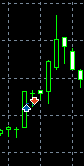 , in the demo account,the closing time picture
  . It seems in different system, the closing time is different, and I think it maybe the main reason that cause the profit differ. Since the SL value setting is same, why different account causes the closing time different? can you take a look? Thanks
Thanks Puslan. I noticed that the main reason that cause differ is closing time. In terms of the history data, in demo account, the closing time is 2:40, please see below picture
But in my live account, the closing time is 2:37, please see below picture. So it cause differ. if we set the time frame as 1 minute, we can see the differ in the closing time
In my live account the closing time picture , in the demo account,the closing time picture . It seems in different system, the closing time is different, and I think it maybe the main reason that cause the profit differ. Since the SL value setting is same, why different account causes the closing time different? can you take a look? Thanks
EA is a scalper and it is very sensitive to price quotes.
The results may differ from broker to broker, as each broker receives slightly different price quotes.
For example, on demo accounts, price quotes are much more accurate than on real accounts. Also, slippage plays a big role in scalping systems.
On demo accounts, the slippage is almost zero.
On real accounts, the slippage is quite high.
For these reasons, the results may be different on real accounts and on demo accounts. And also depends on the broker.
For good synchronization of quotes, you need to use a VPS with a minimum ping to your broker.
CAN YOU PLEASE HELP ME WHY IT IS TELLING NOT TRADING TIME ?
Hi,
Try restarting MT5.
Hi pishun,
I just purchased dragon EA and its activated o my MT5 terminal however i observed that there are 4 Expert advisers with different settings please help me with setup assistance and also the TP isnt active in trades