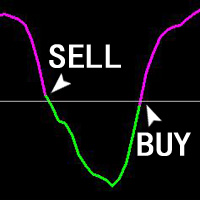
ZhiBiJuJi MT4
168 USD
Versione demo scaricata:
929
Pubblicato:
20 febbraio 2019
Versione attuale:
2.0
Non hai trovato un robot adatto?
Ordina il tuo
su Freelance
Vai alla sezione Freelance
Ordina il tuo
su Freelance
Come acquistare un Robot di Trading o un indicatore
Esegui il tuo EA
hosting virtuale
hosting virtuale
Prova un indicatore/robot di trading prima di acquistarlo
Vuoi guadagnare nel Market?
Come presentare un prodotto per venderlo con successo

Ti stai perdendo delle opportunità di trading:
- App di trading gratuite
- Oltre 8.000 segnali per il copy trading
- Notizie economiche per esplorare i mercati finanziari
Registrazione
Accedi
Accetti la politica del sito e le condizioni d’uso
Se non hai un account, registrati
HOW TO INSTALL THE INDICATOR PLZ HELP
HOW TO INSTALL THE INDICATOR PLZ HELP
After renting or purchasing, you can add it to the chart by opening it in mt4.
HOW TO INSTALL THE INDICATOR PLZ HELP
First of all, your mt4 should log in to the account of the MQL5 website, and then enter the already downloaded indicators in the market inside the terminal. Click the indicator to find the location of the indicator. Alternatively, the downloaded indicator can also be found in the market in the indicator in the navigation.
Hi
I rented the indicator could you please tell me the buy buffer# Sell buffer#
thanks
Hi
I rented the indicator could you please tell me the buy buffer# Sell buffer#
thanks