
100 USD
Versione demo scaricata:
6 407
Pubblicato:
29 gennaio 2019
Versione attuale:
19.3
Non hai trovato un robot adatto?
Ordina il tuo
su Freelance
Vai alla sezione Freelance
Ordina il tuo
su Freelance
Come acquistare un Robot di Trading o un indicatore
Esegui il tuo EA
hosting virtuale
hosting virtuale
Prova un indicatore/robot di trading prima di acquistarlo
Vuoi guadagnare nel Market?
Come presentare un prodotto per venderlo con successo

Ti stai perdendo delle opportunità di trading:
- App di trading gratuite
- Oltre 8.000 segnali per il copy trading
- Notizie economiche per esplorare i mercati finanziari
Registrazione
Accedi
Accetti la politica del sito e le condizioni d’uso
Se non hai un account, registrati
so every symbol just number concurrently right?
Didn't understand the question.
The "Settings file" input parameter is essentially just the name of the folder where the panel will store its settings.
That is, if you set Setting file = 5, then the panel will store its settings in a folder called "5", if you set Setting file = 1265 then the panel will store its settings in a folder called "1265".
In this folder, the panel stores all its settings, if these settings belong to any particular symbol or order, then it signs them with the name of the symbol or ticket number.
I recommend looking in the instructions about the "Settings File", and also look at the "Multi-Currency Mode".
Hello guys, I have two questions.
At the time to set a partial profit.
1) I setted a partial profit, however it doesn´t appear materialized on the chart, is it normal? I even watched a video tutorial and it doesn´t appear there either.
2) Can we set a partial profit one time the trade is in the market?
Thanks.
Hello guys, I have two questions.
At the time to set a partial profit.
1) I setted a partial profit, however it doesn´t appear materialized on the chart, is it normal? I even watched a video tutorial and it doesn´t appear there either.
2) Can we set a partial profit one time the trade is in the market?
Thanks.
Hello,
1) partial close levels are displayed on the chart as labels:
- when opening an order by the lines on the chart,
- when using the Order Management panel.
Both of these options are shown in the gif image below.
2) if the order is already open, then its partial closing settings can only be edited from the Order Management panel.
I also recommend watching this:
Panel for Partial Close
Panel for Order Management (PC tab)
Hello. Just bought the EA and its fantastic. I just wanted to why are there different tab buttons at stop for "Open 1" and "Open 2". I believe one can open more then one orders from the "open 1" button only. Would appreciate if you could tell me. Thanks.
Hello, this is just a demonstration of all blocks of the Trade panel. The name and number of tabs, as well as their content is customizable, so you can customize it for yourself, leaving only those blocks that you need in trading. If these blocks fit in one tab, then instead of 4 tabs you can use one or two.
To configure this panel you need to go here: "Settings: Trade Panel tab".
Теперь понятно.
Я не думаю что это расширение спреда, вероятней всего это просто резкое движение цены. Если сказать точнее, ваш стоп лосс сносит резкое движение цены в начале сессии, без расширения спреда.
Для примера берем логи закрытия ордера:
на момент закрытия ордера спред равнялся 0.67680 - 0.67430 = 0.00250
теперь смотрим спецификацию данного инструмента на сайте этого брокера:
в нем указано что средний спред равен 0.00500.
То есть на момент закрытия ордера, на инструменте спред был меньше чем средний спред по инструменту.
Вы перепутали в представленном скриншоте NG и HG, проблема именно в спреде, в моём случае цены что закрывался ордер и рядом не было по свечному графику.
Вы перепутали в представленном скриншоте NG и HG, проблема именно в спреде, в моём случае цены что закрывался ордер и рядом не было по свечному графику.
Дело в том что инструмент по которому было зарытие вовсе не NG, NG - это у вас в логе отображается текущий открытый график. Таких цен как 0.67 нет тем более пока на NG.
Инструмент был CADCHF, счёт реальный.
Дело в том что инструмент по которому было зарытие вовсе не NG, NG - это у вас в логе отображается текущий открытый график. Таких цен как 0.67 нет тем более пока на NG.
Инструмент был CADCHF, счёт реальный.
понятно, по картинке видно что был скачок спреда. ок в будущем построюсь добавить макс спред для виртуального стоп лосса.
Ещё в качестве предложения для улучшения - можно ли при выставлении Line Sell/Bye показывать полосами допустимые границы для Stop ордера и его SL, чтобы не натыкаться на ошибки Wrong price, Wrong Sl при нажатии на Open?
я подумаю над этим, но вряд ли это добавлю.
Hello, ok, I'll add.
Hi guys , my stop loss seems to have locked and will not drag when i grab it with the mouse , is there a setting that can unlock this or is this an mt5 setting , either way its annoying , cheers
Hello, this is configurable in the terminal. Go to the top menu of the terminal in Tools>Options>Charts, and select this:
Ещё пожелание к улучшению:
для всех горячих клавиш можно установить только одинаковый модификатор. добавьте возможность разных, например
Ctrl+1 используется для H1, Ctrl+2 для H2,
тогда как
Shift+Ctrl+1 для M1, Shift+Ctrl+2 для M2
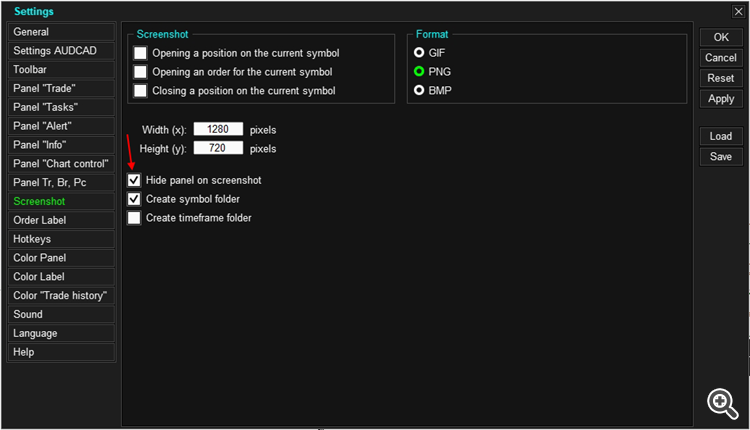
To hide the panel when taking a screenshot, go to the settings and enable "Hide panel on screenshot":
-
Panel "Info":
- Added a new options for the profit - "%TP, %SL, Price".
- The function control interface has been changed.
"% of the current lot" - the closed part of the position will be calculated as a percentage of the current lot of the position.
"% of the initial lot" - the closing part of the position will be calculated as a percentage of the initial lot of the position, that is, the lot that the position had at the time of its opening.
Can you provide more details on what specifically does not work.
Can you provide more details on what specifically does not work.
when i click to chart control icon ( in Toolbar ) not show chart control menu .
. close mt5 and open again
. reset settings
but not resolved
when i click to chart control icon ( in Toolbar ) not show chart control menu .
. close mt5 and open again
. reset settings
but not resolved
All graphic objects of the panel are anchored to the upper left corner. If you have reduced the size of the window, then the panel may be outside the visible part of the chart. To solve this problem, you need to enlarge the window, and move the panel up or to the left. Look at the gif image, I think you will understand what I am writing about.
All graphic objects of the panel are anchored to the upper left corner. If you have reduced the size of the window, then the panel may be outside the visible part of the chart. To solve this problem, you need to enlarge the window, and move the panel up or to the left. Look at the gif image, I think you will understand what I am writing about.
my problem is solved
i don't know why chart panel moved to outside of the chart after update ...
anyway, thanks for your responding ...