Ultimate Volatility Breakout
- Experts
- Versione: 9.0
- Attivazioni: 5

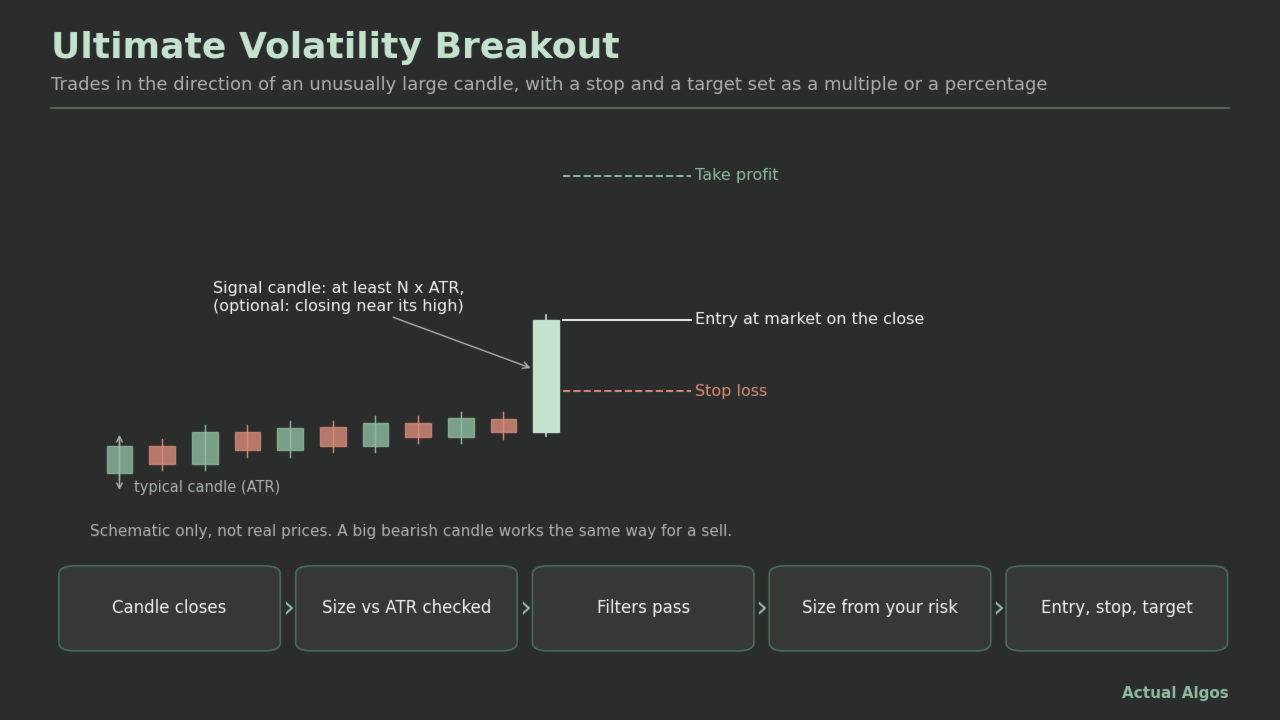
Ultimate Volatility Breakout is an Expert Advisor for MetaTrader 5 built on one idea: an unusually large candle shows momentum, so trade in its direction. ATR (Average True Range) is the usual candle size on that chart; the EA compares each finished candle to it. You choose the market, timeframe and settings yourself.
Full user guide and example settings: https://www.mql5.com/en/blogs/post/780938
How it works
- When a candle finishes, the EA measures its size: body (open to close) or full range (high to low). The signal timeframe is an input; the default is the chart timeframe. The direction is up if the candle closed above its open and down if below. A doji never trades.
- The candle must be at least N x ATR (default 2.0 x ATR with period 14, read from the bar before the signal candle). Optional extras: a minimum size in points, a maximum size in ATR (to skip very large candles), and "close in the top or bottom X% of the candle".
- Optional gates, each checked once, when the candle closes: trading window, weekdays, maximum spread, volume surge (tick volume by default), moving-average trend or fade filter, cooldown candles after a trade, a daily stop, and the news filter. If a gate says no, that signal is dropped and is not retried.
- Entry: a market order straight after the close, or a pending stop order just beyond the signal candle's high or low (with an expiry).
- Stop loss: none, points, ATR multiple, percent of price, or beyond the signal candle. Take profit: none, points, ATR multiple, percent of price, a multiple of the stop (R), or a multiple of the candle size. Defaults: stop 1.5 x ATR, target 3 x the stop.
- Optional break-even, trailing stop, maximum holding time (bars or minutes) and close at the end of the trading window.
- Size: risk percent of balance (default 0.5%), fixed lots, lots per balance step, fixed money risk, or risk percent of a fixed reference balance. Risk modes need a stop; with no stop the EA uses the fixed-lot input. An optional maximum-lot input caps any single order.
Features
- Candle size measured as body or range, against an ATR you configure.
- Five stop modes and six target modes (each includes off), break-even and trailing stop.
- Market or stop-order entry; optional reverse on an opposite signal.
- Trend or fade moving-average filter, volume filter, time window, weekday switches, cooldown.
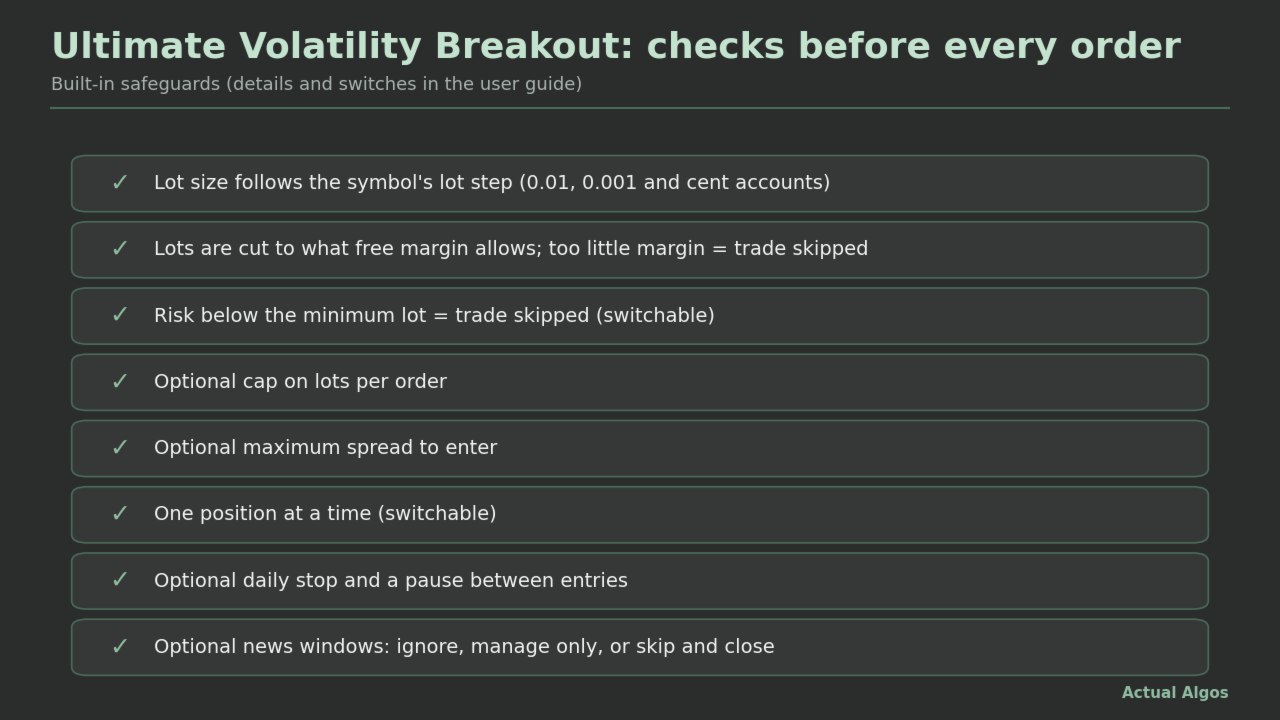
- Five sizing modes. Lots are calculated with the platform's own profit calculator, cut to what free margin allows, and a trade whose risk is below the minimum lot is skipped (switchable).
- Lot size follows the symbol's lot step, including 0.001-lot brokers. Cent accounts: an option reads money inputs in USD.
- Daily stop on equity drop or number of losing trades (off by default).
- Optional news handling, off by default. For high, medium and low impact events you choose Ignore, Manage only (no new trades) or Skip (no new trades, and this EA's positions are closed and its pending orders deleted while the window is active). Events come from MetaTrader's built-in economic calendar on a live chart, from a calendar file you provide, or from times you type in. The built-in calendar is not available in the Strategy Tester, so news handling can only be tested with a file or typed-in times. Note that very large candles often happen around news, so a news filter can remove many signals.
- Trade state is rebuilt from history after a restart.
- Status panel, lines and marks on the chart (visual only).
Example settings
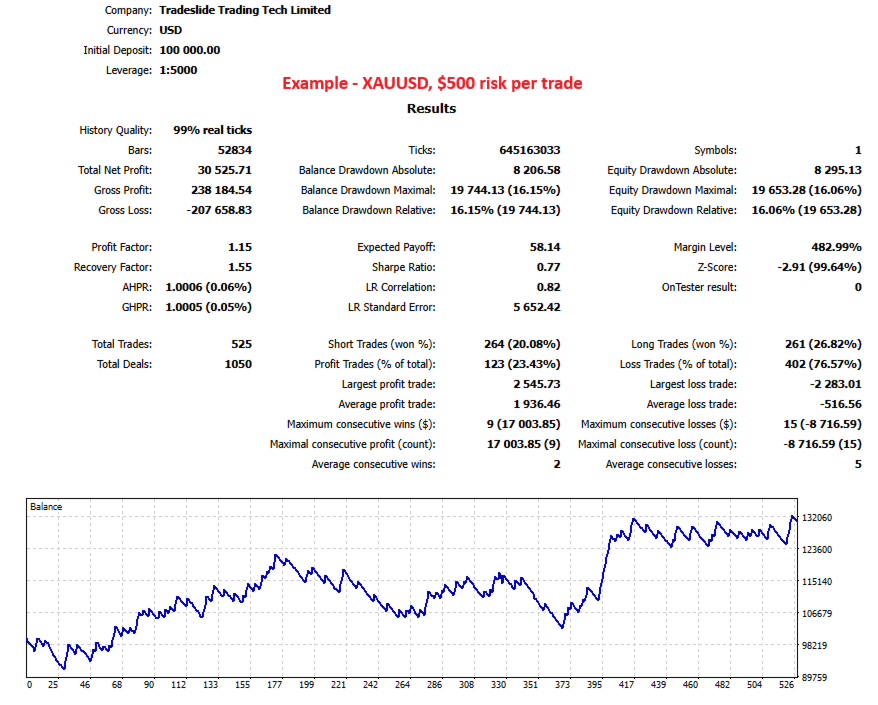
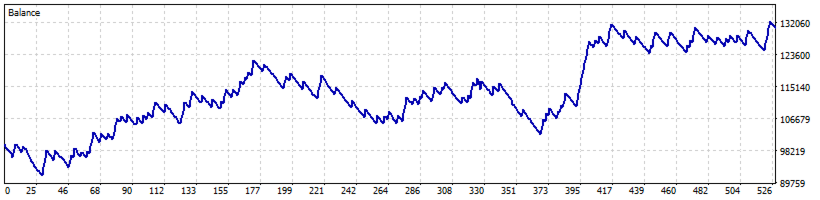
The screenshot uses one example configuration on gold: H1 chart, candles of at least 2.5 x ATR(200) measured by body, close in the top or bottom 25%, market entry, stop 0.5% of price, target 2% of price, 1% risk per trade, spread limit 300 points. The exact settings are in the user guide. They are an example for your own testing, not a tuned recommendation. In our tests the example was a thin edge (profit factor about 1.1, about one trade in four wins) with a deep drawdown (about 34% at 1% risk). The same logic with generic settings on stock-index CFDs lost money in our tests, so test your own market and timeframe.
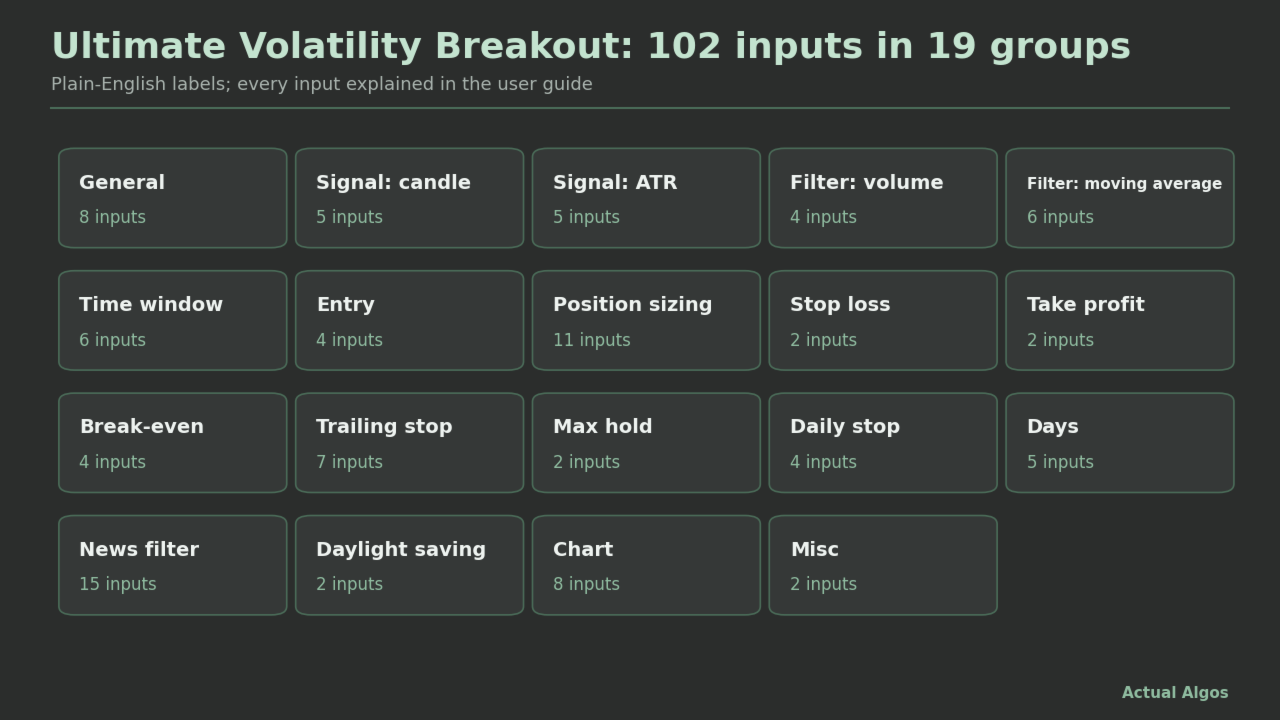
Inputs (102, in plain English)
General, Signal: candle, Signal: ATR, Volume filter, Moving-average filter, Time window, Entry, Position sizing, Stop loss, Take profit, Break-even, Trailing stop, Max hold, Daily stop, Days, News filter, Daylight saving, Chart, Misc.
Defaults: signal candle at least 2.0 x ATR(14) by body, market entry, one position at a time, stop 1.5 x ATR, target 3 x the stop, risk 0.5% of balance, all optional filters off. The defaults are placeholders, not tuned for any symbol.
Recommended use
- Start on a demo account and read the Experts log.
- Try one market and timeframe first and test on several years of history. The same setting behaves very differently on different markets; stops and targets given in percent of price or ATR need adjusting for each market.
- Keep risk low. The strategy has a low win rate by design (a small stop and a larger target), so expect long losing runs. In the example test, drawdowns at 1% risk per trade were about 34% of the account. Size so that you can sit through that, and lower the risk percent accordingly.
- Test with "Every tick based on real ticks": stops and targets are path-dependent.
- Stacking several trades is possible only if you switch off "one position at a time" and only on hedging accounts. It multiplies exposure when several large candles follow each other. Keep the maximum-lot input and the open-trades cap set.
- A signal is evaluated once, right after the candle closes. If the spread is above your limit at that moment, the signal is lost.
What it does not do
- It does not predict or promise profit. A large candle does not always continue; it can also be the end of a move.
- It does not know why a candle was large. It cannot tell a news spike from a trend.
- It has no weekend or Friday close rule unless you set a time window or a maximum hold. Positions can be held for days and can gap.
- It has no total-exposure cap across stacked trades.
- No DLLs, no external services, no economic calendar of its own.
- It cannot prevent slippage, gaps or broker rejections, and it does not choose markets, hours or settings for you.
Risk disclosure
Trading forex, CFDs, indices, metals and crypto carries a high risk of loss and is not suitable for everyone. You can lose some or all of your deposit. Automated trading can fail through software, connection, broker or data problems. This product is software, not investment advice, a managed account or a signal service.
About the screenshots and any test results
Strategy Tester results shown with this product use example settings on historical data. They are hypothetical, chosen with hindsight, and may understate costs such as commission, spread, swap and slippage. Settings that look good in a test usually do less well afterwards. Real results will differ and will include losing periods.
Support
Use the product comments or a private message on MQL5. Please include the product version, broker, symbol, timeframe, settings and the Experts log lines. No custom coding and no individual trading advice.
5 activations are included. If you need more, message me before buying.
1. Will it make money? Nobody can promise that. In our tests the gold example was a thin edge with a deep drawdown, and the same logic lost money on stock indices. Test on demo first.
2. Which markets and timeframes? Any MetaTrader 5 symbol and timeframe you want to test. The example is gold on H1. Distances in percent of price behave very differently on gold than on indices or forex.
3. Why did it skip a large candle? A gate said no: spread above your limit at the close, outside the time window, weekday off, volume or moving-average filter, cooldown, daily stop, or a news window. The signal is checked once and not retried. Switch on the detailed log and read the Experts tab.
4. Why do I see several trades open at once? Stacking is on only if you turned off "one position at a time". Keep the open-trades cap set. Stacking needs a hedging account.
5. Why is the lot the fixed-lot input and not my risk percent? Risk sizing needs a stop. With the stop off, the EA falls back to fixed lots.
6. What does the maximum-lot input do? It caps any single order. A tight stop with a fixed money risk can otherwise give a very large lot.
7. Can it reverse on an opposite candle? Yes, if you switch on "reverse on opposite".
8. Does the news filter work in the Strategy Tester? The built-in calendar does not. Use a calendar file you supply (AA_News.csv in the terminal's Common\Files folder; the format is in the user guide) or typed-in times.
9. Do I need a licence key? No. The Market version has no key input.
10. Does it work on cent accounts and 0.001-lot brokers? Yes. Lots follow the symbol's lot step, and an option reads money inputs in USD on a cent account.
11. Can I run it on several charts? Yes, with a different magic number on each.