MT5 Bars Exporter
- Utilità
-
Christian Koehler
 We are a highly qualified team of experienced programmers and trading experts who have set ourselves the goal of revolutionising the world of trading.
Our approach is simple and clear: we develop EAs based on simple and understandable strategies that deliver profitable results. - Versione: 1.0
MT5 Bars Exporter – export price history to CSV in one click
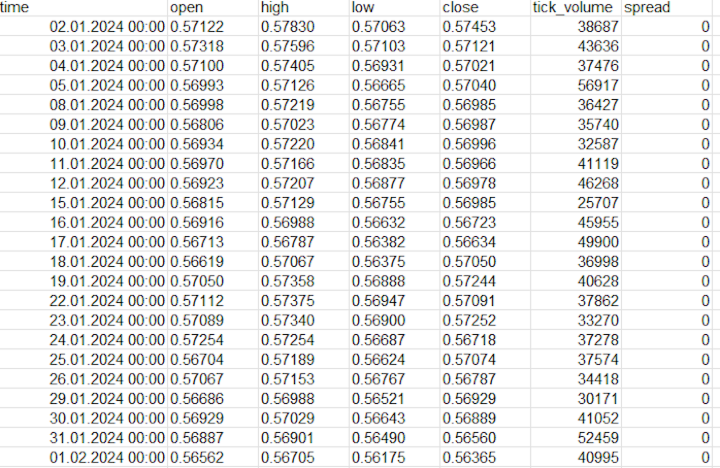
MT5 Bars Exporter writes the bar history of any symbol in your MetaTrader 5 terminal to clean CSV files: open, high, low, close, tick volume, spread and (optionally) real volume. Use the data in Excel, Python, R, machine-learning projects, your own backtesting tools or as an input for other Expert Advisors.
The utility does not open, modify or close any trades.
KEY FEATURES
- All 21 MT5 timeframes: M1, M2, M3, M4, M5, M6, M10, M12, M15, M20, M30, H1, H2, H3, H4, H6, H8, H12, D1, W1, MN1
- Several symbols in one run (comma-separated list, e.g. XAUUSD, EURUSD, US500)
- Four range modes: fixed dates, last N days, last N bars, all available history
- History is downloaded from the broker server automatically – no manual scrolling
- Large exports (millions of M1 bars) are processed in blocks without freezing the terminal
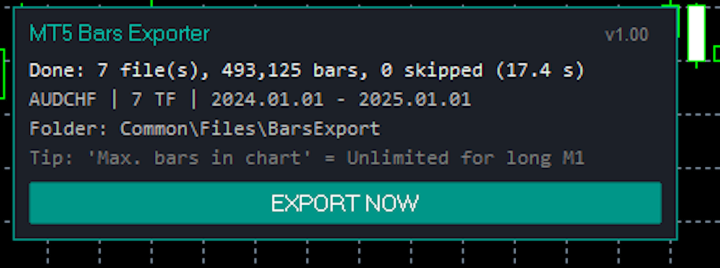
- On-chart panel with an EXPORT NOW button, progress display and result summary
- Automatic export on start and optional repeat every N minutes (ideal for feeding external tools)
- The current, unfinished bar can be skipped
- Flexible CSV format: semicolon, comma or tab; decimal point or comma (for German or other European Excel versions)
- Time formats: MT5 (2024.01.31 13:45), ISO (2024-01-31 13:45:00), separate date and time columns, or Unix timestamp
- Optional time shift in hours, e.g. to convert broker server time to UTC
- Choose the columns: tick volume, spread, real volume
- Save to Common\Files (shared by all terminals) or to MQL5\Files of the terminal, with a subfolder of your choice
- Clear file names, e.g. Bars_XAUUSD_H1_20240101-20241231.csv
- Every file path is written to the Experts journal
HOW TO USE
1. Attach MT5 Bars Exporter to any chart.
2. Choose the range, symbols, timeframes and CSV format in the input settings and click OK.
3. The export starts automatically (or click EXPORT NOW on the panel).
4. When the export is finished, the file paths are listed in the Experts tab of the terminal. Default folder:
%APPDATA%\MetaQuotes\Terminal\Common\Files\BarsExport\
(In MetaTrader: File > Open Data Folder, then go up to Terminal\Common\Files.)
INPUT PARAMETERS (OVERVIEW)
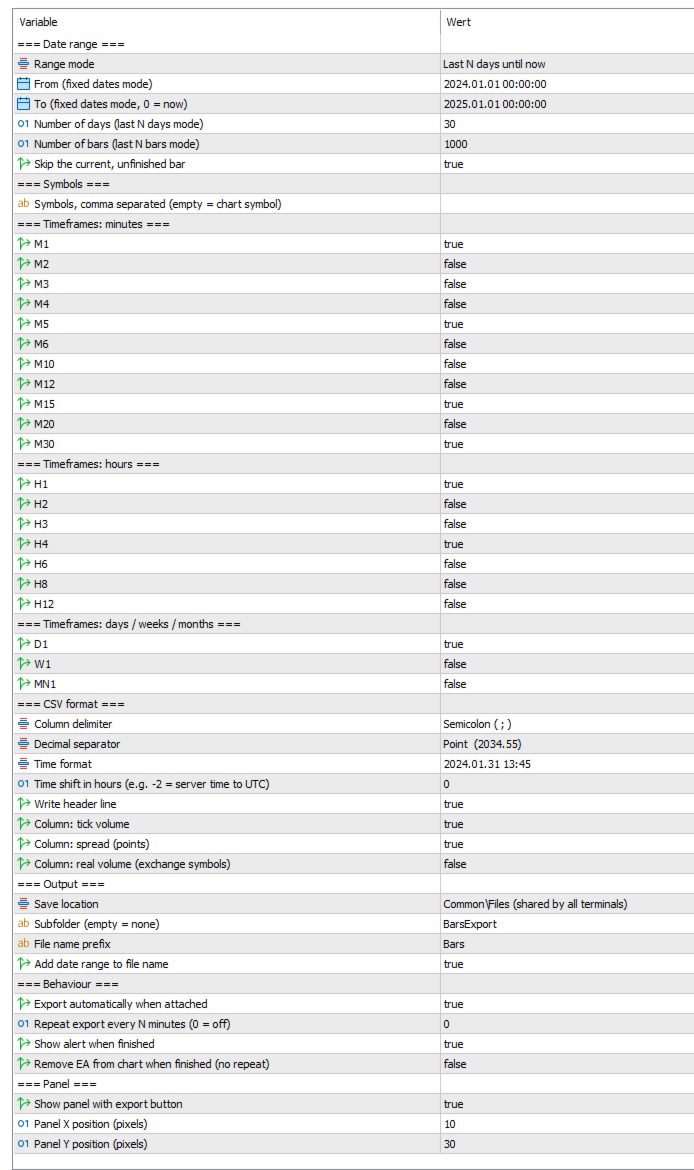
- Range mode / From / To / Number of days / Number of bars: which period is exported
- Skip the current, unfinished bar: only completed bars are written
- Symbols: comma-separated list; empty = chart symbol
- Timeframes: switch every timeframe on or off individually
- Column delimiter, decimal separator, time format, time shift, header line, optional columns
- Save location, subfolder, file name prefix, date range in file name
- Export on start, repeat every N minutes, alert when finished, remove EA when finished
- Panel on/off and panel position
IMPORTANT NOTES
- The amount of history depends on your broker. For very long M1 exports, set "Max. bars in chart" to "Unlimited" (Tools > Options > Charts) and restart the terminal; otherwise MetaTrader limits the available bars.
- Times are broker server times unless you use the time shift.
- Files with the same name are overwritten. Switch off "Add date range to file name" if another program should always read the same file.
- Close a CSV file in Excel before exporting again – an open file cannot be overwritten.
- No trading permission is required.
- Strategy Tester / demo version: the tester only offers the symbol of the test, so the demo exports the chart symbol up to the tester's current date. Buttons cannot be clicked in the tester. The full functionality is available on a live chart.