AlgoForge Trade Manager
- Utilità
-
Daniel Oladipupo Anjorin
 I develop custom MetaTrader 5 Expert Advisors, indicators, scripts and trading automation tools in MQL5, and I test them properly before you risk money.
DEVELOPMENT
• Custom MT5 Expert Advisors built from your rules
• Indicator-based and session/breakout systems - Versione: 1.0
- Attivazioni: 10
Launch price $39. It rises to $49 after the first 10 copies.
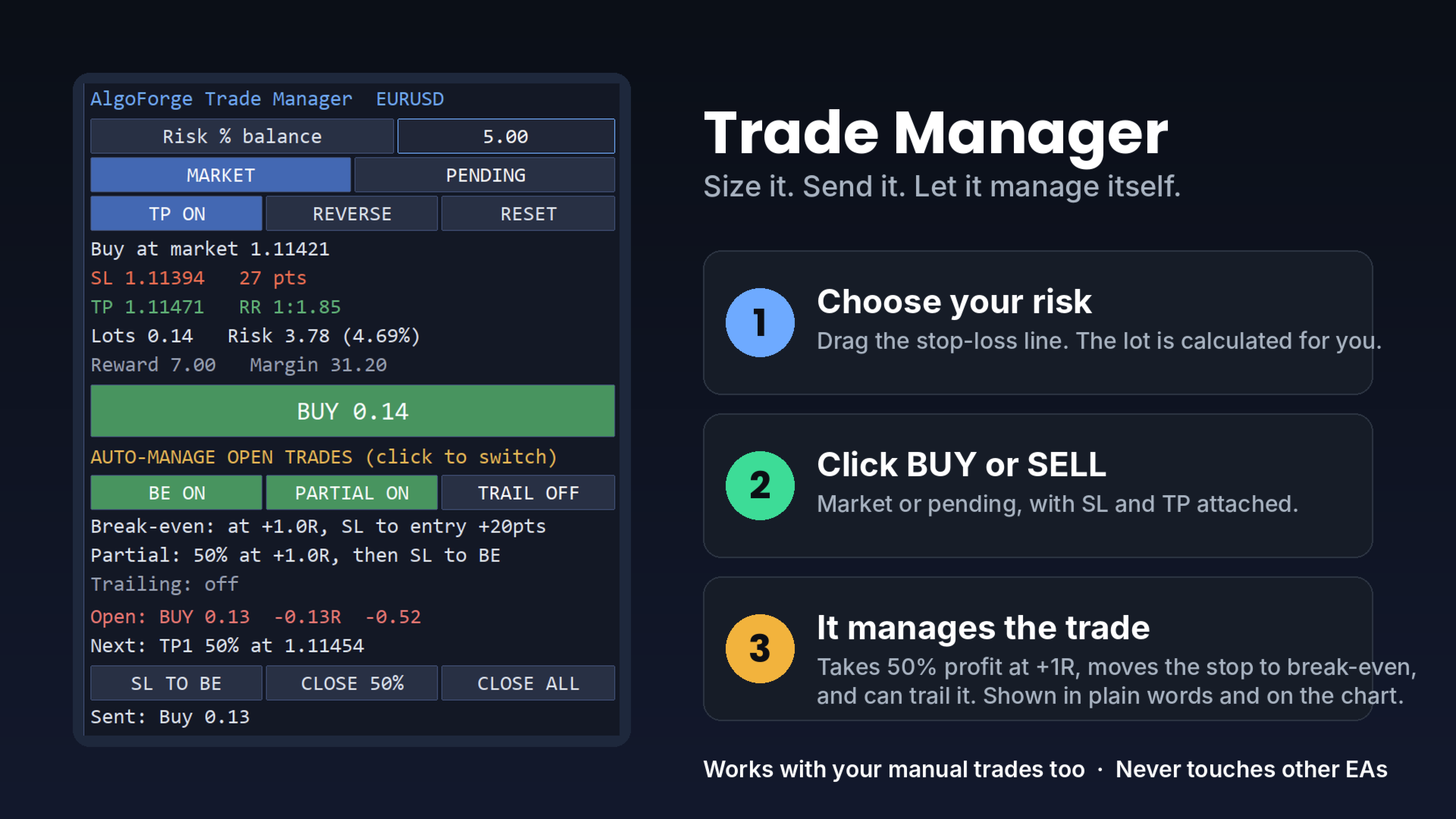
Trade Manager does two jobs. Before the trade, it calculates the exact lot for the risk you choose. After the trade, it manages it for you: it takes partial profit, moves the stop-loss to break-even and can trail it, without you watching the chart.
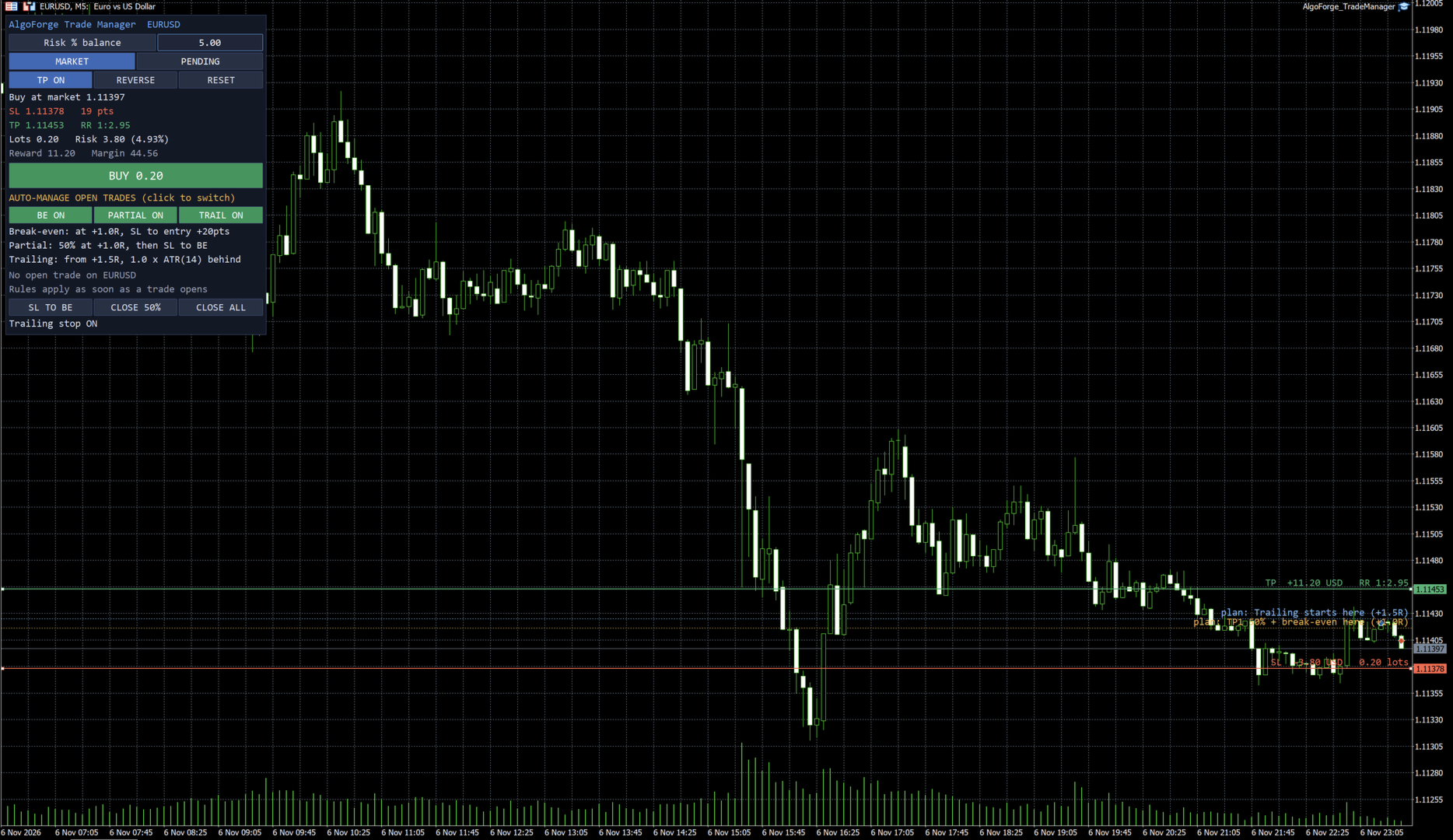
Everything is explained in plain words. The panel says what it will do ("Partial: 50% at +1.0R, then SL to BE") and what happens next ("Next: TP1 50% at 1.11454"). Dotted lines on the chart show exactly where each step will happen.
HOW IT WORKS
1. Choose your risk on the panel: % of balance, % of equity or a fixed amount of money.
2. Drag the red stop-loss line and the green take-profit line. Lot, money at risk, reward and reward:risk update live.
3. Click BUY or SELL (market, or pending: limit or stop is chosen automatically).
4. Trade Manager takes over: at +1R it closes 50% and moves the stop-loss to break-even. If you switch trailing on, it then follows the price with the stop-loss.
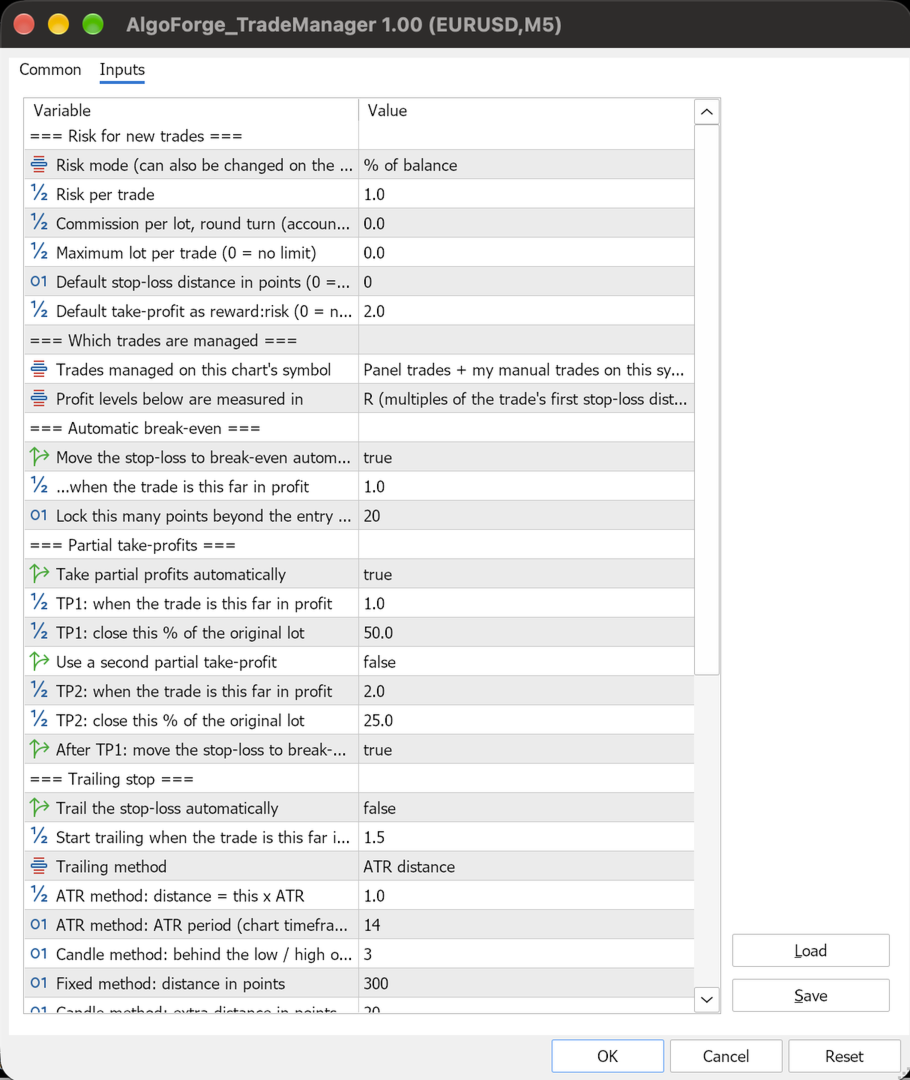
AUTOMATIC MANAGEMENT (each one switched on or off with one click)
- Partial take-profit: TP1 closes a % of the lot at a profit level; an optional TP2 closes another part
- Break-even: moves the stop-loss to the entry plus a few points (to cover costs) at a profit level, or right after TP1
- Trailing stop: three methods, ATR distance, behind the last candles' lows/highs, or a fixed distance; only ever moves in your favour, in steps you set
- Profit levels in R (multiples of the first stop-loss distance) or in points
- Remembers what it has already done for each trade, also after a terminal restart
WHICH TRADES IT MANAGES
- Trades opened with the panel and, if you want, your manual trades on the same symbol
- It never touches other Expert Advisors unless you choose "all trades on this symbol"
ON THE PANEL AND THE CHART
- Live line for the newest trade: direction, lot, profit in R and money, and the next step
- Dotted guide lines with labels: "TP1: close 50% here", "Break-even: SL to entry here", "Trailing starts here", also as a preview before you place the trade
- Buttons: stop-loss to break-even now, close 50% now, close all (with confirmation)
- Clear warnings instead of rejected orders: stop too close, minimum lot larger than your risk, not enough margin, lot too small to split
IMPORTANT
- Attach one copy per symbol. Keep MetaTrader running (or use a VPS): the management works while the terminal is connected.
- A partial close needs at least two minimum lots (for example 0.02 when the minimum is 0.01).
- Slippage and gaps can make a loss larger than planned and can fill a stop at a worse price.
- Strategy Tester: MetaTrader does not pass button clicks or line drags to Expert Advisors in the tester. There, Trade Manager opens small demo trades and manages them, so you can watch the partial close, break-even and trailing in the journal. Every button works on a live or demo chart.
Trade Manager does two jobs. Before the trade, it calculates the exact lot for the risk you choose. After the trade, it manages it for you: it takes partial profit, moves the stop-loss to break-even and can trail it, without you watching the chart.
Everything is explained in plain words. The panel says what it will do ("Partial: 50% at +1.0R, then SL to BE") and what happens next ("Next: TP1 50% at 1.11454"). Dotted lines on the chart show exactly where each step will happen.
HOW IT WORKS
1. Choose your risk on the panel: % of balance, % of equity or a fixed amount of money.
2. Drag the red stop-loss line and the green take-profit line. Lot, money at risk, reward and reward:risk update live.
3. Click BUY or SELL (market, or pending: limit or stop is chosen automatically).
4. Trade Manager takes over: at +1R it closes 50% and moves the stop-loss to break-even. If you switch trailing on, it then follows the price with the stop-loss.
AUTOMATIC MANAGEMENT (each one switched on or off with one click)
- Partial take-profit: TP1 closes a % of the lot at a profit level; an optional TP2 closes another part
- Break-even: moves the stop-loss to the entry plus a few points (to cover costs) at a profit level, or right after TP1
- Trailing stop: three methods, ATR distance, behind the last candles' lows/highs, or a fixed distance; only ever moves in your favour, in steps you set
- Profit levels in R (multiples of the first stop-loss distance) or in points
- Remembers what it has already done for each trade, also after a terminal restart
WHICH TRADES IT MANAGES
- Trades opened with the panel and, if you want, your manual trades on the same symbol
- It never touches other Expert Advisors unless you choose "all trades on this symbol"
ON THE PANEL AND THE CHART
- Live line for the newest trade: direction, lot, profit in R and money, and the next step
- Dotted guide lines with labels: "TP1: close 50% here", "Break-even: SL to entry here", "Trailing starts here", also as a preview before you place the trade
- Buttons: stop-loss to break-even now, close 50% now, close all (with confirmation)
- Clear warnings instead of rejected orders: stop too close, minimum lot larger than your risk, not enough margin, lot too small to split
IMPORTANT
- Attach one copy per symbol. Keep MetaTrader running (or use a VPS): the management works while the terminal is connected.
- A partial close needs at least two minimum lots (for example 0.02 when the minimum is 0.01).
- Slippage and gaps can make a loss larger than planned and can fill a stop at a worse price.
- Strategy Tester: MetaTrader does not pass button clicks or line drags to Expert Advisors in the tester. There, Trade Manager opens small demo trades and manages them, so you can watch the partial close, break-even and trailing in the journal. Every button works on a live or demo chart.