AG Session Box
- Indicatori
- Versione: 1.0

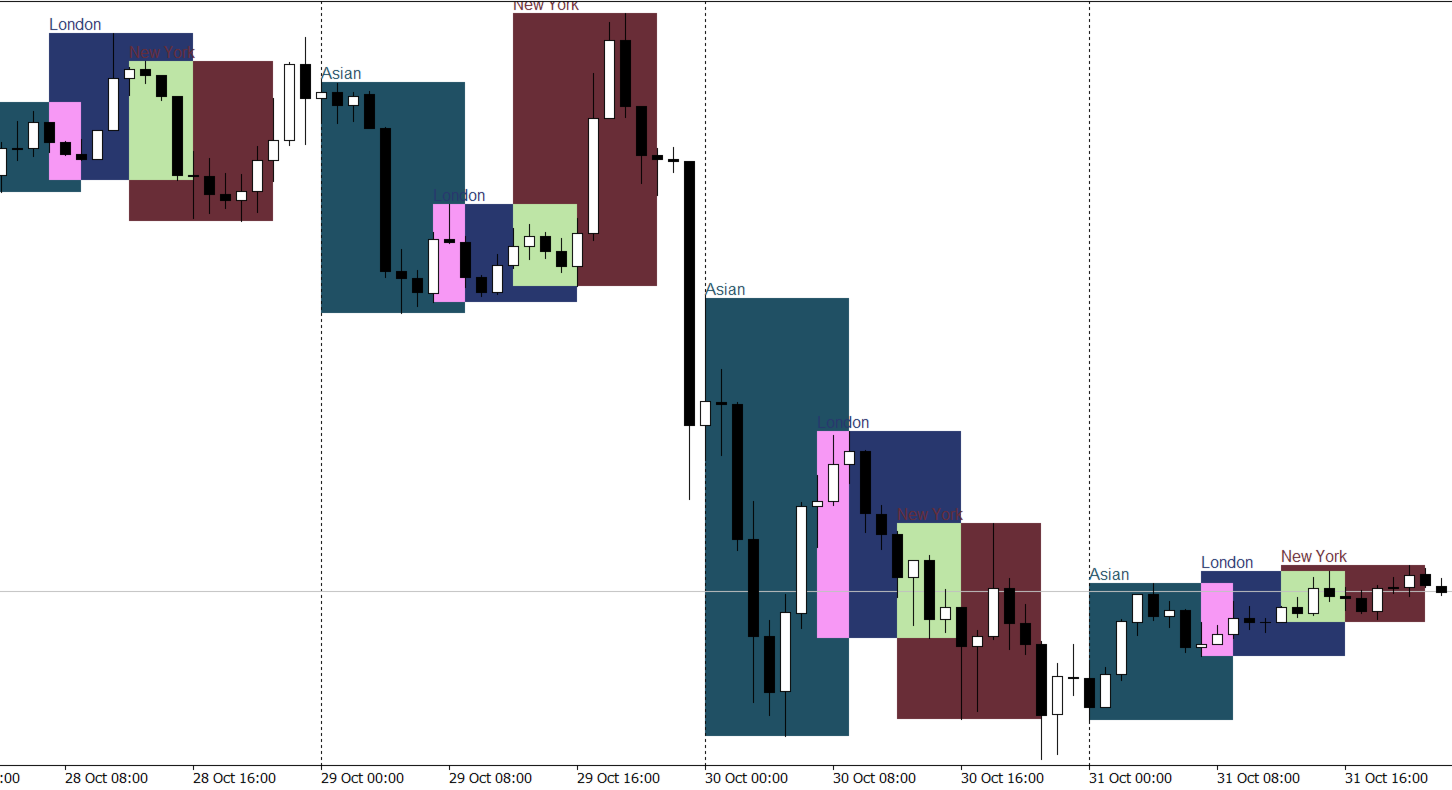
AG Session Box — Asian, London & New York Trading Sessions with Auto GMT Detection
AG Session Box is a high-performance, non-repainting session visualization indicator designed for intraday traders, ICT/SMC practitioners, and breakout specialists on MetaTrader 5. It automatically plots the three major trading sessions—Asian, London, and New York—directly on your chart using clean, customizable background boxes.
Equipped with an intelligent broker-to-GMT offset detection engine, AG Session Box eliminates the common headache of manual timezone calculations. Built using efficient incremental bar processing, it delivers zero tick lag and leaves no residual chart objects upon removal.
KEY FEATURES
- Visualizes 3 Major Global Sessions:
* Asian Session (Tokyo/Sydney: 00:00 – 09:00 GMT)
* London Session (European Open: 07:00 – 16:00 GMT)
* New York Session (US Open & London Overlap: 12:00 – 21:00 GMT)
- Intelligent GMT Auto-Detection: Automatically calculates your broker's server time offset relative to GMT, with optional manual override.
- Ultra-Low CPU Footprint: Incremental calculation engine updates only on bar changes or real-time high/low breakouts.
- Clean Chart Management: Unique object namespace ensures 100% clean chart deinitialization without orphan rectangles.
- Fully Customizable Appearance: Individual toggle, color selection, background fill, and border width for each session.
- Automatic History Management: Configurable lookback period (default 20 days) and automated memory pruning keep charts fast and responsive.
HOW TO USE
1. Attach AG Session Box to any intraday chart (M1, M5, M15, M30, or H1).
2. Choose your preferred GMT Offset Mode (Auto Detect is recommended).
3. Toggle which sessions you wish to monitor and adjust your preferred color theme.
4. Spot market consolidation, range expansions, liquidity sweeps, and session high/low breakouts with precision.
INPUT PARAMETERS
- GMT Offset Mode: Auto Detect (recommended) or Manual.
- Manual GMT Offset (Hours): Broker GMT offset when in Manual mode (-12 to +14).
- History Days to Display: Number of historical days to draw session boxes (1 to 100, default 20).
- Show Asian Session: Enable/disable Asian session box (True/False).
- Asian Box Color: Fill and border color for the Asian session.
- Asian Background Fill: Fill box background or display border outline only.
- Show London Session: Enable/disable London session box (True/False).
- London Box Color: Fill and border color for the London session.
- London Background Fill: Fill box background or display border outline only.
- Show New York Session: Enable/disable New York session box (True/False).
- New York Box Color: Fill and border color for the New York session.
- New York Background Fill: Fill box background or display border outline only.
- Show Session Name Labels: Displays clean text label at the top-left of each session box.
- Box Border Width: Line thickness for the session rectangle border (1 to 5).
REQUIREMENTS & SPECIFICATIONS
- Platform: MetaTrader 5 (MT5).
- Recommended Timeframes: M1, M5, M15, M30, H1, H4.
- Symbols: Any Forex pair, Gold (XAUUSD), Indices, Commodities, or Crypto.
- Does not require DLL imports or external WebRequest permissions.
LOOKING FOR AUTOMATED SESSION STRATEGIES?
If you trade session breakouts and momentum, explore our advanced trading robots available directly on our MQL5 Market author profile.
RISK WARNING
Trading foreign exchange and financial instruments carries a high level of risk and may not be suitable for all investors. Past performance and visual indicators do not guarantee future results.