Equity Gain Lock Manager
- Utilità
-
AL MOOSAWI ABDULLAH JAFFER BAQER
 To trade successfully we need to go through the proven path that others had gone and reached!
Here are 17 quotes from such successful investors:
1- Limit your size in any position so that fear does not become the prevailing instinct guiding your judgment.
Joe Vidich - Versione: 1.0
- Attivazioni: 5
FLOATING PROFIT IS NOT YOURS UNTIL IT IS LOCKED - THIS UTILITY LOCKS IT
Equity Gain Lock Manager is a basket-protection utility for MetaTrader 5. It never opens a trade. It adds up the floating profit of the positions you choose, and once that basket has earned your activation amount it guarantees a minimum profit, raises that floor as the profit grows, and closes the whole basket the moment profit falls back to the floor.
Try it free before you buy: run the free demo in the MetaTrader 5 Strategy Tester with visual mode ticked, open a few trades by hand from the tester chart, and watch the panel arm, lock and trail. The utility places no orders of its own anywhere, in the tester or on a live account, so an empty tester run simply shows a calm panel waiting for positions.
- Activation level, locked minimum, trailing distance and trailing step, in money or in percent of balance.
- Basket filter: the whole account, only this chart's symbol, or only one magic number.
- Optional hard basket loss cut and daily equity target, useful for prop-firm style daily rules.
- Close only inside a server-time session, delete leftover pending orders, alerts and push messages.
- Dry-run mode that reports every decision without closing anything.
- Live panel with a profit-lock progress bar, lock, peak and remaining room, and a P/L share bar for each position.
START HERE
- Attach it to any chart, any timeframe. One copy per basket is enough.
- Allow algo trading in the terminal. Without it the panel shows a red TRADING NOT ALLOWED line and will not try to close.
- Choose the basket with BasketFilter. For one Expert Advisor, pick the magic filter and enter its magic number.
- Size the amounts to your account: a good first idea is an activation of about 1 percent of balance and a locked minimum of about a third of that.
- Rehearse with DryRun on, or press ARMED once to switch to WATCH ONLY. When the decisions you see in the journal match your plan, arm it for real.
WHY A BASKET LOCK AND NOT A STOP ON EACH TRADE
Many traders run several positions at once: a scaled entry, a hedge, a grid, two EAs on correlated pairs, or a handful of manual trades around news. Individually some of those trades are red and some are green, so a stop or trailing stop on each one says very little about how the account is actually doing. What matters is the combined result. You watch it climb to a nice number, you look away, and an hour later the same basket is back at zero. This tool gives that combined result its own trailing stop.
ONE CYCLE, STEP BY STEP
1. Counting. Every second, and on every tick, the utility collects the open positions that match your filter and adds up their profit plus swap. That sum is the basket.
2. Arming the lock. While the basket is below ActivationProfit, the panel shows how much is still missing and the progress bar fills in gold. When the basket reaches the activation amount, the lock switches on and a minimum profit of LockedProfit is protected straight away.
3. Trailing. From then on the utility remembers the highest basket profit seen, the peak. The lock follows the peak at TrailDistance below it, but it only moves when it can rise by at least TrailStep, so it does not react to every small tick. The lock never moves down.
4. Closing. If the basket falls to the lock, every position in the filter is closed. Each close uses the filling mode your broker supports for that symbol, stays within your slippage limit and is retried. Positions that refuse to close are tried again after a cooldown, so the journal does not fill with repeated errors. After a full close the lock resets and waits for the next basket.
5. Tidying up. If DeletePendings is on, pending orders in the same filter are removed after the basket closes, so a forgotten limit order cannot open a new position you did not want.
EXTRA GUARDS YOU CAN SWITCH ON
Hard loss cut. Closes the basket when its floating loss reaches HardLossAmount. This works even when the lock never activated.
Daily equity target. At the start of each server day the utility stores the account equity. When today's equity gain reaches DailyTargetAmount, the basket is closed. That keeps a good day from turning into a flat one.
Session window. With SessionOnly on, closes happen only between SessionStart and SessionEnd in server time; overnight sessions such as 22:00-06:00 are supported. Outside the window the lock keeps trailing, but it waits for the window before closing.
Dry run. Everything works normally except the final close: the utility writes which basket it would have closed, why and at what result. It is a safe way to tune your amounts on a live account.
THE PANEL
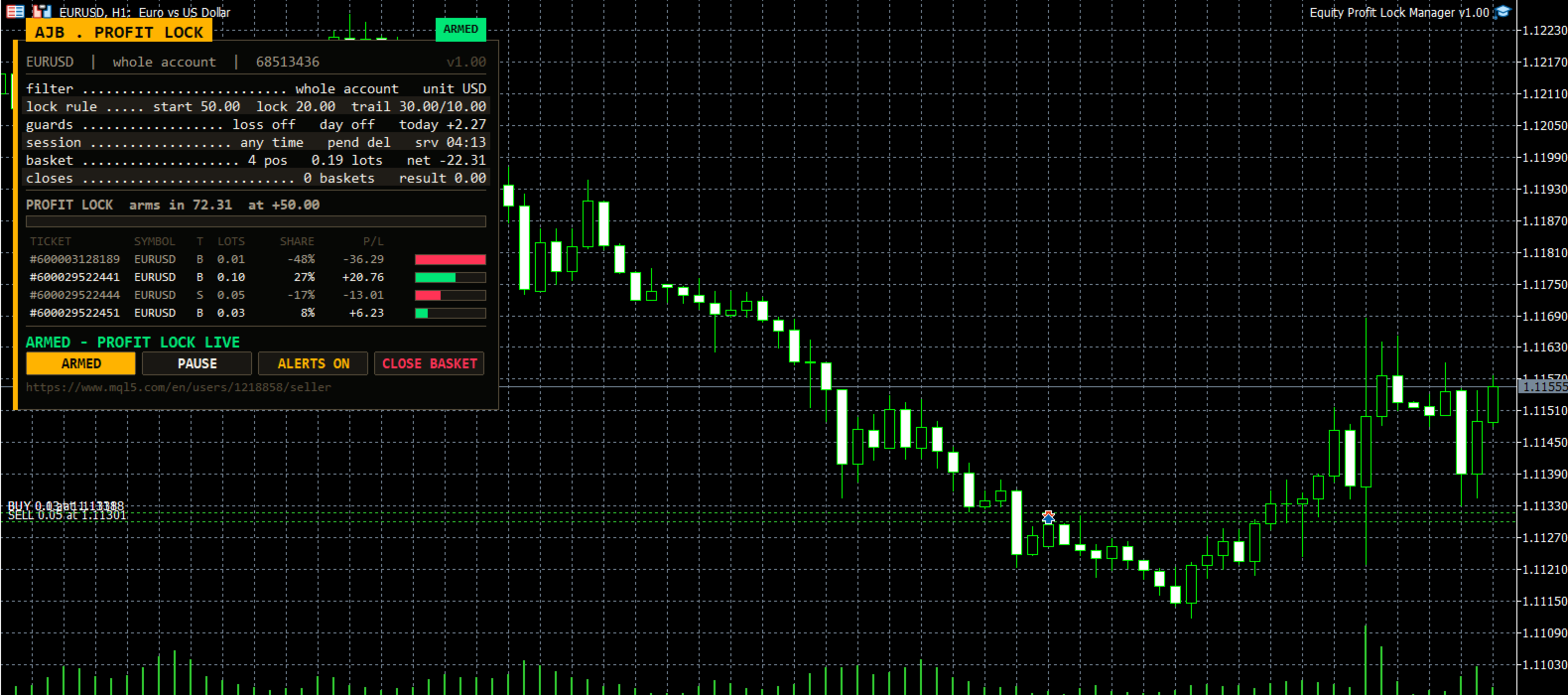
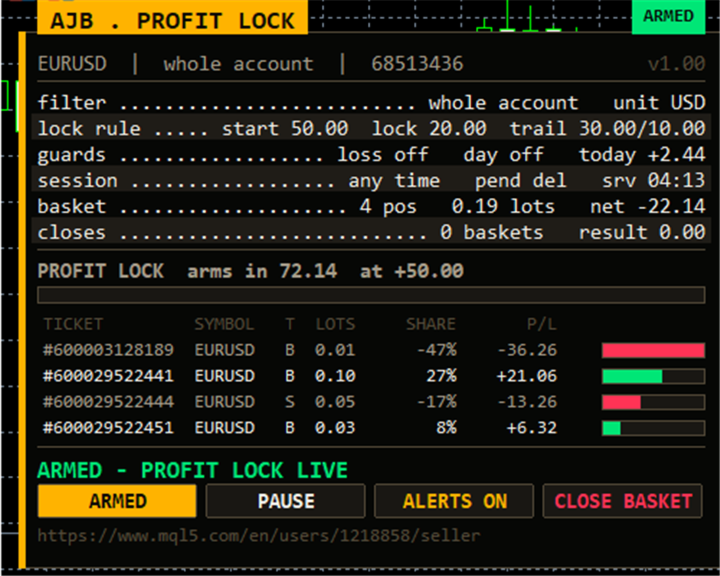
The panel sits in the top-left corner and keeps the right side of the chart and the price scale clear. The gold tab names the tool and a coloured pill shows its state: ARMED, LOCKED, WATCH, PAUSED or DRY RUN. The console rows show the filter and the money unit; the lock rule (start, lock, trail distance/step); the guards with today's equity change; the session, pending-order handling and server time; the basket with positions, lots and net result; and the number of baskets closed so far with their combined result.
New in this product is the profit-lock progress bar. Before activation it fills in gold as the basket gets closer to the activation amount. After activation it shows the room between the lock and the peak: green while there is plenty, amber as profit pulls back, red just before a close. Above it, the status row gives the exact numbers. Below it, each position is listed with ticket, symbol, side, lots, its share of the basket and its P/L, with a green or red share bar, so you can see which trade is carrying the basket and which one is holding it back.
Four buttons switch ARMED / WATCH ONLY, PAUSE / RESUME, mute or unmute alerts, and CLOSE BASKET. CLOSE BASKET only acts on a second click within six seconds. The panel measures its own text, shrinks or drops rows on small screens, and is not drawn during non-visual optimisation.
EVERY INPUT EXPLAINED
Filter
- BasketFilter - which positions form the basket: all on the account, this chart's symbol only, or one magic number on any symbol.
- MagicFilter - the magic number used by the magic filter; 0 means manual trades.
- StartArmed - start ready to close (true) or in watch-only mode (false). Your button choice afterwards is remembered.
- DryRun - report decisions without closing anything.
Profit lock and trailing
- AmountMode - read the amounts below as account money or as percent of balance.
- ActivationProfit - basket profit that switches the lock on (50).
- LockedProfit - minimum profit protected at activation (20). Must be lower than ActivationProfit.
- TrailDistance - how far the lock follows below the peak (30); 0 keeps the lock fixed at LockedProfit.
- TrailStep - the smallest move the lock makes upward (10).
Basket guards
- HardLossEnabled / HardLossAmount - close the basket at this floating loss (200, positive number). Off by default.
- DailyTargetEnabled / DailyTargetAmount - close the basket when today's equity gain reaches this amount (100). Off by default.
Session and cleanup
- SessionOnly - allow closes only inside the session window. Off by default.
- SessionStart, SessionEnd - the window as HH:MM in server time (07:00 and 21:00).
- DeletePendings - delete pending orders of the same filter after a basket close. On by default.
Notifications
- AlertOnEvent - terminal alert when the lock activates, rises, or a basket is closed.
- PushOnEvent - the same messages to the MetaTrader app on your phone (set your MetaQuotes ID in the terminal options).
Execution
- SlippagePoints - accepted price deviation in points (20).
- MaxRetries - attempts per position close (3).
- RetryDelayMs - pause between attempts in milliseconds (400).
- FailCooldownSec - wait after a basket close that left positions open before trying again (30).
Panel and chart
- ShowPanel - show or hide the panel.
- PanelX, PanelY - distance from the chart edges in pixels.
- PanelFontSize - base font size (9); it shrinks automatically on small windows.
- ShowArabic - Arabic captions under the console rows and the status line.
- ShowShareBars - draw the P/L share bar beside each position.
- MaxTableRows - most position rows listed (13); the rest are counted in a "more" line.
- PanelCorner - move the panel to another corner.
QUESTIONS TRADERS ASK
Does it work with my grid or martingale EA? Yes. Put it on a separate chart, choose the magic filter and enter that EA's magic number. It only closes, it never adds to the basket. Keep in mind that the EA may open a new cycle right after the basket is closed.
What happens after a terminal restart? The lock state, the peak, the day-start equity and your button choices are saved under keys that include the account, symbol, filter and magic. The utility continues where it stopped, and several copies never mix.
Hedging and netting? Both are supported. Positions are closed by ticket, so a netting position is closed as a whole. No DLLs and no extra files.
Percent of balance - which balance? The current balance, read each time, so the amounts grow and shrink with the account.
HONEST EXPECTATIONS
A profit lock decides when to stop, not where the market goes. In a fast move the basket can close below the lock because of slippage and spread, and a basket closed at the lock can see price turn back in your favour later. Weekend gaps and closed markets cannot be avoided by any utility. Test your amounts in the Strategy Tester and with DryRun on your own broker before you rely on them live.
If Equity Gain Lock Manager earns its place on your charts, an honest review saying what helped and what you would like to see changed is very welcome. Your feedback will shape the next version.