Synthetic Machine
- Indicatori
-
Tete Adate Adjete
 Fullstack web dev - Web designer - MQL4 / 5 - Graphic designer - Community Manager - Python developer
 - Versione: 1.8
- Attivazioni: 5
A complete trend-following and trade management indicator built for Synthetic Indices
Synthetic indices move around the clock. There are no traditional market sessions to wait for, which means your analysis tools need to be just as flexible.
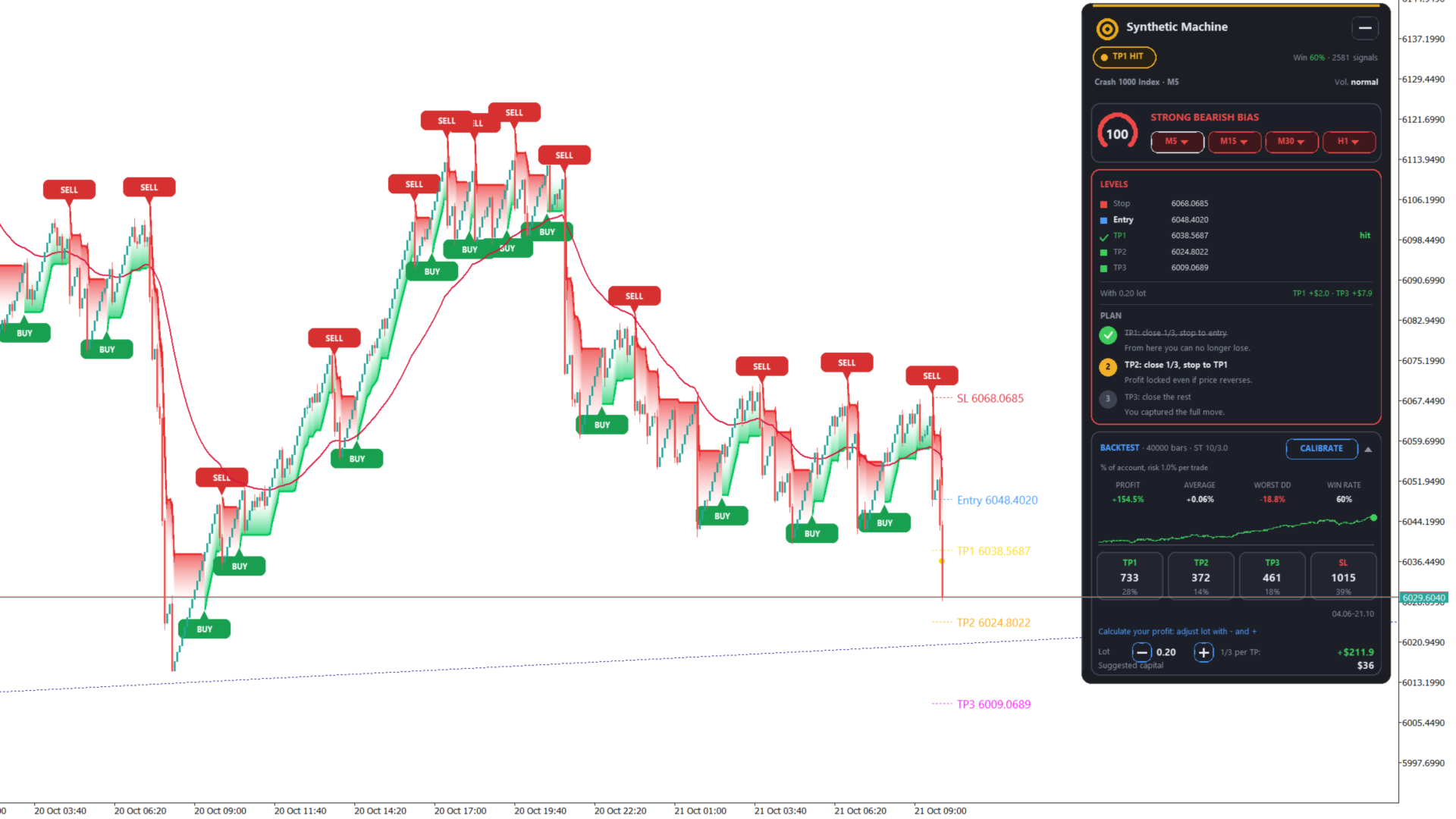
Synthetic Machine combines a clean SuperTrend system, automatic trade levels, multi-timeframe trend analysis, a trading coach dashboard and built-in backtesting into one practical MT5 indicator.
The goal is simple: help you read the trend, identify potential entries, plan your trade and manage it without cluttering your chart.
🔥 Everything You Need on One Chart
📈 SuperTrend + Smooth Cloud
The core of Synthetic Machine is a SuperTrend designed to make trend direction easier to read.
The indicator displays:
-
A clean SuperTrend line
-
A smooth visual cloud following the trend
-
Clear bullish and bearish trend changes
-
BUY and SELL signals confirmed at candle close
-
Customizable cloud and line settings
The visual design keeps the chart clean while giving you an immediate view of the current market direction.
🎯 Automatic Entry, Stop Loss & Take Profit Levels
When a new signal appears, Synthetic Machine automatically calculates the main trade levels.
Each signal can display:
-
Entry
-
Stop Loss
-
TP1
-
TP2
-
TP3
The default targets are based on risk multiples:
-
TP1 = 0.5R
-
TP2 = 1.2R
-
TP3 = 2.0R
These values can be adjusted according to your own trading style.
Instead of manually calculating your levels after every signal, the indicator gives you a complete trade plan directly on the chart.
🧠 Trading Coach Dashboard
Synthetic Machine is more than a simple BUY/SELL indicator.
The built-in dashboard helps you follow the trade after the signal appears.
It can display:
-
Current trade status
-
Trend strength / score
-
Market bias
-
Multi-timeframe trend direction
-
Current trade progress
-
Suggested trade management steps
The management plan is built around a simple three-step approach:
1. Close 1/3 of the position
2. Move Stop Loss to Entry
3. Lock in Profit
The dashboard is designed to help you stay consistent with your predefined plan instead of making emotional decisions during a trade.
🔎 Multi-Timeframe Market Bias
Want to know whether the lower timeframe is moving with the bigger trend?
Synthetic Machine analyzes trend direction across four timeframes and presents the information directly inside the dashboard.
This makes it easier to see whether your current signal is supported by the higher-timeframe trend.
📊 Built-In Backtest
You don't need to leave MetaTrader 5 to get a quick idea of how the indicator has behaved on historical data.
Synthetic Machine includes a built-in backtest covering up to the last 2,000 bars.
The backtest can provide information such as:
-
Total profit
-
Average result
-
Drawdown
-
Win rate
-
Target distribution
-
Number of signals
You can also use the one-click calibration feature to adjust the indicator parameters based on the displayed historical data.
This gives you a convenient way to experiment with different settings before using them on a live chart.
Important: The built-in backtest is intended for analysis and parameter evaluation. It does not account for spread, commission or slippage, and calibration is performed on the displayed historical bars. Results should therefore be considered optimistic and should not be treated as a guarantee of future performance.
💰 Lot Size Calculator & Margin Estimate
Planning a trade is easier when your risk is clear.
Synthetic Machine includes tools to help estimate:
-
Position size
-
Potential risk
-
Required margin
Use the calculator to better understand the size of a potential position before entering a trade.
🔔 Powerful Alerts
Never miss a new signal or an important trade-management event.
Synthetic Machine supports:
-
Popup alerts
-
Sound alerts
-
Push notifications
-
Optional Telegram notifications
Telegram notifications can be used for events such as:
-
New BUY/SELL signals
-
TP1 reached
-
TP2 reached
-
TP3 reached
-
Stop Loss movement
-
Trade close
-
Market bias changes
This allows you to monitor your charts even when you are not looking at MetaTrader 5.
🌍 Designed for Synthetic Indices
Synthetic Machine was created with Synthetic Indices in mind.
It is particularly suitable for traders who work with markets such as:
-
Volatility Indices
-
Boom & Crash Indices
-
Step Index
-
Other synthetic instruments
However, the indicator is not limited to synthetic markets.
It can be applied to other symbols and timeframes available in MetaTrader 5.
⚙️ Fully Customizable
You decide how the indicator looks and behaves.
Customize settings such as:
-
SuperTrend parameters
-
Risk/Reward targets
-
Cloud appearance
-
Line appearance
-
Dashboard colors
-
Signal display
-
Alert options
-
Timeframes
-
Language
The dashboard is available in:
English • French • Spanish
The logic is straightforward.
When the SuperTrend changes direction, Synthetic Machine waits for the signal candle to close before confirming the new signal.
For a confirmed signal:
Entry = close of the signal candle
Stop Loss = SuperTrend level
TP1 / TP2 / TP3 = predefined multiples of the initial risk
Once the trade is active, the dashboard follows its progress and displays the relevant management information.
This gives you a simple workflow:
Trend → Signal → Entry → Risk → Targets → Trade Management
Instead of combining several indicators, calculators and dashboards, you get the main tools in one place.
With Synthetic Machine, you get:
✔ SuperTrend trend detection
✔ Smooth trend cloud
✔ Confirmed BUY/SELL signals
✔ Automatic Entry / SL / TP levels
✔ Three configurable profit targets
✔ Multi-timeframe bias
✔ Trend score
✔ Trading coach dashboard
✔ Built-in historical backtest
✔ One-click calibration
✔ Lot size calculator
✔ Margin estimation
✔ Popup alerts
✔ Sound alerts
✔ Push notifications
✔ Optional Telegram notifications
✔ Multi-language dashboard
✔ Customizable visual settings
✔ Compatible with any MT5 symbol and timeframe
Synthetic Machine is an analysis and decision-support tool. It does not open, modify or close trades automatically.
The indicator does not guarantee profitable trading results.
Telegram notifications require the free companion relay and permission to access api.telegram.org in MetaTrader 5.
The built-in backtest uses historical bar data and does not include real-world trading costs such as spread, commissions or slippage. Calibration is performed using the displayed historical data, so the resulting statistics may be optimistic.
Always test the indicator on a demo account and evaluate it with your broker's actual trading conditions before using it with real money.