Synthetic Machine
- Indicateurs
-
Tete Adate Adjete
 Fullstack web dev - Web designer - MQL4 / 5 - Graphic designer - Community Manager - Python developer
 - Version: 1.8
- Activations: 5
Un indicateur MT5 complet pour analyser les tendances et gérer vos trades sur les indices synthétiques.
Les indices synthétiques évoluent 24h/24. Pour les trader, vous avez besoin d'outils capables de suivre le marché à tout moment, sans dépendre des horaires des sessions de trading classiques.
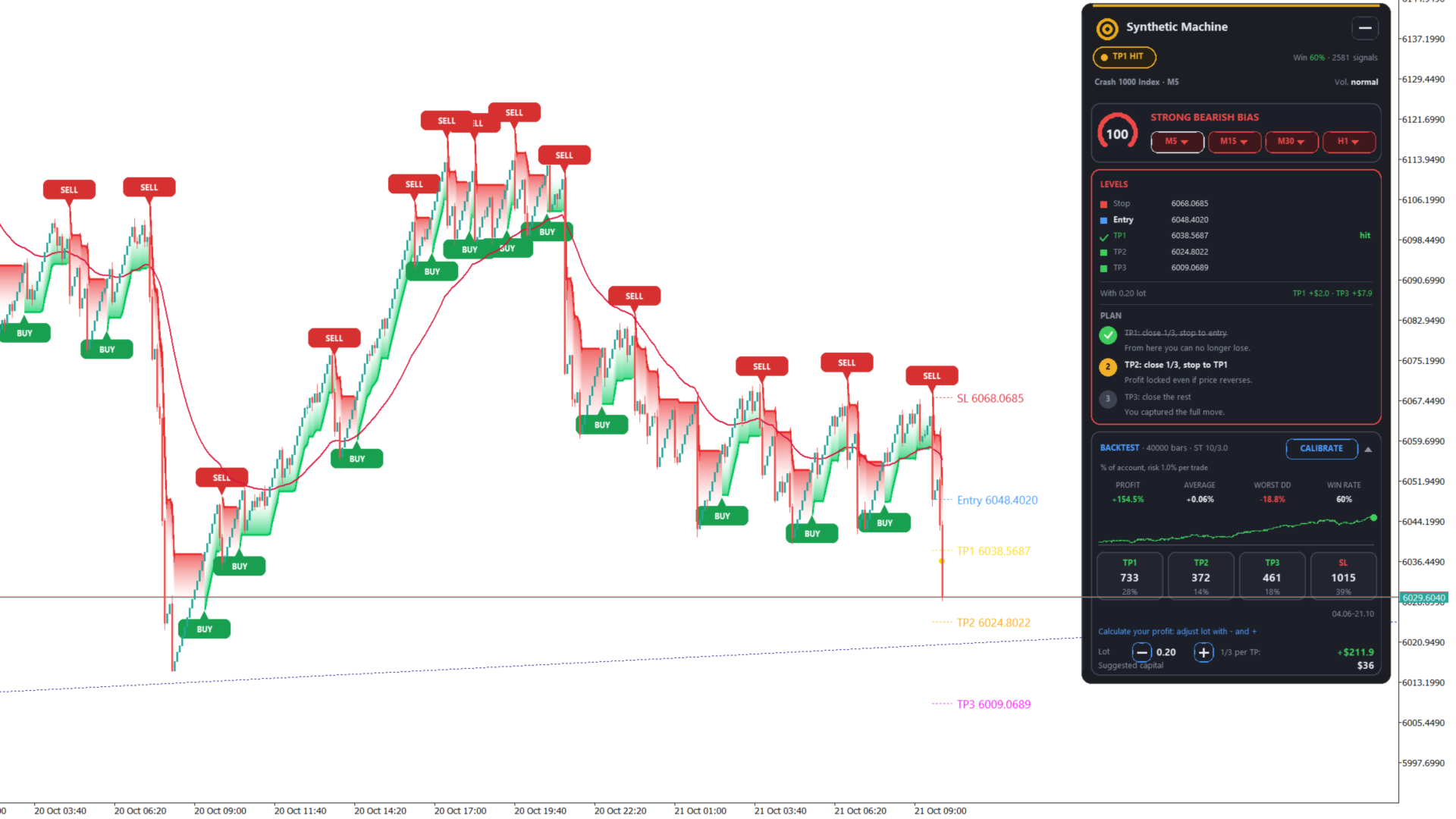
Synthetic Machine réunit dans un seul indicateur tout ce dont vous avez besoin pour structurer votre analyse : un SuperTrend avec cloud en dégradé, des signaux BUY/SELL, des niveaux d'entrée et de sortie automatiques, un tableau de bord intelligent et un backtest intégré.
L'objectif est simple : vous aider à identifier la tendance, repérer les opportunités, planifier vos trades et suivre leur évolution depuis un seul graphique.
📈 Un SuperTrend clair et un cloud élégant
Le SuperTrend est au cœur de Synthetic Machine. Son affichage a été pensé pour vous permettre de lire plus facilement la direction du marché, sans surcharger votre graphique.
Vous bénéficiez de :
-
Une ligne SuperTrend lissée.
-
Un cloud en dégradé qui accompagne visuellement la tendance.
-
Une identification claire des retournements haussiers et baissiers.
-
Des signaux BUY et SELL confirmés à la clôture de la bougie.
-
Des paramètres personnalisables pour adapter l'affichage à vos préférences.
Le résultat : un graphique plus lisible pour vous concentrer sur l'essentiel, à savoir la tendance et les opportunités de trading.
🎯 Entry, Stop Loss et Take Profit calculés automatiquement
Lorsqu'un nouveau signal apparaît, Synthetic Machine calcule et affiche les principaux niveaux nécessaires à la préparation de votre trade.
Chaque signal peut inclure :
-
Entry : le niveau d'entrée.
-
Stop Loss : le niveau d'invalidation du trade.
-
TP1 : premier objectif de profit.
-
TP2 : deuxième objectif de profit.
-
TP3 : troisième objectif de profit.
Les objectifs sont calculés à partir du risque initial, selon les paramètres suivants par défaut :
-
TP1 : 0,5 R
-
TP2 : 1,2 R
-
TP3 : 2,0 R
Ces valeurs sont entièrement réglables afin de vous permettre d'adapter les objectifs à votre stratégie.
Plus besoin de calculer manuellement chaque niveau après l'apparition d'un signal : votre plan de trade s'affiche directement sur le graphique.
🧠 Un tableau de bord qui vous accompagne pendant le trade
Synthetic Machine ne se contente pas d'afficher des signaux. Son tableau de bord Coach vous aide également à suivre l'évolution du trade après son déclenchement.
Il présente notamment :
-
Le statut du trade en cours.
-
Un score de tendance.
-
Le biais directionnel du marché.
-
L'analyse de la tendance sur quatre timeframes.
-
La progression du trade par rapport aux objectifs.
-
Les étapes prévues par le plan de gestion.
Le plan de gestion repose sur trois étapes :
1. Prendre partiellement ses profits
Clôturer un tiers de la position selon le plan défini.
2. Protéger son capital engagé
Déplacer le Stop Loss au niveau d'entrée lorsque les conditions prévues sont réunies.
3. Sécuriser les gains
Suivre le plan de gestion pour protéger les profits lorsque le trade évolue favorablement.
Ces indications vous aident à suivre une approche plus structurée et à limiter les décisions impulsives pendant le trading.
Le tableau de bord fournit des indications de gestion : il n'exécute pas automatiquement les opérations.
🔎 Analyse multi-timeframe sur quatre unités de temps
Un signal sur une petite unité de temps est-il soutenu par la tendance générale du marché ?
Le tableau de bord Synthetic Machine affiche le biais directionnel sur quatre timeframes afin de vous donner une vision plus large de la situation.
Vous pouvez ainsi comparer la tendance de votre unité de temps de travail avec celle des autres unités analysées et mieux comprendre le contexte dans lequel apparaît un signal.
📊 Un backtest intégré directement dans MetaTrader 5
Vous souhaitez évaluer le comportement historique de l'indicateur sans multiplier les outils externes ?
Synthetic Machine intègre un backtest portant sur les 2 000 dernières bougies.
Vous pouvez notamment consulter :
-
Le résultat cumulé.
-
Le résultat moyen.
-
Le drawdown.
-
Le taux de réussite.
-
La répartition des objectifs atteints.
Une fonction de calibration en un clic vous permet également d'expérimenter différents paramètres sur les bougies affichées.
C'est un moyen pratique d'explorer les réglages de l'indicateur et d'étudier son comportement historique avant de l'utiliser dans vos conditions de trading.
À noter : ce backtest est un outil d'analyse et non une garantie de performance. Il ne prend pas en compte le spread, les commissions ni le slippage. La calibration étant effectuée sur les données historiques affichées, les résultats peuvent être optimistes et ne garantissent pas des performances similaires à l'avenir.
💰 Calculateur de lots et estimation de la marge
La préparation d'un trade ne se limite pas au choix d'une entrée.
Synthetic Machine intègre des outils pratiques pour vous aider à estimer la taille de votre position et la marge nécessaire.
Vous disposez ainsi d'informations complémentaires pour préparer vos opérations et mieux comprendre les implications de la taille de position envisagée.
Ces estimations ne remplacent pas la vérification des conditions de votre courtier ni une gestion rigoureuse du risque.
🔔 Des alertes pour rester informé
Vous ne pouvez pas rester devant vos graphiques toute la journée ? Synthetic Machine propose plusieurs moyens de vous avertir des événements importants.
Les alertes disponibles comprennent :
-
Les fenêtres popup.
-
Les notifications push.
-
Les alertes sonores.
-
Les notifications Telegram optionnelles.
Les notifications Telegram peuvent notamment concerner :
-
L'apparition de nouveaux signaux BUY/SELL.
-
L'atteinte des objectifs TP.
-
Les déplacements du Stop Loss.
-
La clôture d'un trade.
-
Les changements de biais directionnel.
Vous pouvez ainsi recevoir des informations sur les événements suivis par l'indicateur, même lorsque vous ne consultez pas directement votre graphique.
🌍 Conçu pour les indices synthétiques
Synthetic Machine a été développé en tenant compte des particularités des marchés synthétiques, qui ne dépendent pas des horaires habituels des marchés financiers traditionnels.
Il peut notamment être utilisé pour analyser :
-
Les indices de volatilité.
-
Les indices Boom et Crash.
-
Le Step Index.
-
D'autres instruments synthétiques compatibles avec votre plateforme.
L'indicateur n'est toutefois pas limité à ces marchés : il peut également être appliqué à d'autres symboles et unités de temps disponibles dans MetaTrader 5.
⚙️ Personnalisez votre expérience de trading
Chaque trader possède ses propres préférences. Synthetic Machine vous permet d'adapter plusieurs éléments à votre manière de travailler.
Vous pouvez notamment personnaliser :
-
Les paramètres du SuperTrend.
-
Les objectifs de profit basés sur le risque.
-
L'apparence du cloud et de la ligne.
-
Les couleurs du tableau de bord.
-
L'affichage des signaux.
-
Les options d'alerte.
-
Les timeframes utilisés pour l'analyse.
-
La langue de l'interface.
Le panneau est disponible en français, anglais et espagnol.
🚀 Comment fonctionne Synthetic Machine ?
Le principe est simple.
Lorsqu'un retournement du SuperTrend est détecté, le signal est confirmé à la clôture de la bougie correspondante.
Les niveaux sont ensuite définis selon la logique de l'indicateur :
Entrée : clôture de la bougie du signal.
Stop Loss : niveau de la ligne SuperTrend.
TP1, TP2 et TP3 : objectifs calculés à partir du risque initial.
Le tableau de bord accompagne ensuite le suivi du trade et présente les informations utiles à chaque étape du plan de gestion.
Votre processus d'analyse devient plus facile à suivre :
Tendance → Signal → Entrée → Gestion du risque → Objectifs → Suivi du trade
💡 Pourquoi choisir Synthetic Machine ?
Plutôt que de jongler entre plusieurs indicateurs, calculateurs et tableaux de bord, vous retrouvez les principaux outils de votre analyse dans une seule interface.
Avec Synthetic Machine, vous disposez de :
-
✔ SuperTrend avec cloud en dégradé.
-
✔ Signaux BUY/SELL confirmés à la clôture.
-
✔ Niveaux Entry, Stop Loss et Take Profit.
-
✔ Trois objectifs de profit personnalisables.
-
✔ Analyse directionnelle sur quatre timeframes.
-
✔ Score de tendance et tableau de bord Coach.
-
✔ Plan de gestion des trades en trois étapes.
-
✔ Backtest historique intégré.
-
✔ Calibration des paramètres en un clic.
-
✔ Calculateur de lots et estimation de la marge.
-
✔ Alertes popup, sonores et push.
-
✔ Notifications Telegram optionnelles.
-
✔ Interface personnalisable en trois langues.
-
✔ Utilisation sur différents symboles et timeframes de MT5.
Un seul indicateur pour réunir l'analyse, la préparation du trade et son suivi dans un environnement de travail cohérent.