VirtualTradePad One Click Trading Panel

75 USD
Versione demo scaricata:
6 965
Pubblicato:
2 febbraio 2012
Versione attuale:
26.326
Non hai trovato un robot adatto?
Ordina il tuo
su Freelance
Vai alla sezione Freelance
Ordina il tuo
su Freelance
Come acquistare un Robot di Trading o un indicatore
Esegui il tuo EA
hosting virtuale
hosting virtuale
Prova un indicatore/robot di trading prima di acquistarlo
Vuoi guadagnare nel Market?
Come presentare un prodotto per venderlo con successo

Ti stai perdendo delle opportunità di trading:
- App di trading gratuite
- Oltre 8.000 segnali per il copy trading
- Notizie economiche per esplorare i mercati finanziari
Registrazione
Accedi
Accetti la politica del sito e le condizioni d’uso
Se non hai un account, registrati
Приветствую.
Спасибо за вопрос :-)
смотрите:
режим Separate order - это режим, при котором советник считает все сделки отдельно друг от друга. Это некий Виртуальный стоплосс тейкпрофит.
При таком режиме - отложенные ордера не удаляются по той причине, что закрываются именно раздельные позиции.
Это , грубо говоря, тот же стоплосс или тейкпрофит только виртуальный, в пунтках, долларах или процентах.
Удалить отложенные ордера можно только тогда, когда включен другой режим. А этот режим был сделан специально для виртуального стоплосс / тейкпрофита.
По второму вопросу и закрытия общей прибыли или убытка по всему счету.
Если Вы хотите считать и закрывать все позиции по всему аккаунту, тогда Вам необходимо установить так:
т.е. Вам необязательно устанавливать либо Separate BUY SELL, либо Separate Order.
Вы можете снять галочки и советник будет считать позиции по всем символам и направлениям вместе.
Просто зачастую, когда открыто равное количество BUY и SELL , тогда их прибыль и убыток движется одинаково и цифра прибыли стоит на месте (+- спред) и закрытия такой "пачки" не всегда случается.
Большое спасибо за пояснения. Получается, что я с галочками не разобрался )), считал, что надо что-то обязательно выбирать.
Теперь это идеальная панель для работы в 3-х режимах! Без чекбокса по позициям и направлениям, утилита закрывает все сделки по аккаунту и удаляет отложки, все отлично работает!!! Может кому пригодится эта информация.
Большое спасибо за пояснения. Получается, что я с галочками не разобрался )), считал, что надо что-то обязательно выбирать.
Теперь это идеальная панель для работы в 3-х режимах! Без чекбокса по позициям и направлениям, утилита закрывает все сделки по аккаунту и удаляет отложки, все отлично работает!!! Может кому пригодится эта информация.
Спасибо.
тут скорее надо изменить графику выбора всех символов и текущего на RadioBox , чтоб было понятнее. :-)
Karlo Berdon: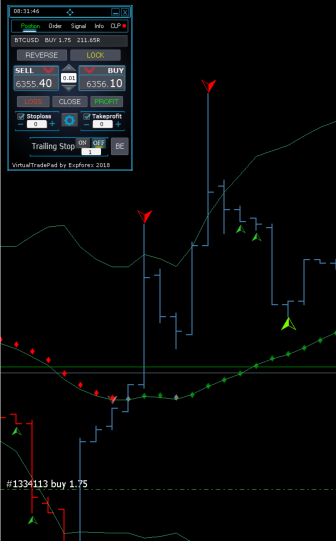 I guess it may looks something like this on 1440p or 2160p resolutions
Other applications have a scaling controls which work with High Resolution (eg. Exp5 Tester PAD for Strategy Tester)
I cannot locate the setting to increase the font size. changing font size 12 to 14 worked well in Exp5 Tester Pad for Strategy Tester.
Please advise on what is recommended, would be interested in using this rental but if I can't read it may have to look at alternatives.
Hello.
Thanks for the update. I assume this may take a bit of work / time, is there a way to suspend the rental or do I need to rent again when the scaling is available?
In this version, the scale is not provided because this panel is drawn on the graph. No scaling features. These are not buttons - these are graphics. It was created in 2009 and in 2012 transferred to MT5.
I doubt that this particular panel will have a redesign. This design will remain forever.
Hi , when I open many trades with grid mode how can I set the same take profit for all ? Thanks.
Hi,
First I love your products.
I can highly recommend t hem.
This is about Virtual Trade Pad. I can not imagine trading without it.
One small thing i would request you to consider:
When I press the BUY or SELL Button and get in the trade, That tab becomes uninteresting for me.
I want it to switch to the CLP TAB. That is how I follow my positions.
So I would request two things:
1) Right After I use a Buy or Sell from POSITION tab, I want it to switch to CLP tab.
2) I want the "LOSS CLOSE PROFIT" and "BE" buttons to be on CLP as well !!!
This way, I can initiate the trade with position and follow with CLP.
I hope this makes sense and you consider.
Thanks.
TeaCii
Hi,
First I love your products.
I can highly recommend t hem.
This is about Virtual Trade Pad. I can not imagine trading without it.
One small thing i would request you to consider:
When I press the BUY or SELL Button and get in the trade, That tab becomes uninteresting for me.
I want it to switch to the CLP TAB. That is how I follow my positions.
So I would request two things:
1) Right After I use a Buy or Sell from POSITION tab, I want it to switch to CLP tab.
2) I want the "LOSS CLOSE PROFIT" and "BE" buttons to be on CLP as well !!!
This way, I can initiate the trade with position and follow with CLP.
I hope this makes sense and you consider.
Thanks.
TeaCii
Hello
Thank you very much for choosing my products.
The fact is that the panel design is full, so changing the design and moving buttons is prohibited.
I made the panel and filled it to the maximum. I just can not change the design.
Regarding the transition - unfortunately. You are the only one asking for this update.
I would love to do it, but this is contrary to the policy of using the panel by other users. Unfortunately, such updates are also prohibited.
Sorry.
Hello
Thank you very much for choosing my products.
The fact is that the panel design is full, so changing the design and moving buttons is prohibited.
I made the panel and filled it to the maximum. I just can not change the design.
Regarding the transition - unfortunately. You are the only one asking for this update.
I would love to do it, but this is contrary to the policy of using the panel by other users. Unfortunately, such updates are also prohibited.
Sorry.
Thank you. I understand.
I guess i have to flip to CLP the moment I do buy sell manually.
Keep up the good work.
Cheers
Hi, thank you for updating your products.
As I do not understand everything I have to ask:
Did you add the function of the same SL and Tp when I open many grid trades, at the new update of VTP ?
It would be nice to move just a line and set the SL (and TP) for the whole group of open trades.
Thanks!
Hi, thank you for updating your products.
As I do not understand everything I have to ask:
Did you add the function of the same SL and Tp when I open many grid trades, at the new update of VTP ?
It would be nice to move just a line and set the SL (and TP) for the whole group of open trades.
Thanks!
Greetings, at the moment not. But I am working on it.
I need to completely redraw the panel in order to add additional buttons - I'm working on it
I am looking forward for an update with the function of common SL and TP at grid orders.
I think aggressive traders would love it! ;)
Thank you for the nice work.
I am looking forward for an update with the function of common SL and TP at grid orders.
I think aggressive traders would love it! ;)
Thank you for the nice work.
Thank.
Do you mean to set the stop loss level at the same price when opening a grid of pending orders?
Thank.
Do you mean to set the stop loss level at the same price when opening a grid of pending orders?
One SL for all the grid orders at the same level. So when the price hit the SL all orders close together at the same price.
The same for the TP. When price hits the TP all orders close at once.
I imagine that when I open a grid of 10 orders I would move SL by moving just one yellow line wherever I want. Also with TP. One green line for the same TP for all.
I hope I make it clear. :)
One SL for all the grid orders at the same level. So when the price hit the SL all orders close together at the same price.
The same for the TP. When price hits the TP all orders close at once.
I imagine that when I open a grid of 10 orders I would move SL by moving just one yellow line wherever I want. Also with TP. One green line for the same TP for all.
I hope I make it clear. :)
A must have utility for every trader.
Thank you Vladislav Andruschenko
A must have utility for every trader.
Thank you Vladislav Andruschenko