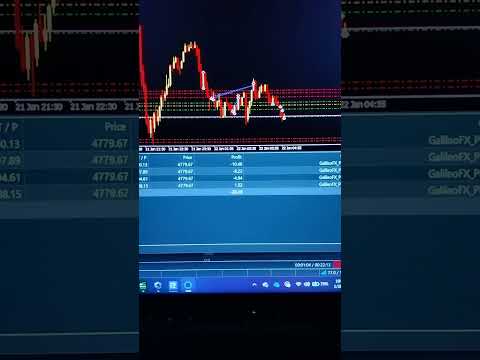
Galileo PLUS1
- Experts
- Florin Tudor
- Versione: 1.0
- Attivazioni: 5
Galileo PLUS 1 – Smart Tick-Volume Momentum EA for MT5
Galileo PLUS 1 is a professional Expert Advisor for MetaTrader 5 designed to trade momentum exhaustion patterns with the help of tick volume and multi-timeframe confirmation.
Galileo PLUS 1 focuses on:
- Smart entries based on consecutive bullish/bearish candles
- Tick-volume confirmation (only strong candles are counted)
- Multi-timeframe filtering (M1–D1)
- Liquidity-based “Smart Entry” towards high-volume price zones
- Strict risk & money management
The EA is built for traders who want a disciplined, rule-based system that “feels the market” through volume and price structure, without gambling with unlimited risk.
------------------------------------
HOW IT WORKS
------------------------------------
1. Consecutive Bars Logic (Momentum Exhaustion)
- The EA counts consecutive bullish and bearish candles.
- After X bullish candles in a row, it looks for a SELL (momentum exhaustion).
- After X bearish candles in a row, it looks for a BUY.
- You control X via:
- BullishBarsForSell
- BearishBarsForBuy
2. Tick-Volume-Based Signal Validation (NEW)
- Not every green or red candle is “strong”.
- Galileo PLUS 1 uses tick volume to validate candles:
- For each candle, it compares current tick volume with the average of the last N candles.
- Only candles with volume >= VolumeSignalFactor × average volume are counted as valid bullish/bearish candles.
- Weak volume candles are ignored and reset the sequence.
- This makes the signals more selective and more in sync with real market activity, reducing noise.
3. Multi-Timeframe Signal Engine
- The EA can scan multiple timeframes (M1, M5, M15, H1, H4, D1) for consecutive-bar signals.
- A trade is opened when:
- The chosen timeframe(s) show a valid exhaustion pattern.
- All active filters (spread, volume, DOM if used, etc.) allow the trade.
- This allows you to, for example, trade on M15 but require confirmation from higher/lower timeframes.
4. Smart Volume Filter
- Independent from the signal logic, a separate Volume Filter checks if market activity is high enough:
- Compares current volume vs the average volume of the last 200 bars.
- If volume is too low, trades are blocked entirely.
- In “Safe Mode”, the required minimum volume is automatically increased for extra protection.
5. Smart Entry & Liquidity Zones
- When enabled, Smart Entry avoids entering exactly at the current price and instead:
- Uses Order Book (DOM) when available to find nearby support/resistance levels with high liquidity.
- Uses Volume Profile (works in Strategy Tester) to detect historical high-volume price zones.
- The EA then adjusts the entry price closer to these liquidity zones (within a user-defined distance) and can use LIMIT orders to get better prices.
6. Dynamic SL/TP & Trailing
- Standard fixed Stop Loss and Take Profit (in points or pips).
- Optional:
- Trailing Stop
- Breakeven Stop
- Dynamic SL/TP adjustment based on:
- DOM imbalance
- Volume momentum
- Current profit
- In strong, favorable conditions, Galileo PLUS 1 can:
- Extend TP (within safe limits)
- Move SL into profit
- Trail SL closer to price when momentum is very strong.
7. Risk Management & Adaptive Mode
- Risk per trade can be fixed or adaptive:
- RiskPercent (per trade)
- Optional adaptive risk based on recent win rate:
- Aggressive mode when performance is strong (higher risk %)
- Conservative mode when performance drops (lower risk %)
- Safe Balance Mode:
- Automatically reduces risk and max open trades below a balance threshold.
- No martingale. No grid. No unlimited averaging down.
- Each trade has a predefined SL and risk per trade is controlled.
8. Auto-Calibration (Self-Tuning Filters)
- Galileo PLUS 1 monitors recent performance:
- If win rate drops below a threshold:
- It tightens filters (increases minimum volume ratio and required consecutive bars).
- If win rate recovers:
- It gradually relaxes filters back towards default values.
- This makes the system adapt to changing market conditions without manual re-optimization after every losing streak.
9. Sentiment & On-Chart Status
- Optional “sentiment” messages after wins and losses for easier tracking.
- Detailed on-chart panel:
- Mode (AGGRESSIVE / NORMAL / CONSERVATIVE)
- Greed level (GREEDY / MODERATE / CONSERVATIVE)
- Trend direction based on recent bars
- Current filters (volume ratio, required consecutive bars)
- Open positions and P/L
- Win/loss stats and calibration status
------------------------------------
KEY FEATURES (SUMMARY)
------------------------------------
- No martingale, no grid, no hedging exploitation.
- Tick-volume-based validation of bullish/bearish candles (volume-sensitive signals).
- Consecutive bars logic to detect momentum exhaustion.
- Optional tick-bar signals (build bars from ticks instead of timeframe candles).
- Multi-timeframe signal scanning (M1–D1).
- Smart volume filter (blocks trades in low-liquidity conditions).
- Smart Entry:
- DOM-based support/resistance (if broker supports Order Book)
- Volume Profile-based liquidity zones (works in Strategy Tester)
- LIMIT orders towards better prices.
- Advanced risk management:
- Risk % per trade + adaptive risk based on win rate.
- Safe Balance Mode for small accounts.
- Dynamic SL/TP management and trailing into profit.
- Auto-calibration of filters based on recent performance.
- Cooldown after losses to prevent revenge trading.
- Detailed logging and on-chart status display.
------------------------------------
RECOMMENDED USE
------------------------------------
- Symbols:
- Major FX pairs and gold (XAUUSD); avoid exotic/penny pairs with poor liquidity.
- Timeframes:
- Core signals: M15 or H1.
- Multi-timeframe:
- Example: trade on M15 with additional confirmation from H1 or M5.
- Accounts:
- ECN / Raw spread accounts recommended (especially if using DOM features).
- Minimum balance:
- At least 100–300 USD recommended; adjust risk accordingly.
------------------------------------
IMPORTANT INPUTS (OVERVIEW)
------------------------------------
(Only the most important groups – full list is available in the EA’s Inputs)
1. Risk & Money Management
- RiskPercent
- DefaultRiskPercent
- MaxOpenTrades
- UseSafeBalanceMode, SafeBalanceThreshold, SafeRiskFactor, SafeMaxOpenTrades
2. Consecutive Bars & Tick-Volume Signals
- UseConsecutiveBars
- BullishBarsForSell
- BearishBarsForBuy
- UseTickBarSignals, TickBarSize
- UseVolumeInSignals
- VolumeSignalLookback
- VolumeSignalFactor
3. Volume Filters
- UseVolumeFilter
- UseTickVolume
- MinVolumeRatio
- SafeVolumeEntryMultiplier
4. Multi-Timeframe Signals
- UseMultiTimeframeSignals
- UseMultiTFVolumeFilter
- UseTF_M1, UseTF_M5, UseTF_M15, UseTF_H1, UseTF_H4, UseTF_D1
5. Smart Entry & Liquidity Zones
- UseSmartEntry
- UseVolumeProfile
- VolumeProfileBars
- LiquidityZoneDistance
- UseLimitOrders
6. Auto-Calibration
- UseAutoCalibration
- CalibrationRecentTrades
- CalibrationMinWinRate
- CalibrationRecoveryWinRate
- CalibrationMinVolumeStep
- CalibrationBarsStep
- CalibrationMaxMinVolumeRatio
- CalibrationMaxBarsOffset
- CalibrationCooldownSeconds
- CalibrationStepEveryTrades
------------------------------------
RISK WARNING
------------------------------------
- Galileo PLUS 1 does NOT guarantee profits.
- All trading involves risk. Past performance and backtests do not guarantee future results.
- Always test on a demo account first and use risk settings that make sense for your capital and risk tolerance.
- Do not use high leverage or aggressive risk if you are not prepared to accept significant drawdowns.
If you have any questions about configuration, recommended settings for a specific symbol/timeframe, or how to interpret the on-chart statistics, feel free to contact me – I will be happy to help you set up Galileo PLUS 1 properly.