The Seismograph Marketquake Detector MT5

88 USD
Versione demo scaricata:
3
Pubblicato:
17 marzo 2024
Versione attuale:
6.6
Non hai trovato un robot adatto?
Ordina il tuo
su Freelance
Vai alla sezione Freelance
Ordina il tuo
su Freelance
Come acquistare un Robot di Trading o un indicatore
Esegui il tuo EA
hosting virtuale
hosting virtuale
Prova un indicatore/robot di trading prima di acquistarlo
Vuoi guadagnare nel Market?
Come presentare un prodotto per venderlo con successo

Ti stai perdendo delle opportunità di trading:
- App di trading gratuite
- Oltre 8.000 segnali per il copy trading
- Notizie economiche per esplorare i mercati finanziari
Registrazione
Accedi
Accetti la politica del sito e le condizioni d’uso
Se non hai un account, registrati
This method is also provided for developers or programmers.
More detail at:
https://www.mql5.com/en/market/product/113869#!tab=comments&page=1&comment=52673000
Notifications.
1. This is an example of when you get a notification from a Seismograph
- and on the chart screen: there appears to be a new vertical red line:
2. Place a 5 pips pending stop-order: buy-stop above the price
* To display the menu, right-click the chart and then select:
3. and sell-stop below the price.
4. This is an illustration :
Right-click on your order then place trailing-stop for them :
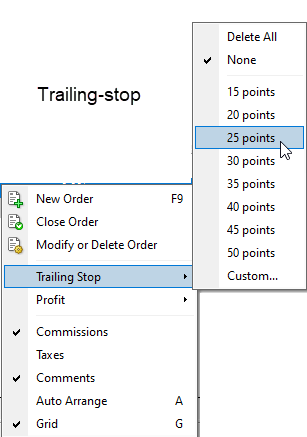
5. Then you just wait where the market will move the price.
- Prices can be brought up or brought down.
You can also make it automatic by hiring a coder to create an EA.
https://www.mql5.com/en/market/product/113869#!tab=comments&page=1&comment=52673000
This method is also provided for developers or experienced programmer in EA creation.
* If the number of vertical lines increases by 1, then it is a trigger entry.
by reading the contents of the objects named "seismographHighest" and "sesimographAvg".