Polynom Moving and Channel
75 USD
Versione demo scaricata:
1 056
Pubblicato:
19 giugno 2015
Versione attuale:
1.6
Non hai trovato un robot adatto?
Ordina il tuo
su Freelance
Vai alla sezione Freelance
Ordina il tuo
su Freelance
Come acquistare un Robot di Trading o un indicatore
Esegui il tuo EA
hosting virtuale
hosting virtuale
Prova un indicatore/robot di trading prima di acquistarlo
Vuoi guadagnare nel Market?
Come presentare un prodotto per venderlo con successo

Ti stai perdendo delle opportunità di trading:
- App di trading gratuite
- Oltre 8.000 segnali per il copy trading
- Notizie economiche per esplorare i mercati finanziari
Registrazione
Accedi
Accetti la politica del sito e le condizioni d’uso
Se non hai un account, registrati
Скоро...
https://www.youtube.com/watch?v=kHRQ0o5WS0U
Буду признателен, если носители языка для улучшения качества перевода или добавления нового языка отредактируют этот прикрепленный файл.
I would be grateful if the native speakers to improve the quality of translation, or add a new language edit this attachment.
وسأكون ممتنا إذا الناطقين بها لتحسين جودة الترجمة، أو إضافة لغة تحرير جديدة هذا المرفق.
我將不勝感激,如果母語來提高翻譯質量,或添加新的語言編輯本附件。
Ich wäre dankbar, wenn die Muttersprache , die Qualität der Übersetzung zu verbessern, oder um eine neue Sprache zu bearbeiten diese Anlage hinzufügen.
من سپاسگزار خواهد بود اگر به زبان مادری به بهبود کیفیت ترجمه، و یا اضافه کردن یک زبان جدید ویرایش این پیوست.
Le agradecería si los hablantes nativos para mejorar la calidad de la traducción, o añadir un nuevo idioma editar este archivo adjunto.
ネイティブスピーカーは、翻訳の品質を向上させる、または新しい言語の編集にこの添付ファイルを追加する場合、私は感謝されます。
Je vous serais reconnaissant si les locuteurs natifs pour améliorer la qualité de la traduction, ou ajouter une nouvelle langue modifier cet attachement.
Nikolai Semko
Hello Nikolai,
I would be interested in buying a Center of Gravity indicator if this indicator is able to automatically find the "numbers of bars" setting that plots the central line on a desired price level.
For example ploting central line at current candle opening, or at the opening of the last bar. Is this possible to realise for you ?
Please answer by Private Message.
Kind Regards
Hello Nikolai,
I would be interested in buying a Center of Gravity indicator if this indicator is able to automatically find the "numbers of bars" setting that plots the central line on a desired price level.
For example ploting central line at current candle opening, or at the opening of the last bar. Is this possible to realise for you ?
Please answer by Private Message.
Kind Regards
On the screenshot below, center is approximatively at current price, more precisely at last candle closing. Manual search found 1720 as parameter value to obtain this. In general I find value is between 600 and 2000 to obtain this.
Hello Nikolai,
I would be interested in buying a Center of Gravity indicator if this indicator is able to automatically find the "numbers of bars" setting that plots the central line on a desired price level.
For example ploting central line at current candle opening, or at the opening of the last bar. Is this possible to realise for you ?
Please answer by Private Message.
Kind Regards
Do you have any instructional videos on how you make a trade with this indicator?
Do you have any instructional videos on how you make a trade with this indicator?
Thanks for your question.
There is a more visual option than video, and with full diagnostics.
There is a tester mode in this indicator. To enter this mode, press "T".
In this mode, the results of 10 strategies and 10 of their inverse strategies with a graphical depiction of transactions in the form of dashed lines (buy - blue line, sale - red line) are demonstrated.
The first 5 strategies (from number 1 to number 5) and 5 of their inverse strategies are strategies using the channel, i.e. when the channel width is greater than zero.
The following strategies from 6 to 10 and their inverse options are strategies without a channel, but with a polynomial center line, i.e. when in the settings you set the channel width to zero.
Here is a brief description of these strategies:
1. Sell→Price⤈Cannel Up
Buy→Price⤉Cannel Down
1. inv. Buy→Price⤈Cannel Up
Sell→Price⤉Cannel Down
2. Sell→Price⤉Cannel Up
Buy→Price⤈Cannel Down
2. inv. Buy→Price⤉Cannel Up
Sell→Price⤈Cannel Down
3. Sell→Price⤈Cannel Up if color=Blue
Buy→Price⤉Cannel Down if color=Violet
3. inv. Buy→Price⤈Cannel Up if color=Blue
Sell→Price⤉Cannel Down if color=Violet
4. Sell→Cannel Down ↷ if color=Blue
Buy→Cannel Up ⤻ if color=Violet
4. inv. Buy→Cannel Down ↷ if color=Blue
Sell→Cannel Up ⤻ if color=Violet
5. Sell→ Cannel Down ↘,Price<Cannel Down, color=Blue
Buy→ Cannel Up ↗, Price>Cannel Up,color=Violet
5. inv. Buy→ Cannel Down ↘,Price<Cannel Down, color=Blue
Sell→ Cannel Up ↗, Price>Cannel Up,color=Violet
The following strategies appear when channel width = 0
6. Sell→ MA ↷
Buy→ MA ⤻
6. inv. Buy→ MA ↷
Sell→ MA ⤻
7. Sell→ MA ↷ if color=Blue
Buy→ MA ⤻ if color=Violet
7. inv. Buy→ MA ↷ if color=Blue
Sell→ MA ⤻ if color=Violet
8. Sell→Price ⤈ MA
Buy→Price ⤉ MA
8. inv. Buy→Price ⤈ MA
Sell→Price ⤉ MA
9. Sell→Price ⤈ MA if color=Blue
Buy→Price ⤉ MA if color=Violet
9. inv. Buy→Price ⤈ MA if color=Blue
Sell→Price ⤉ MA if color=Violet
10. Sell→Price ⤈ MA if color=Violet
Buy→Price ⤉ MA if color=Blue
10.inv. Buy→Price ⤈ MA if color=Violet
Sell→Price ⤉ MA if color=Blue
Designations:
⤈ ⤉ - The price line intersects the channel line from top to bottom or from bottom to top.
↷ - T rend change of the channel line or moving polynomial line (the center line of the channel) from upward to downward
⤻ - T rend change of the channel line or moving polynomial line (the center line of the channel) from downward to upward
↗ - Uptrend
↘ - Downtrend
Thanks for that explanation. - I have created a custom ea that give me a trading panel I like to us and use to call various indicators from using icustom
I would like to be able to call your indicator and set the degree of polynomial, period and channel just using the icustom function.
I can see all you buffer values in the data window.
However I don't see where the period can be set using icustom as you don't have that as an option in the Inputs like the degree of polynomial or channel width are?
Is it possible to do this using your indicator?
Thanks,
Alan
Thanks for that explanation. - I have created a custom ea that give me a trading panel I like to us and use to call various indicators from using icustom
I would like to be able to call your indicator and set the degree of polynomial, period and channel just using the icustom function.
I can see all you buffer values in the data window.
However I don't see where the period can be set using icustom as you don't have that as an option in the Inputs like the degree of polynomial or channel width are?
Is it possible to do this using your indicator?
Thanks,
Alan
Yes, of course, it is possible. Here is an example indicator that demonstrates this:
Buffers map:
You can also look here.
https://www.mql5.com/ru/market/product/10098#!tab=comments&page=1&comment=13320377
I set the polynomial as part of my default template in Mql4. However now the help menu won't appear any longer.
this still occurs after I change the default template to something without this indicator in it.
Do you know how to resolve this?
I set the polynomial as part of my default template in Mql4. However now the help menu won't appear any longer.
this still occurs after I change the default template to something without this indicator in it.
Do you know how to resolve this?
Here are the control keys. Try to press "H" and "I"
Here are the control keys. Try to press "H" and "I"
Yes, that's the thing - H and I no longer display the information - only when I press T does the tester information appear.
If I press H the tester information will move up and down, however the text of the Help screen does not appear.
However to fix this issue, if I just delete the default.tpl file, I can get it working again.
It's only an issue if I want to set a new default template in mql4
how do you see if trend is uo or down?
how do you see if trend is uo or down?
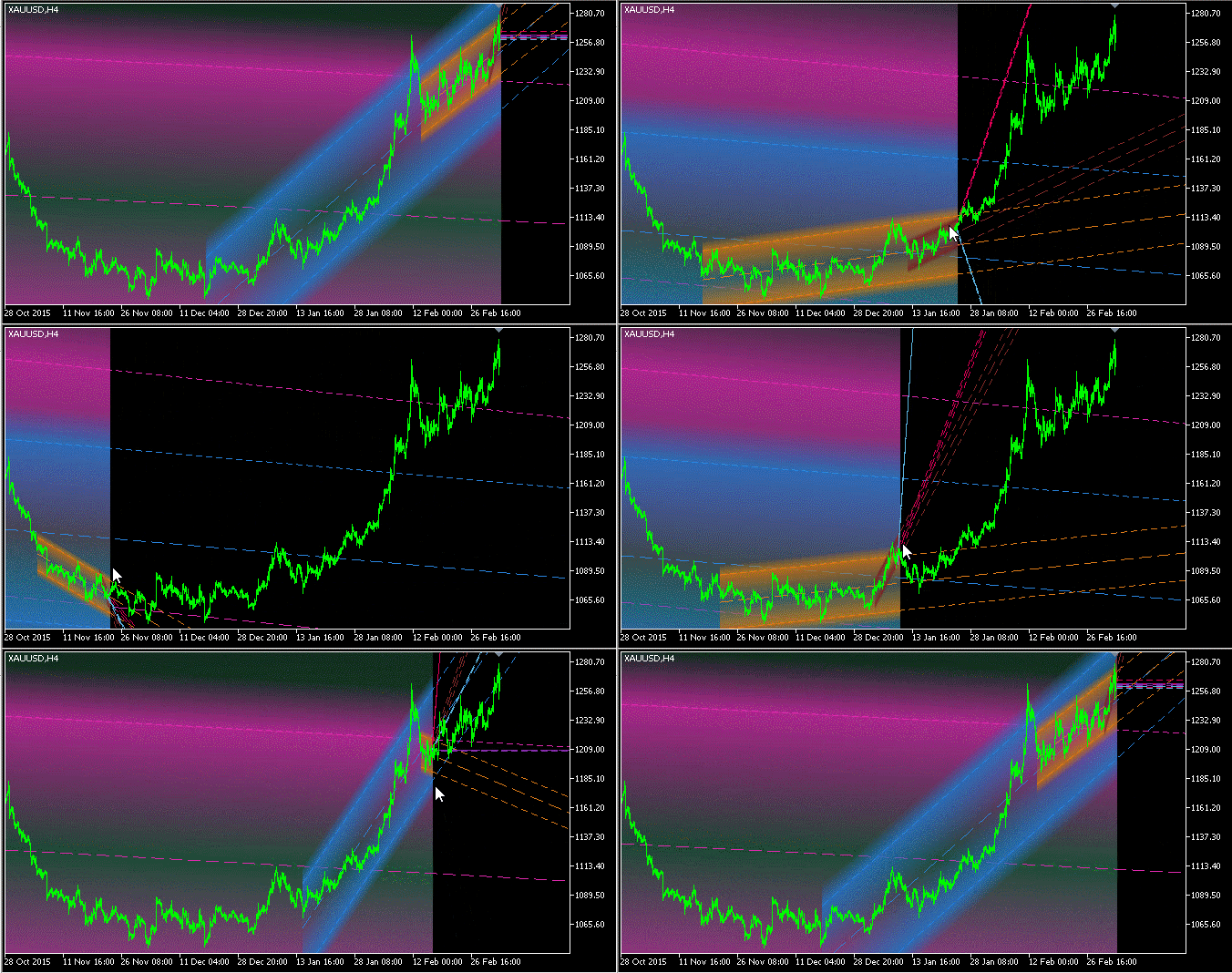
My recommendation for determining the trend, both short-term and medium-term, as well as long-term:
Especially valuable is the extrapolation information of the channel, the left border of which starts from the moments when the market has changed the trend or its behavior has changed dramatically.