 MetaTrader 5
 Sistemi Esperti
 Indicatori
 Script
 Librerie
 Archiviazione
Unisciti alla nostra fan page

Imbalance Finder (FVG) - indicatore per MetaTrader 5

- Visualizzazioni:
- 169
- Valutazioni:
- Pubblicato:
- Aggiornato:
-
 Ti stai perdendo delle opportunità di trading:
- App di trading gratuite
- Oltre 8.000 segnali per il copy trading
- Notizie economiche per esplorare i mercati finanziari
Registrazione AccediAccetti la politica del sito e le condizioni d’uso
Se non hai un account, registrati -
 Hai bisogno di un robot o indicatore basato su questo codice? Ordinalo su Freelance
Vai a Freelance
Hai bisogno di un robot o indicatore basato su questo codice? Ordinalo su Freelance
Vai a Freelance
Panoramica
L'Imbalance Finder è un indicatore grafico per MetaTrader 5 che rileva automaticamente i Fair Value Gaps (FVG), noti anche come squilibri, e ne traccia visivamente il ciclo di vita sul grafico. Identifica gli squilibri sia rialzisti che ribassisti e monitora in tempo reale se il prezzo ha toccato (riempito parzialmente) o riempito completamente ogni gap.
I Fair Value Gaps sono pattern a tre candele in cui gli stoppini della prima e della terza candela non si sovrappongono, lasciando un "gap" di prezzo nella candela centrale. Queste zone fungono spesso da supporto/resistenza e sono ampiamente utilizzate nelle metodologie di trading Smart Money Concepts (SMC).
Come funziona
Logica di rilevamento
L'indicatore esamina ogni barra completata e confronta i massimi e i minimi delle candele circostanti:
- FVG rialzista: il minimo della barra [i] è superiore al massimo della barra [i-2]. La zona di gap si estende dal massimo[i-2] (in basso) al minimo[i] (in alto) ed è tracciata alla barra [i-1].
- FVG ribassista: il massimo della barra [i] è inferiore al minimo della barra [i-2]. La zona di gap si estende dal massimo [i] (in basso) al minimo [i-2] (in alto) ed è disegnata in corrispondenza della barra [i-1].
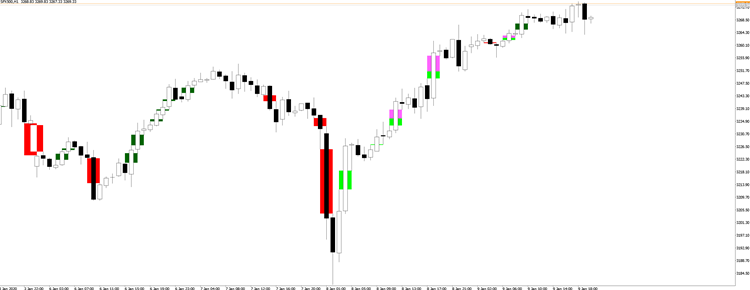
Tappato vs. Riempito
Una volta rilevato uno squilibrio, l'indicatore monitora continuamente se la successiva azione dei prezzi interagisce con la zona:
- Tappato: Il prezzo è entrato nella zona di squilibrio ma non l'ha attraversata completamente. Per un FVG rialzista, ciò significa che il prezzo è entrato nel gap dall'alto ma non ha raggiunto il bordo inferiore. La parte toccata è evidenziata in un colore separato.
- Riempito: Il prezzo ha attraversato completamente la zona di squilibrio, raggiungendo il bordo opposto. L'intero rettangolo cambia colore per indicare che il gap non è più attivo.
Questa distinzione è utile perché un FVG toccato ma non riempito spesso agisce ancora come zona di supporto/resistenza, mentre un FVG completamente riempito è considerato consumato.
Parametri di ingresso
| Parametro | Predefinito | Descrizione |
|---|---|---|
| Colore squilibrio rialzista | Lime | Colore del rettangolo per i FVG rialzisti attivi |
| Colore squilibrio ribassista | Arancione | Colore del rettangolo per le FVG ribassiste attive |
| Mostra squilibri toccati/riempiti | vero | Alterna la visibilità delle sovrapposizioni toccate/riempite |
| Colore rialzista toccato/riempito | Verde scuro | Colore applicato quando un FVG rialzista viene toccato o riempito |
| Colore ribassista toccato/riempito | Rosso | Colore applicato quando un FVG ribassista viene toccato o riempito |
Buffer dell'indicatore
L'indicatore espone 7 buffer (senza tracciati; solo dati) che possono essere letti dagli Expert Advisor o da altri indicatori:
| Buffer | Indice | Valori |
|---|---|---|
| Squilibrio rialzista | 0 | 1 = FVG presente, EMPTY_VALUE = nessuno |
| Squilibrio ribassista | 1 | 1 = FVG presente, VUOTO_VALORE = nessuno |
| Bandiera di spillatura | 2 | 1 = parzialmente toccato |
| Spillato fino al prezzo | 3 | Livello di prezzo raggiunto all'interno del gap |
| Flag riempito | 4 | 1 = completamente riempito |
| Interazione con la candela | 5 | 1 = toccato, 2 = riempito (sulla barra di interazione) |
| Tipo di interazione | 6 | 1 = FVG rialzista, 2 = FVG ribassista |
Lettura del grafico
- Gli squilibri attivi appaiono come rettangoli colorati che si estendono su tre barre.
- Quando il prezzo entra in una zona, un secondo rettangolo del colore toccato/riempito si sovrappone alla parte penetrata.
- Quando il prezzo riempie l'intera zona, il rettangolo originale viene sostituito da un unico rettangolo del colore del riempimento.
- Impostare "Mostra squilibri toccati/riempiti" su false se si desidera visualizzare solo gli FVG attivi (non toccati).
Note
- L'indicatore ricalcola tutti gli squilibri e il loro stato al primo caricamento (dati storici). Nelle barre successive, solo l'ultima barra viene controllata per verificare la presenza di nuovi squilibri, mentre tutti gli squilibri aperti vengono monitorati rispetto al tick corrente.
- I nomi degli oggetti sono preceduti da ImbalanceUp- e ImbalanceDn- per evitare conflitti con altri indicatori o disegni manuali.
- La rimozione dell'indicatore elimina in modo pulito solo i suoi oggetti grafici.
Tradotto dall’inglese da MetaQuotes Ltd.
Codice originale https://www.mql5.com/en/code/71540
 KSQ Fair Value Gap EA FVG with Regime Detection and Dual SL TP Mode
KSQ Fair Value Gap EA negozia automaticamente le zone FVG istituzionali con rilevamento del regime integrato per filtrare i setup di bassa qualità nei mercati variabili. STRATEGIA Rileva i pattern FVG rialzisti e ribassisti a 3 barre. Entra su pullback confermati nella zona. Ogni FVG si attiva una sola volta. FILTRO REGIME Bias di tendenza EMA, filtro di forza ADX o entrambi combinati. Configurabile su un timeframe superiore (M15-D1). SL e TP Entrambi supportano la modalità basata su ATR o su punti fissi, impostabili indipendentemente. LOT SIZING Lotto fisso o % basato sul rischio - commutabile dagli ingressi. TRADE MANAGEMENT Stop di pareggio, chiusura parziale e trailing stop ATR/punti. PROTEZIONE DEL RISCHIO Kill switch giornaliero e di drawdown totale. Limite massimo di operazioni per direzione. Filtro temporale di sessione. Non è ancora ottimizzato per nessuna coppia.
Pivot point
Linea per cambiare direzione
 ASQ PropFirm Shield
Libreria di protezione delle società di investimento istituzionali per MetaTrader 5.
Institutional Shannon Entropy (Predictability Index)
A quantitative Information Theory engine that calculates the Shannon Entropy of price distribution to mathematically measure market randomness and algorithmic predictability.