 MetaTrader 5
 Sistemi Esperti
 Indicatori
 Script
 Librerie
 Archiviazione
Unisciti alla nostra fan page

CExecutionSafety - Ping + Execution Latency Guard for MQL5 EAs - libreria per MetaTrader 5

- Visualizzazioni:
- 157
- Valutazioni:
- Pubblicato:
- Aggiornato:
-
 Ti stai perdendo delle opportunità di trading:
- App di trading gratuite
- Oltre 8.000 segnali per il copy trading
- Notizie economiche per esplorare i mercati finanziari
Registrazione AccediAccetti la politica del sito e le condizioni d’uso
Se non hai un account, registrati -
 Hai bisogno di un robot o indicatore basato su questo codice? Ordinalo su Freelance
Vai a Freelance
Hai bisogno di un robot o indicatore basato su questo codice? Ordinalo su Freelance
Vai a Freelance
Panoramica
CExecutionSafety è una classe leggera di inclusione MQL5 progettata per proteggere gli Expert Advisor dall'esecuzione di operazioni in condizioni di rete o di esecuzione inadeguate.
Misura due componenti di latenza, il ping del terminale in tempo reale e il ritardo di esecuzione dell'orologio a muro, e blocca i tentativi di negoziazione quando il loro valore combinato supera una soglia configurabile.
Il problema che risolve
La maggior parte degli EA esegue alla cieca, indipendentemente dalle condizioni di rete. Un picco di ping o di ritardo di esecuzione sul lato broker durante un ordine critico può causare slittamenti, riquotazioni o mancati riempimenti.
CExecutionSafety introduce un gate di sicurezza pre-trade che impedisce l'esecuzione quando le condizioni sono degradate.
Come funziona
La classe utilizza due fonti di dati:
- TERMINAL_PING_LAST: legge il ping più recente registrato da MetaTerminal (in millisecondi).
- RecordExecDelay(): accetta una misura di wall-clock da avvolgere intorno a qualsiasi operazione di CTrade.
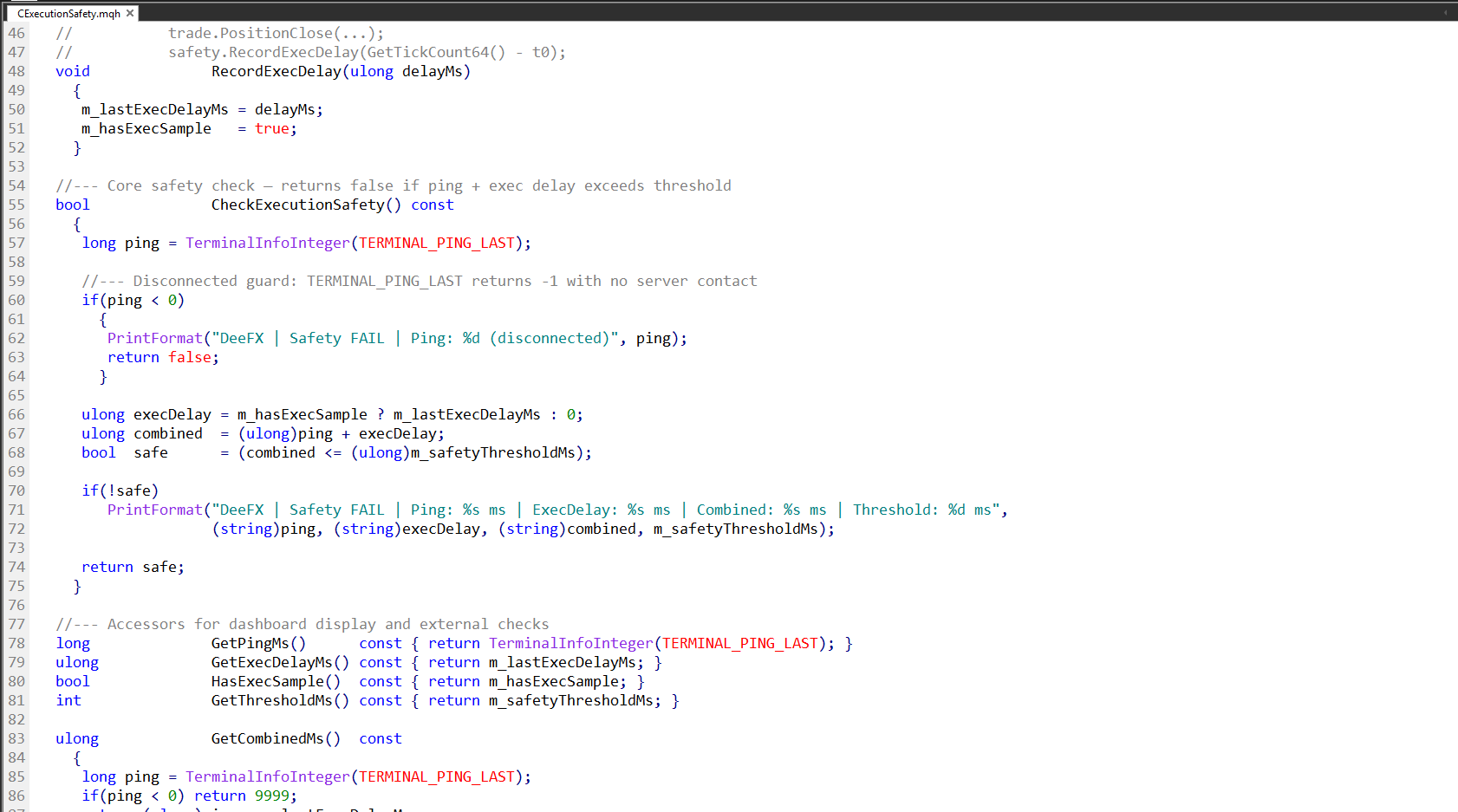
Questi due valori vengono sommati e confrontati con la soglia configurata. Se la latenza combinata supera la soglia, CheckExecutionSafety() restituisce false e stampa una voce di log diagnostica.
Protezione dalla disconnessione
Quando il terminale non ha contatti con il server, TERMINAL_PING_LAST restituisce -1. La classe lo rileva e restituisce automaticamente una voce di log diagnostica. La classe lo rileva e restituisce automaticamente false, impedendo i tentativi di compravendita su un terminale disconnesso.
Esempio di integrazione
Includete il file e istanziate la classe nel vostro EA:
#include <DeeFX/CExecutionSafety.mqh> CExecutionSafety safety; int OnInit() { safety.Init(150); // soglia combinata di 150ms return INIT_SUCCEED; } void OnTick() { if(!safety.CheckExecutionSafety()) return; ulong t0 = GetTickCount64(); trade.PositionClose(ticket); safety.RecordExecDelay(GetTickCount64() - t0); }
Accessori
I seguenti accessori di sola lettura sono disponibili per la visualizzazione del cruscotto o per la logica esterna:
- GetPingMs(): ping del terminale corrente in ms
- GetExecDelayMs(): ultimo ritardo di esecuzione registrato in ms
- GetCombinedMs(): ping + ritardo di esecuzione combinati (restituisce 9999 se disconnesso)
- HasExecSample(): vero se è stata registrata almeno una misura
- GetThresholdMs(): soglia di sicurezza configurata
Changelog
- v1.0 - Rilascio iniziale
- v1.1 - La macro Guard è stata rinominata. Gli specificatori di formato %I64u sono stati sostituiti con cast (di stringhe).
- v1.2 - Tipo di ritorno di Init() cambiato void → bool. Azzeramento dello stato alla riaccensione per evitare campioni non aggiornati.
Tradotto dall’inglese da MetaQuotes Ltd.
Codice originale https://www.mql5.com/en/code/70033
 Institutional Unmitigated Order Block Matrix
A dynamic Smart Money utility that identifies institutional Order Blocks backed by volume anomalies and automatically tracks their mitigation state to keep your charts clean and focused on fresh liquidity.
Institutional Toxic Flow and Tick Speedometer
A high-frequency trading utility designed to measure real-time tick velocity and detect toxic order flow spikes before they reflect entirely on standard price candles.
Institutional Cumulative Volume Delta (CVD)
An advanced order flow engine that approximates tick-by-tick aggressor data to calculate the true Cumulative Volume Delta, it exposes institutional absorption and divergence hidden within standard price candles.
ASQ Divergence Detector
ASQ Divergence Detector scans your chart for regular and hidden RSI divergences and marks them with color-coded, non-repaint arrows.