 MetaTrader 5
 Experts
 Indicateurs
 Scripts
 Bibliothèque
 Stockage
Rejoignez notre page de fans

Risk Guard — taille de lot en fonction du risque, limitation quotidienne des pertes, nombre maximal de positions, réduction des transactions surdimensionnées, stop-loss forcé - expert pour MetaTrader 5

- Vues:
- 18
- Note:
- Publié:
-
 Vous manquez des opportunités de trading :
- Applications de trading gratuites
- Plus de 8 000 signaux à copier
- Actualités économiques pour explorer les marchés financiers
Inscription Se connecterVous acceptez la politique du site Web et les conditions d'utilisation
Si vous n'avez pas de compte, veuillez vous inscrire -
 Besoin d'un robot ou d'un indicateur basé sur ce code ? Commandez-le sur Freelance
Aller sur Freelance
Besoin d'un robot ou d'un indicateur basé sur ce code ? Commandez-le sur Freelance
Aller sur Freelance

Risk Guard n'est pas une stratégie de trading. Il n'ouvre jamais de position. Associez-le à un graphique par compte et il surveillera toutes les positions du compte — qu'il s'agisse de transactions manuelles ou d'autres Expert Advisors — et appliquera les règles que vous aurez définies. Chaque règle correspond à un paramètre et peut être désactivée.
1. Taille de lot basée sur le risque, affichée en temps réel sur le graphique. Choisissez le risque sous forme de pourcentage du solde ou de montant fixe, définissez la distance de stop avec laquelle vous négociez, et le panneau affiche la taille exacte du lot pour ce symbole. Le calcul utilise la valeur du tick, la taille du tick et le pas de volume du symbole ; il est donc précis pour l’or, les indices et les CFD sur cryptomonnaies, et pas seulement pour les paires de devises.
2. Limite de perte journalière avec verrouillage. Lorsque le P/L (profit/perte) cumulé de la journée (clôture du jour plus P/L flottant) atteint la limite (un montant en euros ou un pourcentage du solde en début de journée), toutes les positions sont clôturées (facultatif) et toute nouvelle position est clôturée dès son ouverture — jusqu’au prochain jour ouvrable du serveur. Le verrouillage est stocké dans une variable globale du terminal ; son redémarrage ou celui de l’EA ne l’efface donc pas.
3. Nombre maximal de positions ouvertes. La position la plus récente dépassant le plafond est clôturée.
4. Limitation des transactions surdimensionnées. Lors de l’ouverture d’une position, Risk Guard analyse la distance de son stop-loss et calcule la taille de lot autorisée par votre paramètre de risque. Si la position est plus importante, le volume excédentaire est clôturé par une clôture partielle ; si même le lot minimum présente un risque trop élevé, la position entière est clôturée.
5. Stop-loss forcé. Toute position ouverte sans stop-loss se voit attribuer un stop-loss à la distance que vous avez définie.
6. Avertissement de spread. Le panneau affiche « WAIT » lorsque le spread dépasse votre seuil maximal.
Chaque action est consignée dans le journal des experts et, si vous le souhaitez, peut faire l’objet d’une alerte dans le terminal.
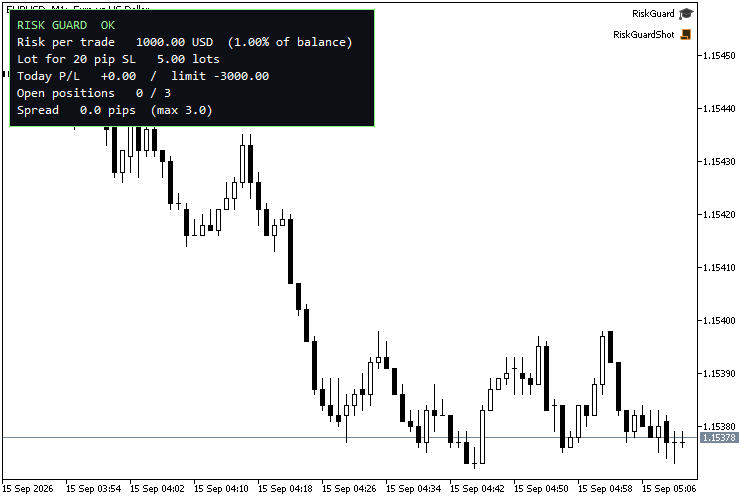
Utilisation recommandée : n’importe quel symbole, n’importe quelle période — le graphique ne sert que de support au panneau. La capture d’écran utilise l’EURUSD M1. Laissez l’option « Surveiller uniquement le symbole de ce graphique » désactivée pour protéger l’ensemble du compte à partir d’un seul graphique.
Paramètres
| Groupe | Paramètre | Par défaut |
|---|---|---|
| Calcul de la taille de la position | Mode de risque | Pourcentage du solde |
| Calcul de la taille de la position | Risque en % du solde | 1,0 |
| Taille de la position | Risque fixe (devise du compte) | 50 |
| Calcul de la taille de la position | Distance du stop (pips) pour le calcul du lot | 20 |
| Limites | Activer la limite de perte journalière | vrai |
| Limites | Limite de perte journalière (montant, 0 = utiliser le pourcentage) | 0 |
| Limites | Limite de perte journalière (% du solde en début de journée) | 3,0 |
| Limites | Clôture de toutes les positions à la limite | vrai |
| Limites | Nombre maximal de positions ouvertes (0 = désactivé) | 3 |
| Limites | Spread maximal (pips, 0 = désactivé) | 3,0 |
| Protection | Ajouter un stop-loss aux positions ouvertes qui n'en ont pas | vrai |
| Protection | Distance du SL forcé (pips) | 30 |
| Protection | Réduire les positions dont le risque dépasse la limite | vrai |
| Protection | Ne surveiller que le symbole de ce graphique | false |
| Protection | Afficher une alerte contextuelle à chaque application de la règle | true |
| Affichage | Afficher le panneau | true |
| Affichage | Coin du panneau | En haut à gauche |
| Affichage | Taille de la police du panneau | 10 |
Un pip correspond à 10 points pour les cotations à 3 et 5 chiffres, et à 1 point dans les autres cas.
Fonctionnement
L'application des règles s'effectue dans la fonction OnTradeTransaction lors de l'événement « deal-add » ; ainsi, une position rejetée est clôturée au cours du même tick que celui où elle a été ouverte. La limite journalière prend en compte les transactions clôturées (profit + swap + commission) depuis minuit serveur, ainsi que le P/L flottant des positions ouvertes, vérifiés à chaque tick et toutes les secondes via un minuteur. Le verrouillage quotidien est enregistré dans une variable globale du terminal portant le nom d’utilisateur du compte et est automatiquement réinitialisé le jour serveur suivant.
Vérifié
Strategy Tester, EURUSD M1, MetaQuotes-Demo, 10 000 USD, compte de couverture. Un dispositif de test a délibérément ouvert des transactions défavorables à l’EA :
Risk Guard : nouveau jour 02/06/2026, solde initial 10 000,00
étape 1 : achat de 1,00 lot sans SL
Risk Guard : SL forcé sur la position n° 2 à 1,16017 – ok
Risk Guard : n° 2 1,00 lot > max. 0,33 pour un SL de 30,0 pips – réduit à 0,67 (ok)
Étape 2 : quatre achats de 0,01 (max. 3)
Risk Guard : 5 positions ouvertes > max. 3 - clôture de la position n° 4 la plus récente
Risk Guard : 4 positions ouvertes > max. 3 - clôture de la plus récente n° 5
Étape 3 : effectuer 30 allers-retours au-delà de la limite quotidienne
Risk Guard : LIMITE DE PERTE JOURNALIÈRE ATTEINTE – P/L -230,60, limite 50,00. Pas de nouvelles positions jusqu’à demain.
Étape 4 : achat de 0,01 en position bloquée
Risk Guard : limite quotidienne active - clôture EURUSD n° 73
AUTOTEST TERMINÉ : 5 réussites, 0 échecs
Traduit de l’anglais par MetaQuotes Ltd.
Code original : https://www.mql5.com/en/code/77364
USDX Trader EA - Trade the US Dollar Index even if your broker does not include the USDX among their symbols.
USDX Trader v1.33 — Synthetic Dollar Index chart and basket trading for MetaTrader 5 Version 1.33 · MetaTrader 5 · Any broker that offers the major USD pairs
 GDS Renko Canvas
GDS Renko Canvas est un indicateur pédagogique compact qui montre comment un graphique Renko classique à taille fixe peut être affiché directement dans MetaTrader 5 à l’aide de la classe standard CCanvas. L’indicateur construit des briques Renko à partir des ticks BID entrants et n’affiche que les briques terminées. La poursuite de la tendance nécessite un bloc, tandis qu’un renversement suit la règle classique des deux blocs. Contrairement aux superpositions Renko basées sur des objets, le graphique visible est dessiné sur une seule couche bitmap Canvas. Cela permet de limiter la taille de la liste des objets du graphique et facilite le rafraîchissement lors du redimensionnement.
Prop-Firm Equity Guard - daily and max drawdown protection (FTMO-style)
Outil de gestion des risques rigoureux, spécialement conçu pour répondre aux défis des sociétés de trading pour compte propre. Il surveille automatiquement l'ensemble de votre compte afin d'éviter tout dépassement des seuils de drawdown quotidiens et maximaux. Il agit comme un rempart de sécurité contre les pics de spread et les opérations de « revanche », en clôturant instantanément toutes les positions et tous les ordres en attente avant que votre évaluation ne soit terminée.
Vitesse moyenne selon l'AIS
L'indicateur affiche la vitesse moyenne de classement des cours