 MetaTrader 5
 Experts
 지표
지표
 스크립트
스크립트
 라이브러리
라이브러리
 보관함
보관함
당사 팬 페이지에 가입하십시오

리스크 가드 — 리스크 기반 로트 크기, 일일 손실 제한, 최대 포지션 수, 과도한 거래 규모 조정, 강제 손절매 - MetaTrader 5용 expert

- 조회수:
- 9
- 평가:
- 게시됨:
-
 이 코드를 기반으로 한 로봇이나 지표가 필요하신가요? 프리랜스로 주문하세요
프리랜스로 이동
이 코드를 기반으로 한 로봇이나 지표가 필요하신가요? 프리랜스로 주문하세요
프리랜스로 이동


리스크 가드(Risk Guard)는 거래 전략이 아닙니다. 포지션을 개설하지 않습니다. 계정당 하나의 차트에 적용하면, 해당 계정의 모든 포지션(수동 거래 및 기타 전문가 자문(EA) 포함)을 모니터링하며 사용자가 설정한 규칙을 적용합니다. 모든 규칙은 입력 항목이며, 필요에 따라 비활성화할 수 있습니다.
1. 차트 상에서 실시간으로 확인 가능한 리스크 기반 랏 크기. 위험을 잔고의 백분율 또는 고정 금액으로 선택하고, 거래 시 적용할 스탑 거리를 설정하면 패널에 해당 종목의 정확한 랏 크기가 표시됩니다. 계산에는 종목의 틱 값, 틱 크기 및 거래량 단위가 사용되므로 외환 쌍뿐만 아니라 금, 지수 및 암호화폐 CFD에서도 정확하게 적용됩니다.
2. 잠금 기능이 있는 일일 손실 한도. 당일 종가 및 미실현 손익의 합계가 한도(금액 또는 당일 시작 잔고의 백분율)에 도달하면, 모든 포지션이 청산되며(선택 사항), 다음 서버 영업일까지 새로운 포지션이 생성되는 즉시 청산됩니다. 이 제한값은 터미널 전역 변수에 저장되므로, 터미널이나 EA를 재시작하더라도 초기화되지 않습니다.
3. 최대 미결제 포지션 수. 한도를 초과하는 가장 최근의 포지션이 청산됩니다.
4. 과도한 거래 규모 조정. 포지션이 개설되면 Risk Guard는 해당 포지션의 손절 거리(stop-loss distance)를 읽어들이고, 위험 설정에서 허용하는 로트 크기를 계산합니다. 포지션 규모가 이를 초과할 경우, 초과 분량은 부분 청산으로 정리되며, 최소 로트 크기조차도 위험 부담이 너무 크다면 전체 포지션이 청산됩니다.
5. 강제 손절. 손절매 설정 없이 개설된 모든 포지션에는 사용자가 설정한 거리만큼의 손절매가 적용됩니다.
6. 스프레드 경고. 스프레드가 최대 허용치를 초과하면 패널에 ‘WAIT’이 표시됩니다.
모든 작업 내역은 전문가(Expert) 로그에 기록되며, 선택에 따라 터미널 알림으로 표시될 수 있습니다.
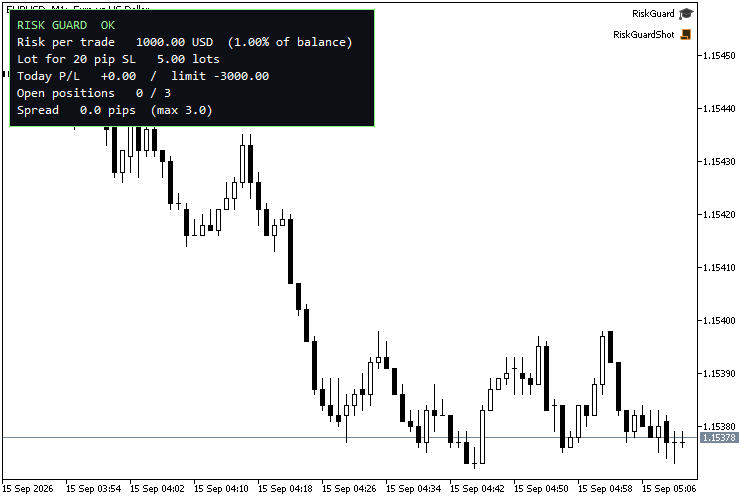
권장 사용법: 모든 종목, 모든 시간대 — 차트는 패널을 표시하기 위한 공간일 뿐입니다. 스크린샷에서는 EURUSD M1을 사용했습니다. “이 차트의 종목만 보호” 옵션을 해제하면 하나의 차트에서 전체 계정을 보호할 수 있습니다.
입력값
| 그룹 | 입력 | 기본값 |
|---|---|---|
| 포지션 크기 | 위험 모드 | 잔고의 백분율 |
| 포지션 규모 | 잔고의 위험 비율 | 1.0 |
| 포지션 규모 | 고정 위험(계좌 통화) | 50 |
| 포지션 규모 | 랏 계산 시 스탑 거리 (핍) | 20 |
| 한도 | 일일 손실 한도 활성화 | true |
| 한도 | 일일 손실 한도 (금액, 0 = % 적용) | 0 |
| 한도 | 일일 손실 한도 (당일 시작 잔액의 %) | 3.0 |
| 한도 | 한도 도달 시 모든 포지션 청산 | true |
| 한도 | 최대 미결제 포지션 수 (0 = 비활성화) | 3 |
| 한도 | 최대 스프레드 (핍, 0 = 비활성화) | 3.0 |
| 보호 | 손절매(SL)가 설정되지 않은 포지션에 SL 추가 | true |
| 보호 | 강제 SL 거리 (핍) | 30 |
| 보호 | 한도를 초과하는 위험에 노출된 포지션 정리 | true |
| 보호 | 이 차트의 종목만 보호 | false |
| 보호 | 집행 시마다 팝업 알림 표시 | true |
| 표시 | 패널 표시 | true |
| 표시 | 패널 모서리 | 왼쪽 상단 |
| 표시 | 패널 글꼴 크기 | 10 |
3자리 및 5자리 시세에서는 1 핍이 10포인트이며, 그 외의 경우에는 1포인트입니다.
작동 방식
강제 청산은 거래 추가(deal-add) 이벤트 시 OnTradeTransaction에서 실행되므로, 거부된 포지션은 개설된 동일한 틱에서 청산됩니다. 일일 한도는 서버 자정 이후 청산된 거래(이익 + 스왑 + 수수료)와 미결제 포지션의 변동 손익을 합산한 값으로 계산되며, 매 틱마다 그리고 타이머를 통해 매초마다 확인됩니다. 일일 제한값은 계정 로그인 이름을 따서 명명된 터미널 전역 변수에 기록되며, 다음 서버 영업일에 자동으로 초기화됩니다.
검증 결과
전략 테스터, EURUSD M1, MetaQuotes-Demo, 10,000 USD, 헤징 계정. 테스트를 위해 EA에 대항하여 의도적으로 불리한 거래를 개설했습니다:
리스크 가드: 새 거래일 2026.06.02, 초기 잔고 10000.00
1단계: SL 없이 1.00 랏 매수
리스크 가드: #2에서 1.16017에 강제 SL - 정상
리스크 가드: #2 1.00 랏 > 30.0 핍 SL 기준 최대 0.33 초과 - 0.67 축소 (정상)
2단계: 0.01 랏 매수 4건 (최대 3건)
리스크 가드: 5개 포지션 > 최대 3개 - 가장 최근 포지션인 #4 청산
리스크 가드: 미결제 포지션 4개 > 최대 3개 - 가장 최근 포지션인 #5 청산
3단계: 일일 한도를 초과하여 30회 왕복 거래 수행
리스크 가드: 일일 손실 한도 도달 - 손익 -230.60, 한도 50.00. 내일까지 신규 포지션 진입 금지.
4단계: 포지션이 잠긴 상태에서 0.01 매수
리스크 가드: 일일 한도 적용 중 - EURUSD #73 청산
자체 테스트 완료: 5개 통과, 0개 실패
MetaQuotes Ltd에서 영어로 번역함.
원본 코드: https://www.mql5.com/en/code/77364
USDX Trader EA - Trade the US Dollar Index even if your broker does not include the USDX among their symbols.
USDX Trader v1.33 — Synthetic Dollar Index chart and basket trading for MetaTrader 5 Version 1.33 · MetaTrader 5 · Any broker that offers the major USD pairs
 GDS Renko Canvas
GDS Renko Canvas는 표준 CCanvas 클래스를 사용하여 MetaTrader 5에서 고전적인 고정 크기 렌코 차트를 직접 렌더링하는 방법을 보여주는 간결한 교육용 지표입니다. 이 지표는 수신되는 BID 틱을 기반으로 렌코 브릭을 생성하며, 완료된 브릭만 표시합니다. 추세 지속에는 브릭 하나가 필요한 반면, 추세 반전은 고전적인 두 브릭 규칙을 따릅니다. 객체 기반 렌코 오버레이와 달리, 표시되는 차트는 단일 Canvas 비트맵 레이어에 그려집니다. 이를 통해 차트 객체 목록을 최소화하고, 크기 조정 시 재그리딩을 간편하게 수행할 수 있습니다.
Prop-Firm Equity Guard - daily and max drawdown protection (FTMO-style)
프로프펌의 과제를 해결하기 위한 엄격한 리스크 관리 도구입니다. 전체 계좌를 자동으로 모니터링하여 일일 및 최대 드로다운 한도 초과를 방지합니다. 스프레드 급등이나 복수심에 의한 거래로부터 안전 장벽 역할을 수행하며, 평가가 종료되기 전에 모든 포지션과 대기 주문을 즉시 청산합니다.
AIS 평균 순위 속도
이 지표는 가격의 평균 순위 속도를 나타냅니다.