Nguyen Hang Hai Ha / Perfil
- Información
|
13+ años
experiencia
|
35
productos
|
1325
versiones demo
|
|
0
trabajos
|
1
señales
|
0
suscriptores
|
I'm designer, developer, trader stock, bitcoin, forex since 2012
Nguyen Hang Hai Ha
compartir producto
Expert Advisor Neuralink utiliza los algoritmos de trading automatizado más avanzados y exclusivos. Las señales de trading se analizan a partir de movimientos correlacionados de múltiples pares de divisas en múltiples marcos temporales. Combina estrategias scalper y Trailing Stop para cerrar posiciones cuando se alcanzan los objetivos de beneficios. El EA utiliza la estrategia DCA para gestionar posiciones flotantes. El EA ha sido optimizado y es fácil de usar. Si usted no tiene experiencia en
Nguyen Hang Hai Ha
Free indicator Hide Borders is used to hide the chart window border. Useful if you need to open multiple charts windows when analyzing multiple time frames or when you need to monitor multiple charts at the same time. Copy file Hide Borders.ex4 (in attachment below) to the folder...
Compartir en las redes sociales · 4
780
3
Nguyen Hang Hai Ha
Dear customer,
I hid some products from the Market website mql5.com for a few days for upgrade plans.
However, the products are still available on the Market of MT4 Terminal (MetaTrader 4).
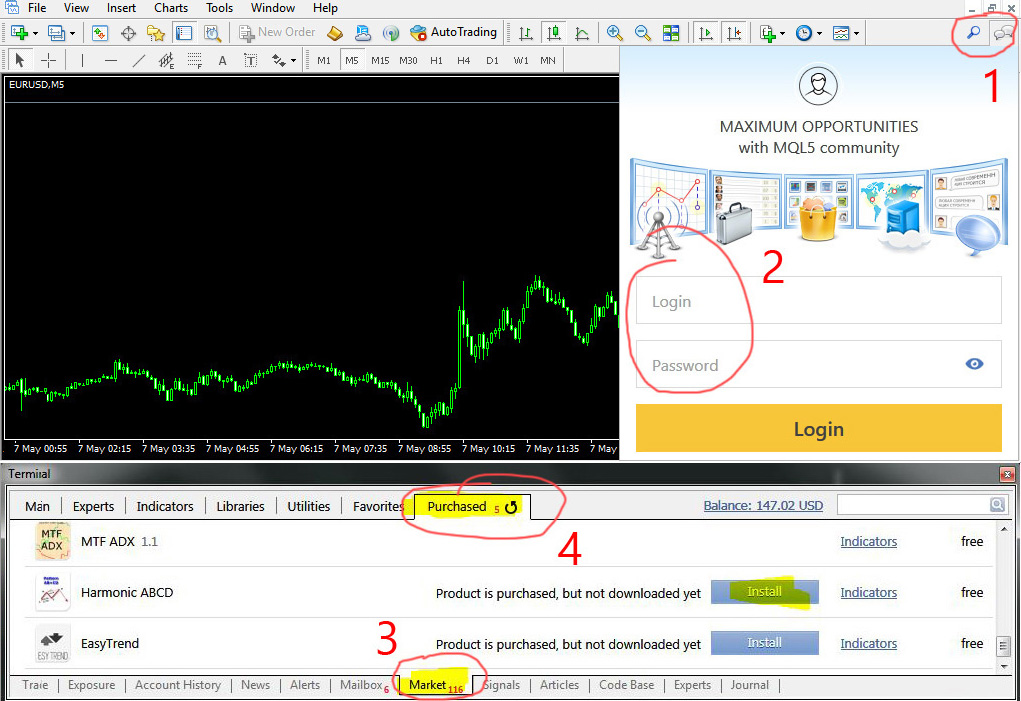
If you want to access or download hidden EAs, please do so on MT4 Terminal using the following instructions:
+ Open your MT4 Terminal.
+ Login your mql5 account on MT4 Terminal.
+ Press Ctrl + T, go to the Market tab and the Purchased tab.
+ You will see the products that you have purchased and then be able to download the product.
+ You can also send me a private message if you need my assistance.
I hid some products from the Market website mql5.com for a few days for upgrade plans.
However, the products are still available on the Market of MT4 Terminal (MetaTrader 4).
If you want to access or download hidden EAs, please do so on MT4 Terminal using the following instructions:
+ Open your MT4 Terminal.
+ Login your mql5 account on MT4 Terminal.
+ Press Ctrl + T, go to the Market tab and the Purchased tab.
+ You will see the products that you have purchased and then be able to download the product.
+ You can also send me a private message if you need my assistance.
: