Guad Bibar / Perfil
- Información
|
1 año
experiencia
|
8
productos
|
18
versiones demo
|
|
0
trabajos
|
0
señales
|
0
suscriptores
|
I develop MQL4/MQL5 indicators, Expert Advisors and utilities, with a focus on chart analysis, configurable trading logic and practical dashboards.
Choosing a product
Start with the task you need to solve: visual chart context, signal analysis or automated execution. Check the platform, inputs, limitations and screenshots on each product page. For paid products, evaluate the Market demo in the Strategy Tester before purchasing.
Setup and support
Use the product Comments tab or contact JojoBar through MQL5 messages. Include the product name and version, MetaTrader build, symbol, timeframe, settings and steps to reproduce the issue. Remove account numbers and other private information from screenshots.
Custom development
For a custom MT4/MT5 project, define the entry and exit rules, risk limits and acceptance checks in an MQL5 Freelance specification. Scope and testing requirements are agreed before work begins.
Trading involves risk. Indicators and automated strategies do not guarantee profits; historical examples are not promises of future results.
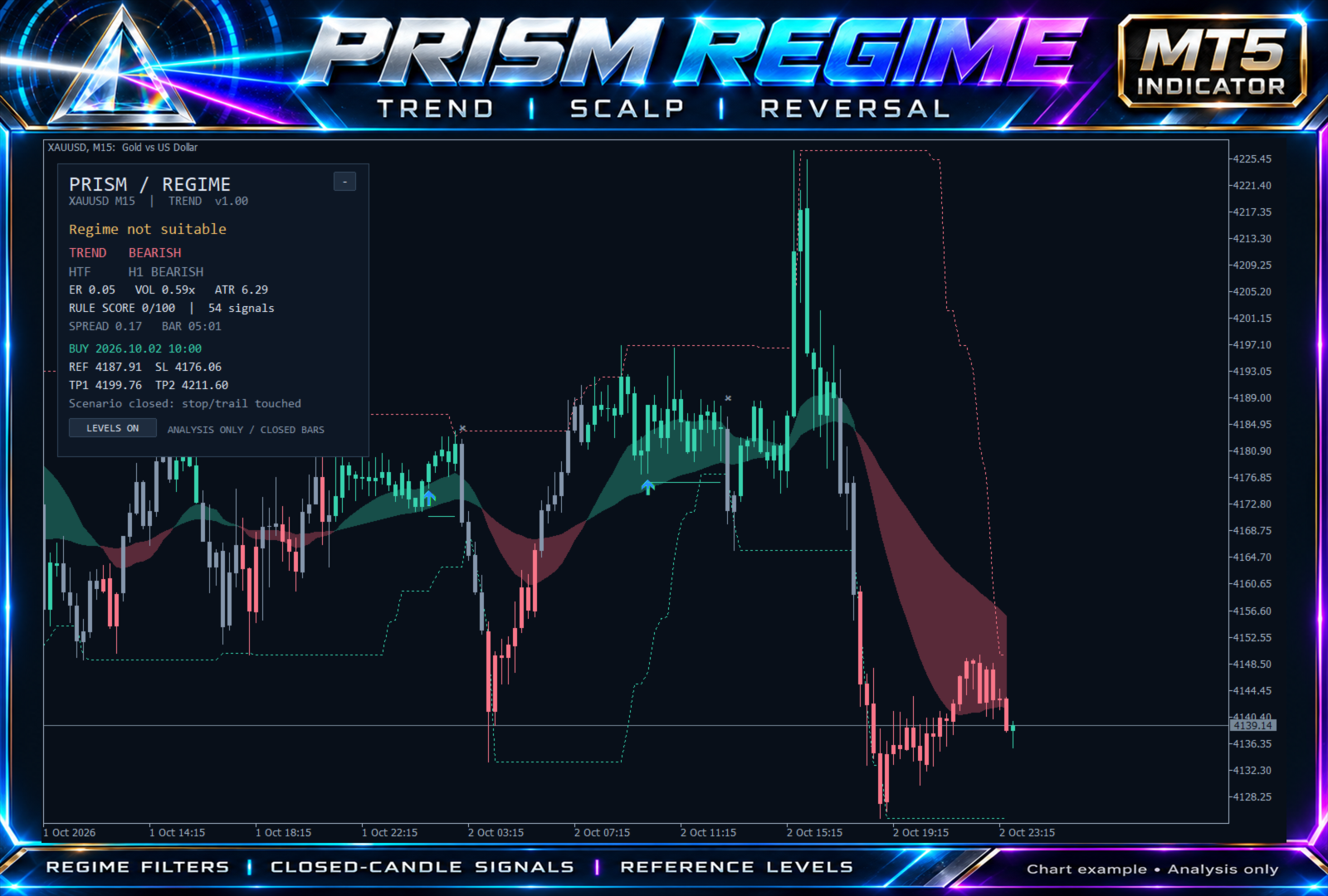
The attached XAUUSD M15 example shows bearish chart and H1 direction, yet the dashboard still says "Regime not suitable." Direction alone does not qualify a setup.
Prism checks directional efficiency, relative volatility, historical spread and optional completed higher-timeframe alignment. Its dashboard shows the current gate status alongside the trend cloud and reference levels.
Choose Trend, Scalp or Reversal mode to match the type of setup you want to study. Confirmed signals use completed candles.
Explore Prism Regime and its Market demo:
https://www.mql5.com/en/market/product/199414
Chart example for analysis only. Reference levels and scenario exits are not executed trades or promises of results. Prism does not open, modify or close orders.
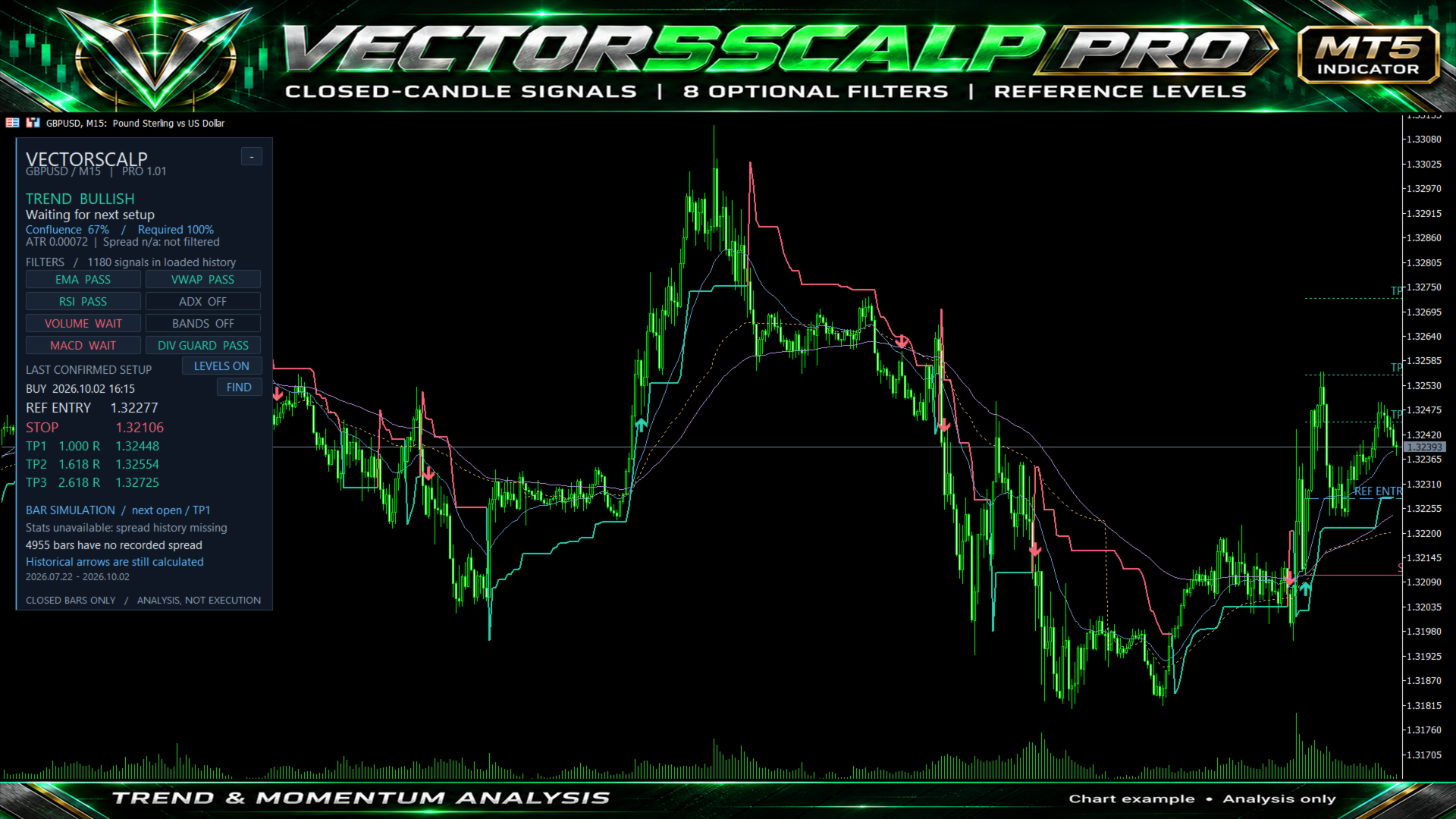
In this dashboard example, EMA, VWAP and RSI pass, while volume and MACD are waiting. The panel shows 67% confluence against a required 100%, making the incomplete alignment visible at a glance.
Combine a Supertrend regime with up to eight optional filters, review closed-candle signals, and inspect reference entry, stop and target levels. The confluence percentage measures agreement among enabled filters; it is not a win probability.
Explore VectorScalp Pro and its Market demo:
https://www.mql5.com/en/market/product/199426
Chart shown for interface illustration. The panel also flags missing spread history and withholds simulation statistics. This is an analysis indicator and does not place trades.
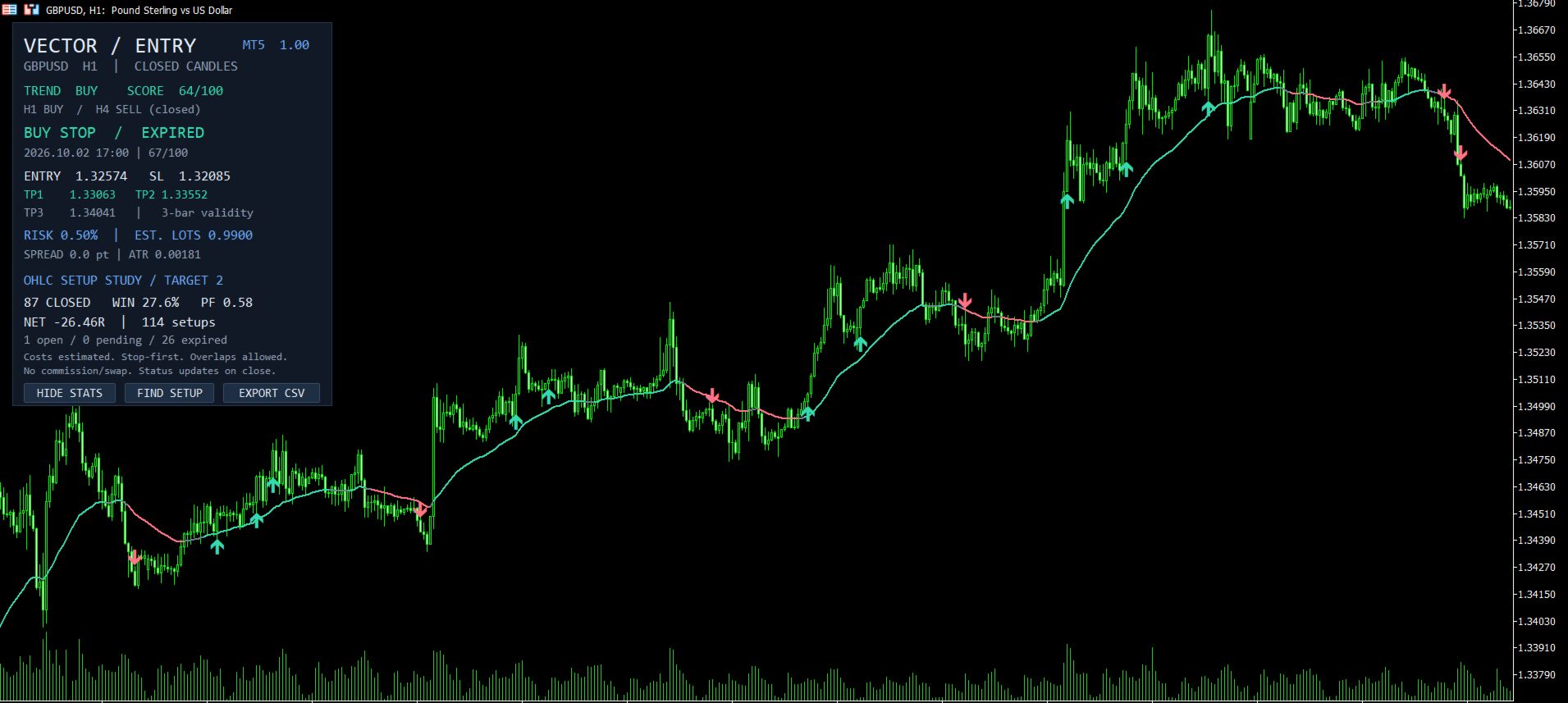
A signal is easier to review when its levels and status are visible. VectorEntry brings a pending entry, stop loss, three targets and estimated position size onto the chart after a candle confirms.
This GBPUSD H1 example also shows why setup status matters: the displayed Buy Stop has expired. By default, an entry that is not reached within the next three bars expires.
Use FIND SETUP to inspect the latest candidate, then check the levels against your own process. The indicator supports manual analysis and does not execute orders.
Explore the inputs and Market demo:
https://www.mql5.com/en/market/product/199438
The screenshot includes an OHLC setup study, not account returns. Its historical statistics and rule scores are not a forecast or a probability of winning.
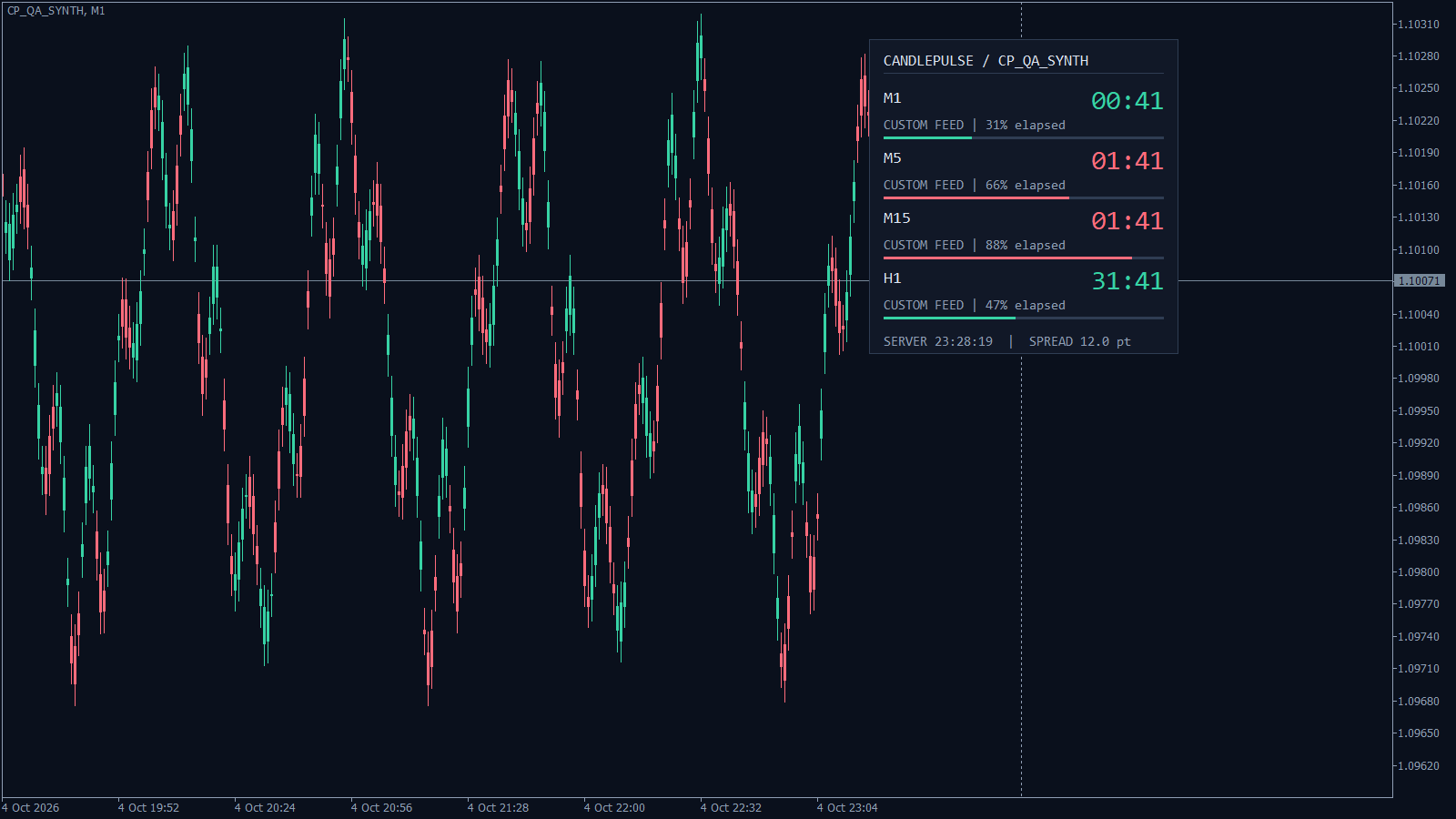
Keep the candle close in view across up to four timeframes. The screenshot shows M1, M5, M15 and H1 together, with countdowns and progress bars in one panel.
Prefer a smaller display? Choose the compact corner timer or place the countdown beside the latest candle. Optional pre-close and new-bar alerts are off by default, so you can enable only what you need.
Download CandlePulse here:
https://www.mql5.com/en/market/product/199589
Which layout fits your charts best: dashboard, compact, or beside the candle?
Screenshot: synthetic test prices used to demonstrate the interface. CandlePulse is a timing utility and does not place trades.
CandlePulse Candle Timer MT5 muestra el tiempo restante de la vela actual, con un panel de control para hasta cuatro marcos temporales y alertas opcionales al cierre de la vela. Elige entre un panel completo, un temporizador compacto en esquina o una cuenta atrás junto a la última vela. Todas las funciones están incluidas sin coste alguno. No se requiere suscripción, cuenta externa ni DLL. Características principales Panel de control con múltiples marcos temporales: supervisa el marco temporal
De una señal de cierre de vela a un plan de trading definido VectorEntry MT5 reúne en un único gráfico las configuraciones de compra y venta, los niveles de entrada pendientes, el stop loss, tres objetivos y un tamaño estimado de la posición. Está diseñado para operadores manuales que desean ver las condiciones de una configuración antes de decidir si operar o no. El indicador combina la dirección de la tendencia, la estructura de ruptura o retroceso, el impulso y la calidad de las velas. Cuando
VectorScalp Pro reúne señales de velas cerradas, filtros técnicos configurables y niveles de precios de referencia en un único gráfico de MetaTrader 5. Se trata de un indicador de análisis destinado a evaluar las condiciones de tendencia y de impulso. No abre, modifica ni cierra órdenes. Señales y filtros El motor combina un régimen Supertrend con ocho filtros opcionales: medias móviles exponenciales rápidas/lentas, VWAP de volumen por tick diario del servidor, RSI, ADX con movimiento
Prism Regime MT5 Prism Regime es un indicador gráfico para operadores que desean disponer de contexto de tendencia, señales de velas completadas y niveles de referencia para las operaciones en una sola vista. Elige el modo «Tendencia», «Scalping» o «Reversión» y descubre por qué el mercado actual cumple o no los requisitos para una configuración. Su característica distintiva es un filtro de régimen explícito: la eficiencia direccional, la volatilidad relativa, el diferencial histórico y la
Trend Ensemble Pro MT5 es un asesor experto que sigue tendencias, destinado a los operadores que desean evaluar una estrategia automatizada para el par XAUUSD en el timeframe H4, con parámetros configurables de entrada, salida y riesgo. Empieza con una evaluación en el Strategy Tester y una cuenta demo. Revisa el panel de control y todos los parámetros antes de activar las operaciones. Qué configurar Parámetros de entrada en la tendencia y de confirmación, incluyendo la dirección y el contexto
I also fixed the panel disappearing after timeframe changes. The H1 → H4 → H1 check passed, and both MT5 regression tests matched the previous build exactly. Trading logic was left untouched.
Most trading tools focus on finding the next entry.
I have been working on something built around a different question:
**What should happen after the position is already open?**
This is an early development snapshot of my upcoming **MT5 Position Manager**.
It is designed to continuously evaluate existing positions as market conditions develop — helping distinguish between situations that deserve patience, situations that require attention, and situations where protecting the position becomes the priority.
It does **not hunt for trades or automatically create entries.**
Its job begins after the trade exists.
The system combines several layers of market information into one management framework, while keeping the final logic deliberately selective rather than reacting to every small price movement.
The screenshot shows one stage of the current development/testing process.
More details will be revealed when the EA is ready for the MQL5 Market.
**Coming soon.**
*Disclaimer: Screenshot, positions and displayed results are provided for illustration and development demonstration only. They should not be interpreted as expected performance or a guarantee of future results. Trading involves risk.*
Here is a practical **XAUUSD M5** example using **Kumo Confluence Signals MT5**.
This chart shows how Kumo helps structure trade analysis through **signal confluence**, not just a single arrow on the screen.
What this setup illustrates:
• Ichimoku-based trend structure
• Closed-candle signal logic
• Optional Fibonacci pullback confirmation
• Pattern, RSI, and Bollinger confluence filters
• Adaptive **TP1 / TP2 / TP3** target mapping
• A clearer framework for reviewing entry location, targets, and overall trade context
The goal of Kumo Confluence Signals MT5 is to help traders focus on situations where multiple conditions align, making chart analysis more structured and easier to evaluate.
**Disclaimer:** The chart, position, and results shown are provided for illustration only and are not representative of expected or future performance. Kumo Confluence Signals MT5 is an analytical indicator and does not automatically open, modify, or close trades. Trading decisions and risk management remain the responsibility of the trader.
**Kumo Confluence Signals MT5**
https://www.mql5.com/en/market/product/191624
XAUUSD M15 example using **Northstar Regime Navigator MT5**.
At the moment shown, Northstar identified:
🔻 **M15 — DOWNTREND | 54 | DEVELOPING**
🟠 **H1 — TRANSITION | 44 | DEVELOPING**
🟢 **H4 — UPTREND | 71 | MODERATE**
🟢 **D1 — UPTREND | 100 | STRONG**
This is exactly why analysing only one timeframe can give an incomplete picture.
Northstar Regime Navigator provides a compact multi-timeframe view of **market regime + regime strength**, helping traders see whether short-term movement is aligned with or moving against the broader market structure.
In this example, the lower timeframe is developing bearish momentum while the higher timeframes remain bullish — and the dashboard makes that conflict immediately visible.
**Closed-bar analysis. Multi-timeframe context. No forced BUY or SELL call.**
The positions and results visible in the screenshot are shown **for illustration only** and should not be interpreted as representative of future performance. Northstar Regime Navigator is an analytical indicator and does not automatically open, modify, or close trades.
**Northstar Regime Navigator MT5**
https://www.mql5.com/en/market/product/192631