Aethon Trendscope
- Indicators
-
Sukhwinder Singh
 # AETHON | Algorithmic Trading Systems
**12+ Years of Trading Experience | Quantitative Research | Advanced Trading Automation**
Welcome to **AETHON**, where market experience meets intelligent trading technology. - Version: 1.11
AETHON Trendscope — Non-Repainting Gold Trend Indicator for XAUUSD (MT5) with Trailing Stop, BUY / SELL / EXIT Signals and Alerts
Catch the trend when it starts. Stay in while it holds. Get out when it turns.
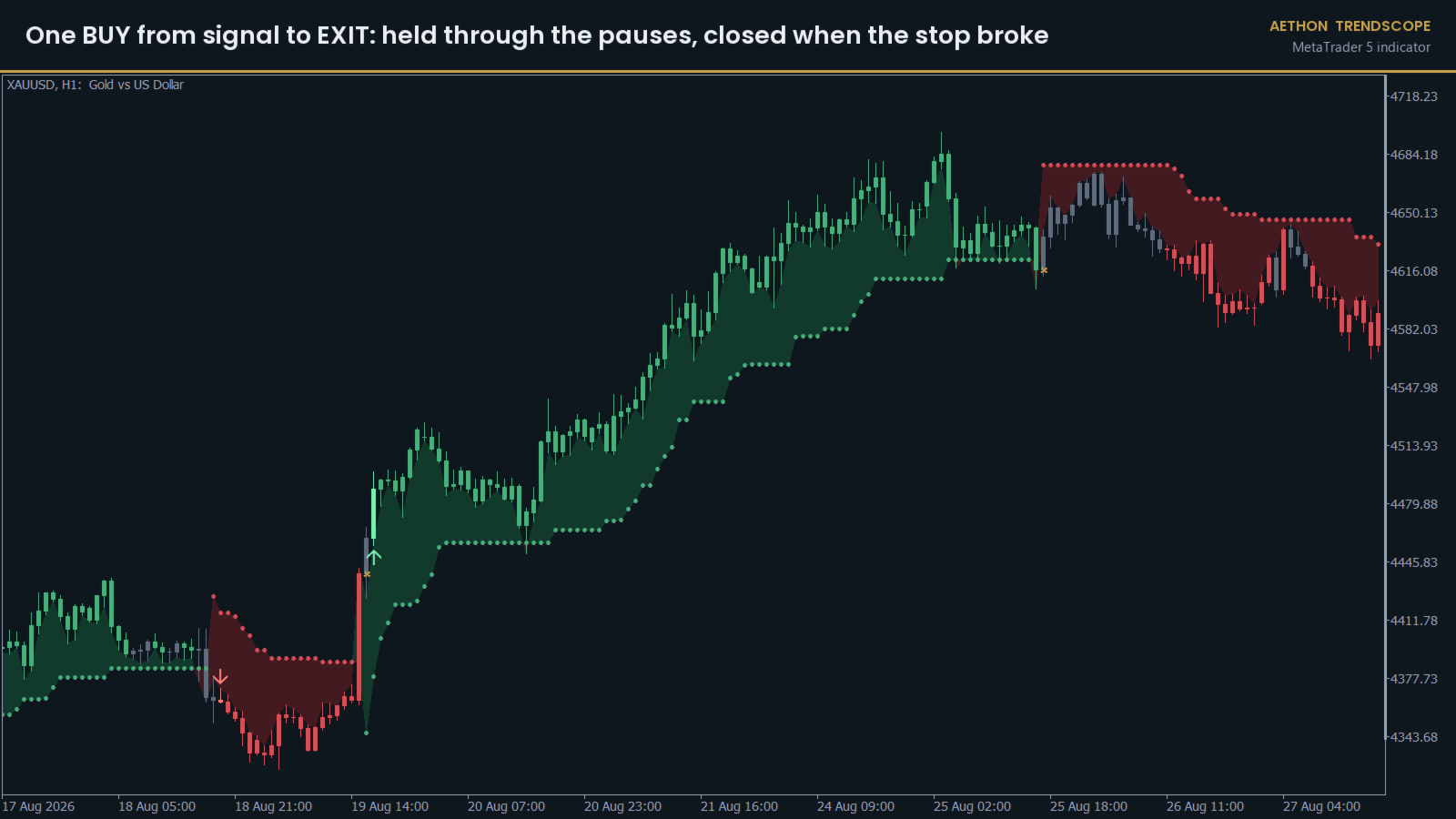
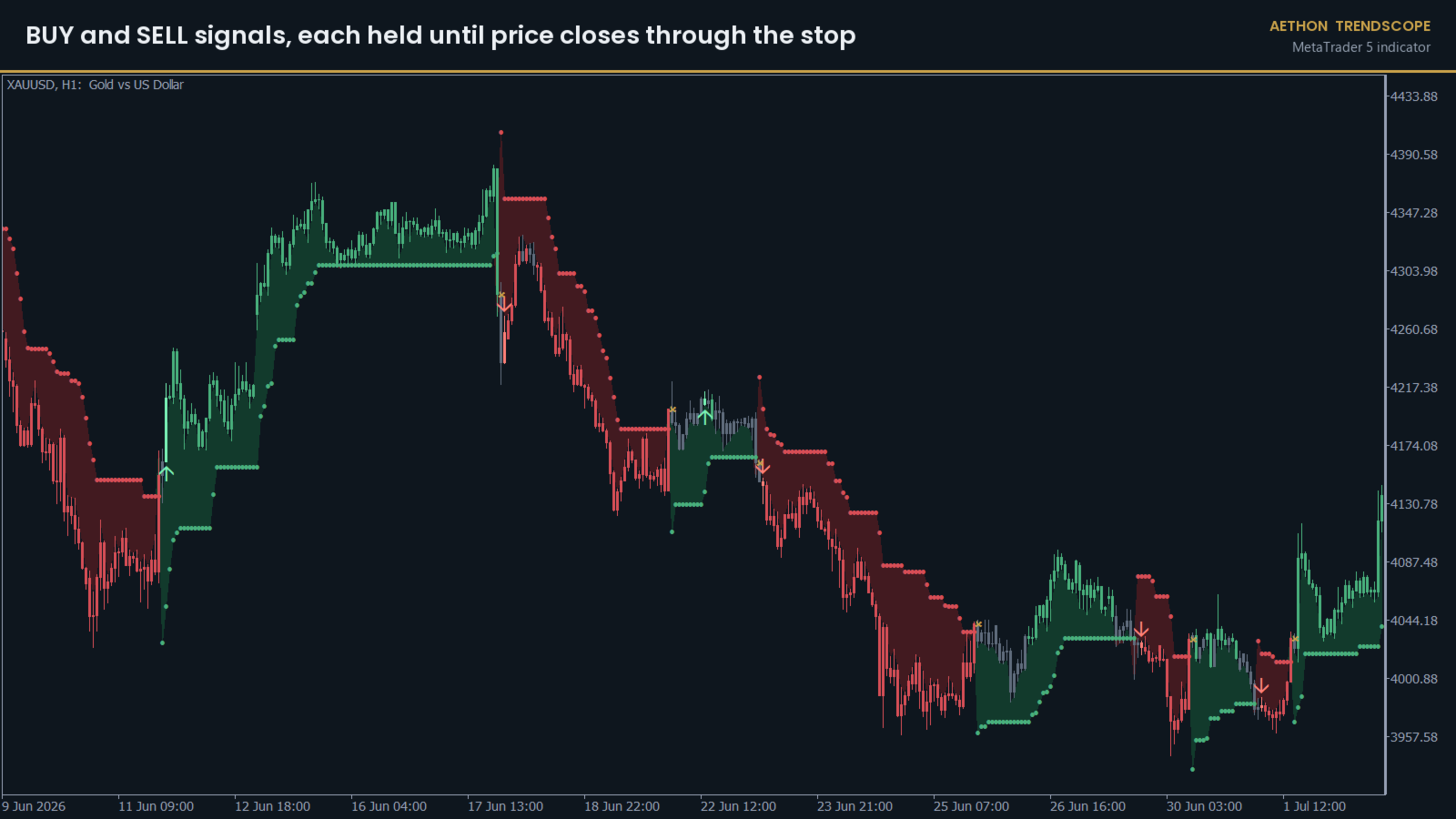
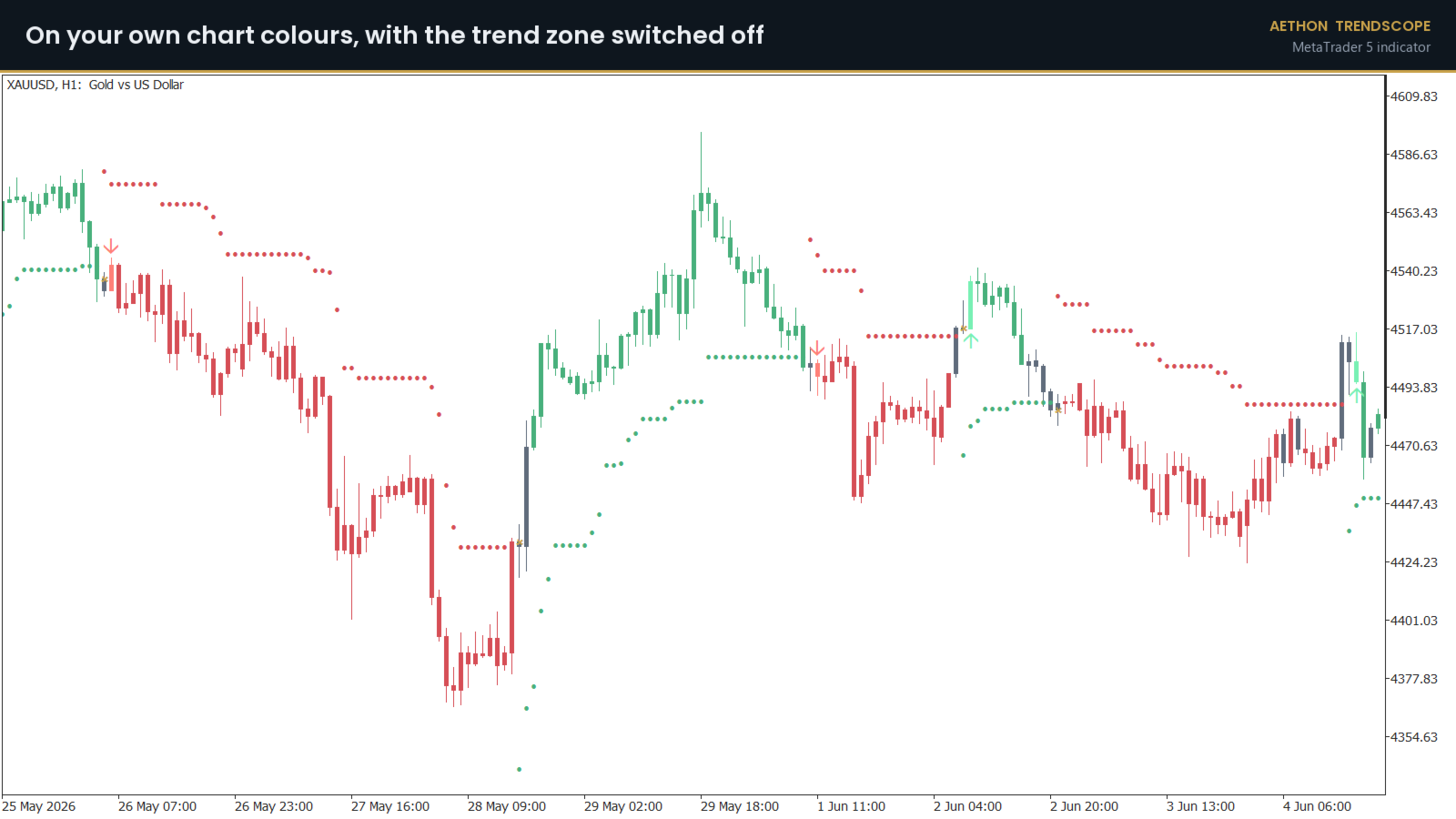
AETHON Trendscope is a non-repainting trend indicator for gold (XAUUSD) on MetaTrader 5 (MT5). It colours every candle by the state of the trend, draws an ATR trailing stop under or over price, and marks three moments on the chart: where a new trend begins (BUY or SELL), and where it ends (EXIT). Between those two markers it does nothing at all, which is the point. Most of the money in a trend is made by sitting still through the pullbacks, and most trend indicators shake you out of them.
Every signal is decided at the open of a bar, from bars that have already closed. Nothing on the chart changes after the fact: what you see in history is exactly what you would have seen live. No repainting, in history or live.
The signal rules were built and tested on gold, hourly (H1). On EURUSD they did not hold up, and the results section below says so.
WHAT YOU SEE ON THE CHART
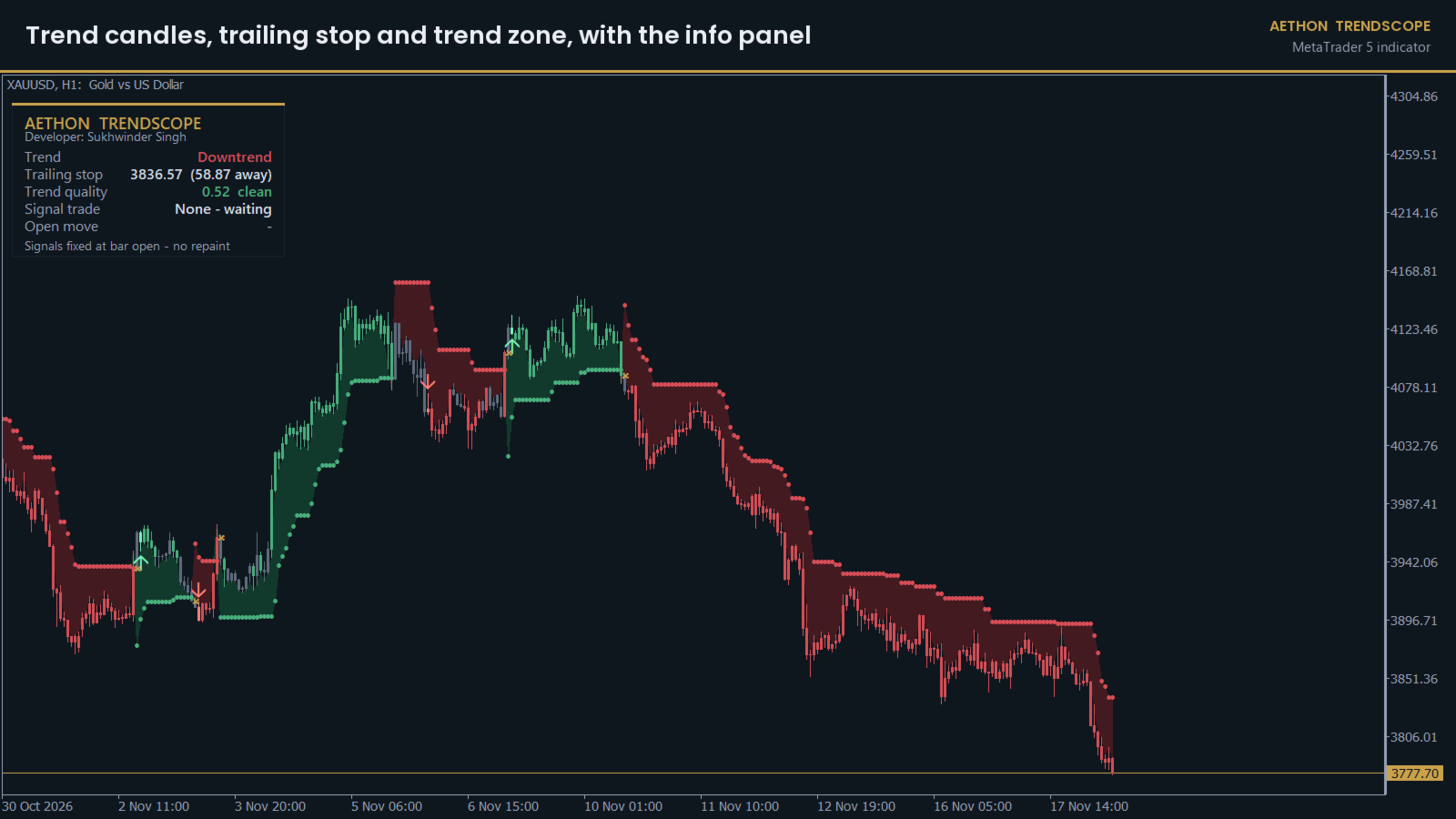
CANDLES — green in an uptrend, red in a downtrend, grey when the market is sideways. The candle where a new BUY or SELL starts is drawn brighter, so trend starts stand out when you scroll back
STOP DOTS — the trailing stop, one dot per bar, taken from the last CLOSED bar so it never moves backwards on you
TREND ZONE — a tinted band between the candles and the stop dots. It shows how much room price has before the trend is broken. A thin band means the stop is close
MARKERS — a BUY arrow under the candle, a SELL arrow over it, and a gold cross at the exit
INFO PANEL — the current trend, the stop level and how far away it is, the trend quality, and the open signal trade with its running move and age in bars
DARK THEME — an optional navy chart theme. Your own chart colours are saved when the indicator loads and put back when you remove it
All of these can be switched on and off one by one.
HOW THE SIGNALS WORK
Trendscope uses three things, all calculated on the signal timeframe (H1 by default):
- A trailing stop that sits a set distance away from price, measured in average ranges (ATR). It only ever moves in the direction of the trend. When a bar closes through it, the trend has flipped.
- A moving average (50 bars) as a filter. A trend is only counted when the last close is on the right side of it.
- Trend quality, a number from 0 to 1: how far price actually travelled over the last 15 bars, divided by the total distance it covered going up and down to get there. A clean move scores high. A market chopping back and forth scores near zero.
From those, each new bar gets its state, checked in this order:
1. Sideways (grey), when the trailing stop flipped on the last bar or the last close is on the wrong side of the moving average.
2. New leg, when the trend has turned to the other direction since the last leg. If trend quality is at least the minimum (0.25 by default) and no signal trade is open, this is a BUY or SELL signal at the open of this bar.
3. Uptrend (green) or downtrend (red) otherwise.
A signal trade ends at the open of the bar after price closes through the trailing stop. Grey sideways candles do NOT end it. That one rule is what keeps you in a trend through its pauses, and in testing it raised the share of winning trades more than any filter did.
There is no fixed take-profit. A trade runs until the trend breaks.
KEY FEATURES
- Trend candles, trailing stop dots, trend zone and BUY / SELL / EXIT markers on the price chart
- Signals fixed at the bar open from closed bars only. No repainting, in history or live
- Choppy-market filter: signals are skipped when trend quality is below your minimum
- Grey sideways candles never close a trade, only a close through the stop does
- Info panel with trend, stop distance, trend quality and the open signal trade
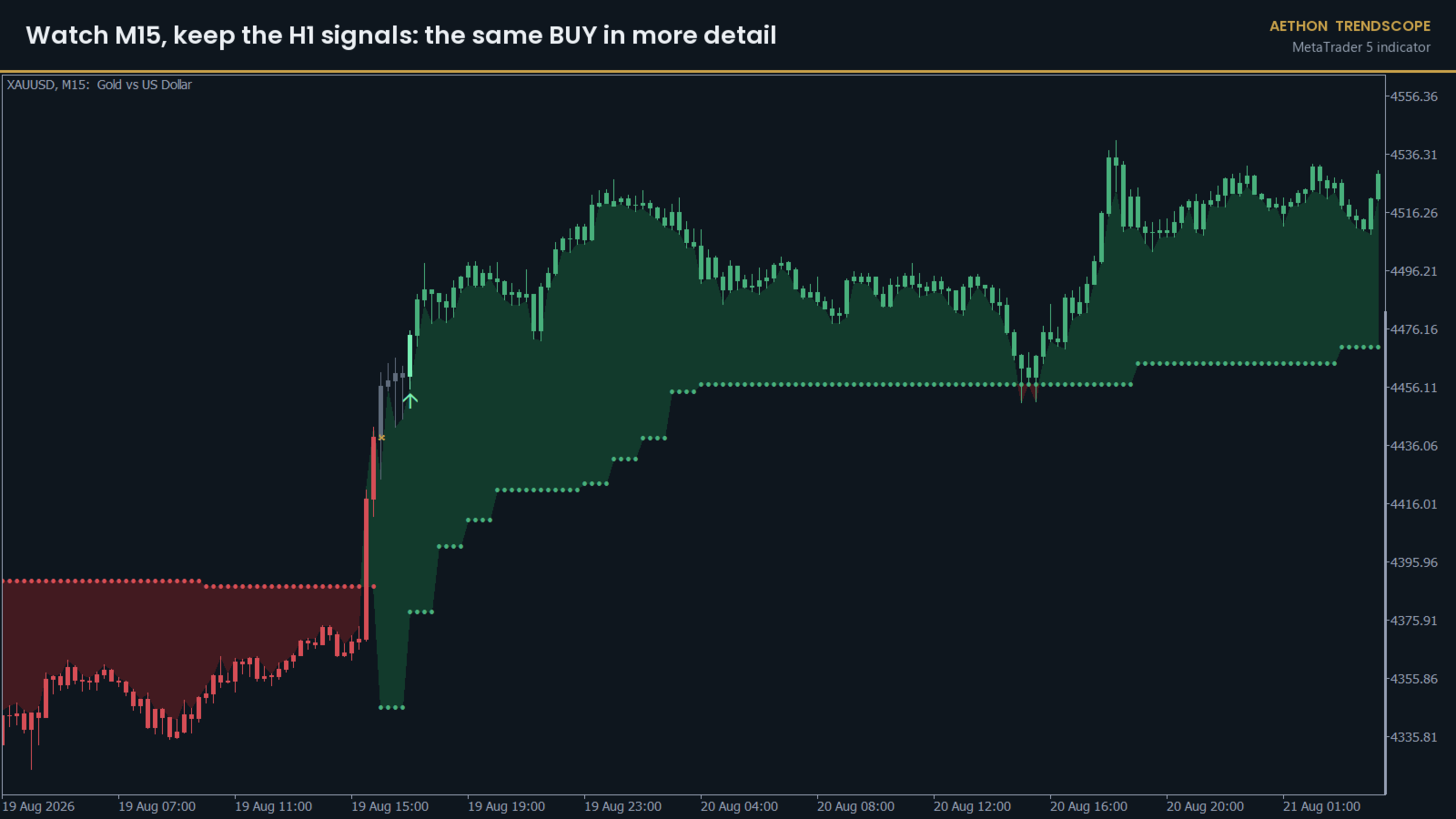
- Signal timeframe input: keep H1 signals while you watch M15 or M5 for timing
- Optional AETHON dark chart theme that restores your own colours when removed
- Every colour adjustable
- Buffers for Expert Advisors: 12 = trend state, 13 = entry (+1 buy / -1 sell), 14 = exit (1 = close), all set at the bar open
- No DLLs, no web requests, no file access
Alerts
- Alert on new BUY / SELL signals — on by default
- Alert on EXIT — on by default
- Pop-up alert with sound — on by default
- Send to phone (MetaTrader mobile app) — off by default. Enter your MetaQuotes ID under Tools > Options > Notifications first
- Send email — off by default. Set up your mail account under Tools > Options > Email first
An alert reads like this: "AETHON Trendscope XAUUSD H1: SELL at 2643.97, trailing stop 2662.52". Alerts only fire while the terminal is running with the indicator on a chart.
The test results above use the default Signals settings. Changing them gives different signals that have not been tested.
RECOMMENDED SETUP
- Symbol: XAUUSD (gold), or your broker's gold symbol such as XAUUSD.m or GOLD
- Chart timeframe: H1. On M5, M15 or M30 the signals still come from H1 (the signal timeframe input), so you see the same trades with more detail. On H4 or higher the indicator calculates on the chart's own timeframe instead, which is untested
- Broker: any. A low spread helps, because the method trades about 85 times a year
- Other symbols: the indicator works on them, but the results above do not apply. Test first
QUICK START
1. Open an XAUUSD H1 chart.
2. In the Navigator, under Indicators, drag AETHON Trendscope onto the chart and press OK.
3. Read the panel: Trend tells you the state now, Signal trade tells you whether a BUY or SELL is running and from what price, and Trailing stop shows the level that ends it.
4. Scroll back through history. Every BUY and SELL you see there was decided at that bar's open, exactly as it would have been live.
If you want to discuss settings or how the signals work, write in the product's Comments tab or send me a message through my MQL5 profile. I answer there, and the discussion stays where other buyers can read it too.
MAIN INPUTS
Signals
- Signal timeframe — the timeframe the signals are calculated on, used when it is higher than the chart's (default H1)
- Trailing stop: average range length (bars) — how many bars the average range is measured over (default 10)
- Trailing stop: distance (x average range) — how far the stop sits from price. Larger means fewer, longer trades (default 3.0)
- Trend filter: moving average length (bars) — the moving average a trend has to be on the right side of (default 50)
- Trend quality: bars to measure — the window trend quality is measured over (default 15)
- Skip choppy markets: minimum trend quality (0-1, 0 = take all) — signals below this are not taken (default 0.25)
Look
- Colour the candles / Show trailing stop dots / Show trend zone / Show BUY / SELL / EXIT markers / Show info panel — each part of the display on or off
- Info panel position — top left or top right
- Use the AETHON dark chart theme — navy chart background; your colours come back when the indicator is removed
- Uptrend, Downtrend, Sideways, Buy signal candle and Sell signal candle colour
The test results above use the default Signals settings. Changing them gives different signals that have not been tested.
WHY TRENDSCOPE
A trend indicator is only useful if you can trust what it showed you yesterday and still be holding the trade a week later. Trendscope fixes every signal at the bar open, keeps you in through the grey patches, and only calls the trade over when price actually breaks the stop.
Download the demo, run it on a gold chart in the Strategy Tester's visual mode, and watch a few trends go from BUY to EXIT.
---
SEO notes (not part of the listing text): optimised for MQL5 internal search and for gold / XAUUSD trend-indicator searches. The searchable phrase — non-repainting gold trend indicator for XAUUSD, MetaTrader 5 (MT5), trailing stop, BUY / SELL / EXIT signals, alerts — is in the title and first paragraph, and repeated naturally in Key Features and Why Trendscope. No new facts, numbers, results or claims were added; the Alerts section is the one already in the text supplied on 2026-11-18. The text still refers to a results section that was not supplied, so no results section was invented.