MT5 Build 6323 – Issue with Year Editing in Strategy Tester
Confirmed. I will report it to MetaQuotes.
Thank you, Alain, for confirming the issue and reporting it to MetaQuotes!
While testing, I noticed another small peculiarity in the MT5 Strategy Tester.
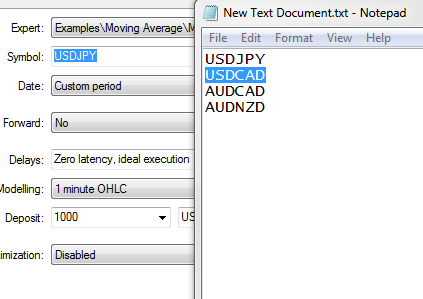
When I copy a symbol name and try to paste it into the Strategy Tester's Symbol field using Ctrl+V, nothing happens.
However, when I right-click in the same field and select Paste, the symbol name is pasted successfully.
I tested this behavior in both MT5 builds 5330 and 6323, with the same result.
I'm not sure whether this is intentional behavior or a minor user interface issue, but it would be nice if Ctrl+V worked in this field just like the Paste command.
Perhaps this small improvement could be considered for a future MT5 update?
Thank you, Alain, for confirming the issue and reporting it to MetaQuotes!
While testing, I noticed another small peculiarity in the MT5 Strategy Tester.
When I copy a symbol name and try to paste it into the Strategy Tester's Symbol field using Ctrl+V, nothing happens.
However, when I right-click in the same field and select Paste, the symbol name is pasted successfully.
I tested this behavior in both MT5 builds 5330 and 6323, with the same result.
I'm not sure whether this is intentional behavior or a minor user interface issue, but it would be nice if Ctrl+V worked in this field just like the Paste command.
Perhaps this small improvement could be considered for a future MT5 update?
You can use CTRL+C and CTRL+V for the whole parameters set of the Strategy Tester.
For example.
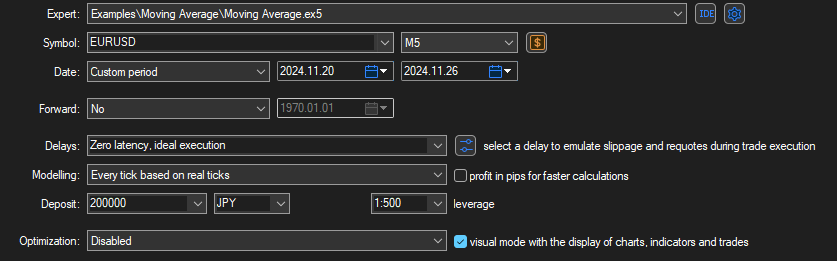
Expert=Examples\Moving Average\Moving Average.ex5
Symbol=EURUSD
Period=M5
Optimization=0
Model=4
FromDate=2024.11.20
ToDate=2024.11.26
ForwardMode=0
Deposit=200000
Currency=JPY
ProfitInPips=0
Leverage=500
ExecutionMode=0
OptimizationCriterion=0
Visual=1
[TesterInputs]
MaximumRisk=0.02||0.02||0.005||0.200000||Y
DecreaseFactor=3.0||3.0||0.300000||30.000000||Y
MovingPeriod=12||12||1||120||Y
MovingShift=6||6||1||60||N
[Tester]
Expert=Examples\Moving Average\Moving Average.ex5
Symbol=EURUSD
Period=M5
Optimization=0
Model=4
FromDate=2024.11.20
ToDate=2024.11.26
ForwardMode=0
Deposit=200000
Currency=JPY
ProfitInPips=0
Leverage=500
ExecutionMode=0
OptimizationCriterion=0
Visual=1
[TesterInputs]
MaximumRisk=0.02||0.02||0.005||0.200000||Y
DecreaseFactor=3.0||3.0||0.300000||30.000000||Y
MovingPeriod=12||12||1||120||Y
MovingShift=6||6||1||60||N
Thank you, Alain! I tested your suggestion, and everything works perfectly. Very useful information — I really appreciate your help!

Hi everyone,
Has anyone else noticed unusual behavior when editing the year in the Strategy Tester date fields in MT5 build 6323?
In build 5330, I can edit the year normally.
However, in build 6323, when I select the year and start typing a new one, nothing visibly changes until I have entered all four digits.
For example, when changing 2026 to 1998:
After typing 1 – the year still shows 2026.
After typing 19 – still 2026.
After typing 199 – still 2026.
After typing 1998 – the year suddenly changes to 1998.
This behavior is different from build 5330.
Is anyone else experiencing the same issue in build 6323?
Is this an intentional change in the date input behavior, or could it be a bug?