Questions About AI Assistant MQL5 Lite
Can I build complex EAs with MQL5 Lite, or does its capability depend on the prompts I give it?
Yes, and yes. There is almost no limit to what you can build with the MQL5 Lite AI Assistant─especially if you enable "All requests," MCP, and optionally... integrate Python (more advanced). Giving detailed instructions in the prompt(s) is always necessary for any AI bot.
Can I continue working on my prompt in the same chat room on another day once I've reached the daily limit?
Yes. Although the AI Assistant cannot save the AI session, itself, the AI Assistant can save a note-to-self as an .md file, read it upon starting a new AI session, and continue the same task/project.
(This is not an AI generated post).
Can I build complex EAs with MQL5 Lite, or does its capability depend on the prompts I give it?
Yes, and yes. There is almost no limit to what you can build with the MQL5 Lite AI Assistant─especially if you enable "All requests," MCP, and optionally... integrate Python (more advanced). Giving detailed instructions in the prompt(s) is always necessary for any AI bot.
Can I continue working on my prompt in the same chat room on another day once I've reached the daily limit?
Yes. Although the AI Assistant cannot save the AI session, itself, the AI Assistant can save a note-to-self as an .md file, read it upon starting a new AI session, and continue the same task/project.
(This is not an AI generated post).
how to generate that .md file for MQL5 lite? do i only need to type the prompt?
is there any MQL5 lite model references/documentations/tutorial related to your statement "especially if you enable "All requests," MCP, and optionally... integrate Python (more advanced)"? so i can learn it
thank you for the respons btw
[H]ow to generate that .md file for MQL5 lite? [D]o [I] only need to type the prompt?
Yes. Just prompt the AI Assistant to "save a note of the current AI session so that I can resume working on the same project in a new AI session." I did that and the AI Assistant knew what to do.
[I]s there any MQL5 lite model references/documentations/tutorial related to your statement "especially if you enable "All requests," MCP, and optionally... integrate Python (more advanced)"? [S]o I can learn it[.]
Screenshots of the settings appear in the initial AI rollout release notes: https://www.metatrader5.com/en/releasenotes/terminal/2447.
Python actually integrates with MT5 and MetaEditor. The best one-stop guide that I've found is an Article:
Mohamed Abdelmaaboud, 2024.08.14 15:18
Python is a well-known and popular programming language with many features, especially in the fields of finance, data science, Artificial Intelligence, and Machine Learning. Python is a powerful tool that can be useful in trading as well. MQL5 allows us to use this powerful language as an integration to get our objectives done effectively. In this article, we will share how we can use Python as an integration in MQL5 after learning some basic information about Python.Make sure that you enable the appropriate Python options in MetaEditor (https://www.metatrader5.com/en/metaeditor/help/development/python) and MT5:
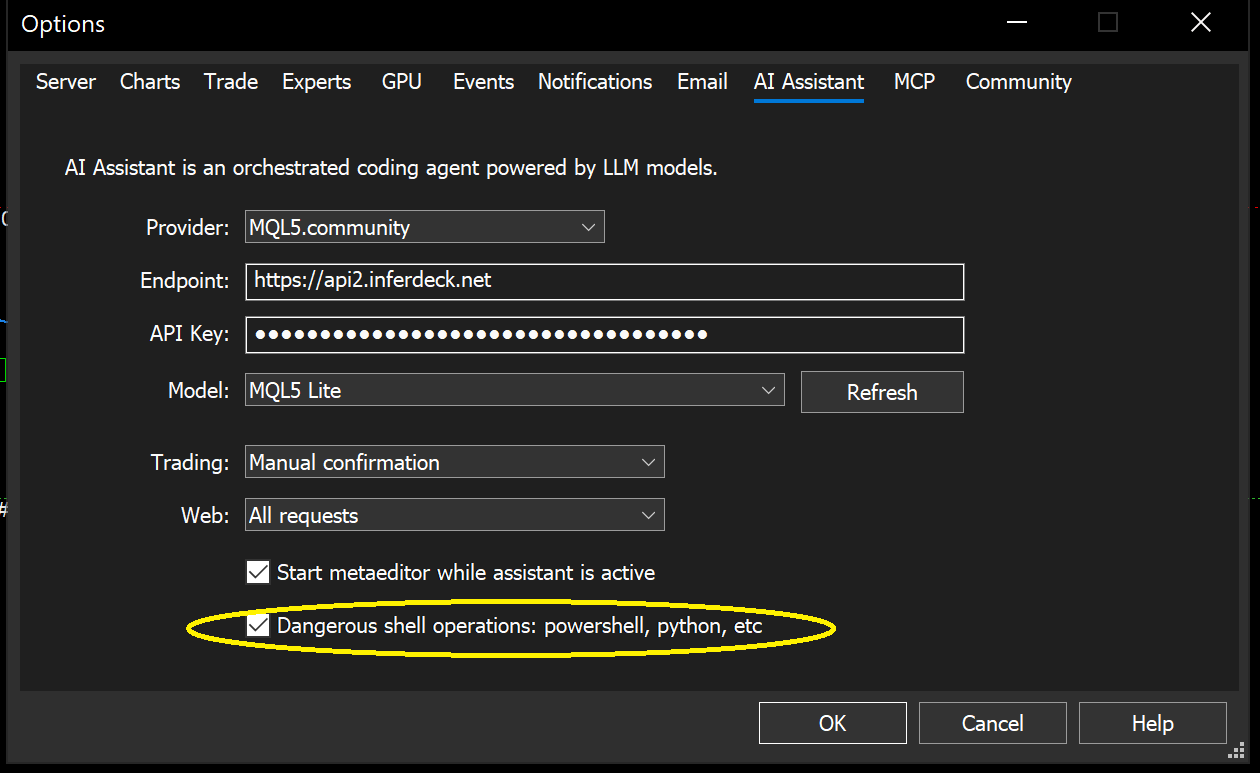
Following successful integration, the AI Assistant will detect access Python as necessary.
In my experience, the AI Assistant also uses Powershell often. It also writes C++ and other languages using online resources as necessary (I have Visual Studio but that is outside of the AI Assistant's sandbox).
I should also note that I only use the AI Assistant with a demo account in my experimental MT5 terminal for security reasons. Then I simply copy my AI generated utilities over to my live trading terminal. I'm not trying to scare you. This is merely a matter of best security practices.
Yes. Just prompt the AI Assistant to "save a note of the current AI session so that I can resume working on the same project in a new AI session." I did that and the AI Assistant knew what to do.
Screenshots of the settings appear in the initial AI rollout release notes: https://www.metatrader5.com/en/releasenotes/terminal/2447.
Python actually integrates with MT5 and MetaEditor. The best one-stop guide that I've found is an Article:
Make sure that you enable the appropriate Python options in MetaEditor (https://www.metatrader5.com/en/metaeditor/help/development/python) and MT5:
Following successful integration, the AI Assistant will detect access Python as necessary.
In my experience, the AI Assistant also uses Powershell often. It also writes C++ and other languages using online resources as necessary (I have Visual Studio but that is outside of the AI Assistant's sandbox).
I should also note that I only use the AI Assistant with a demo account in my experimental MT5 terminal for security reasons. Then I simply copy my AI generated utilities over to my live trading terminal. I'm not trying to scare you. This is merely a matter of best security practices.
what a great resource,
i don't think i can comprehend those python integration in a short time, but thanks
based on your personal experience, how long do you have to wait until MQL5 Lite reset the prompt limit? since this model is free, surely it has very limited token,
or do you personally using another model instead of MQL5 Lite in order to expand the limit?
or you just embrace the very short limited prompt and wait calmly for the next session?
also, why does MQL5 mention the powershell and pyhton as an "Dangerous operation" tho ?

- Free trading apps
- Over 8,000 signals for copying
- Economic news for exploring financial markets
You agree to website policy and terms of use
Can I build complex EAs with MQL5 Lite, or does its capability depend on the prompts I give it?
Can I continue working on my prompt in the same chat room on another day once I've reached the daily limit?