Setup Problem
1. Open your local MT5 terminal.
2. Open the appropriate chart (symbol and timeframe) for your 1st EA, attach it on the chart and you configure it.
3. Open another chart, the appropriate chart (symbol and timeframe) for your 2nd EA, attach it on the chart and you configure it too.
4. Click the Algo Trading button in you MT5 terminal.
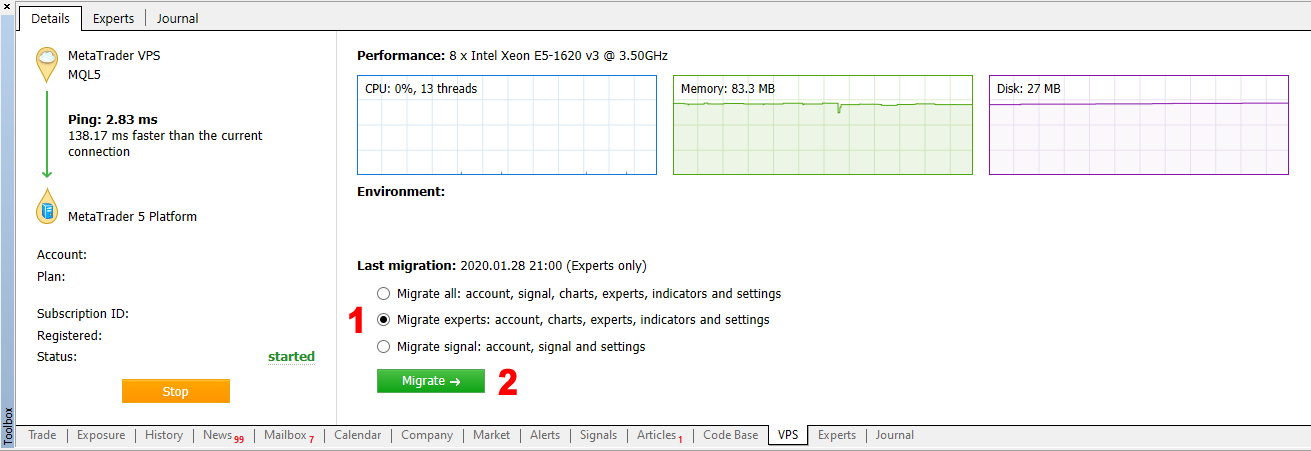
5. Migrate your local MT5 trading environment to your MQL5 VPS, by clicking on the MQL5 VPS in the Toolbox window >> Migrate experts: account, charts, experts, indicators and settings.
1. Open your local MT5 terminal.
2. Open the appropriate chart (symbol and timeframe) for your 1st EA, attach it on the chart and you configure it.
3. Open another chart, the appropriate chart (symbol and timeframe) for your 2nd EA, attach it on the chart and you configure it too.
4. Click the Algo Trading button in you MT5 terminal.
5. Migrate your local MT5 trading environment to your MQL5 VPS, by clicking on the MQL5 VPS in the Toolbox window >> Migrate experts: account, charts, experts, indicators and settings.
Thank you but I I want to use 2 EA in one chart in one trade pair . lockaly I have open 2 trade terrminals loget to one trade acc with the 2 diferent EA loadet .
Thank you but I I want to use 2 EA in one chart in one trade pair . lockaly I have open 2 trade terrminals loget to one trade acc with the 2 diferent EA loadet .
Open the same symbol and timeframe chart twice, attach your 2 EAs on them, on the same MT5 terminal and then migrate to your MQL5 VPS.
What you are doing now locally is actually the same thing, but you can't migrate 2 MT5 terminals on 1 MQL5 VPS.Hi,
i have 2 account in this account only one software in this account and six software another account can you merge this account software to my another which have six account and also can you please send me your support email address.
Regards
Ahmed Hassan
Hi,
i have 2 account in this account only one software in this account and six software another account can you merge this account software to my another which have six account and also can you please send me your support email address.
Regards
Ahmed Hassan
More than 1 MQL5 accounts are not allowed, contact the Service Desk about this.
this done by mistakenly if you transfer to my main account i will be very thankfull to you.
Regards
this done by mistakenly if you transfer to my main account i will be very thankfull to you.
Regards

- Free trading apps
- Over 8,000 signals for copying
- Economic news for exploring financial markets
You agree to website policy and terms of use