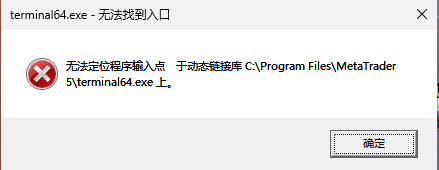
MT5 5.00 Build 6180 Command-Line Backtesting Error: "The procedure entry point WorldTransform could not be located in the dynamic link library"
Update: After upgrading to Build 6182, the issue persists. However, the symptoms are now more stable and clearly defined.
Core Facts
terminal64.exe (Build 6182, upgraded today at 08:34) crashes immediately whenever the Strategy Tester is triggered.
- Exit Code: 0xC0000139 ( STATUS_ENTRYPOINT_NOT_FOUND ).
- Logging: No logs are written (the crash occurs during early initialization, before the logging system starts).
Decisive Comparison (Same EXE, Different Launch Methods)
| Launch Method | Result |
|---|---|
| Double-click / Start-Process (no arguments) | ✅ Normal startup, normal login |
| With /portable argument | ✅ Normal startup |
| With /config:xxx.ini (containing [Tester] section, i.e., running backtest) | ❌ Crash 0xC0000139 |
| Python / Command Line direct launch | ❌ Crash 0xC0000139 |
Conclusion
This is not a version issue (both builds 6180 and 6182 crash) and not an account issue (GUI login works fine).
The root cause is specifically the "Strategy Tester Engine Initialization" step crashing in this specific environment.
The root cause is specifically the "Strategy Tester Engine Initialization" step crashing in this specific environment.
Environment Context
- OS: Windows 11 Build 26200 (64-bit)
- Environment: Remote / Virtualized environment (Virtual GPU)
- History: Previously tested builds 5833, 5200, 6180, and 6182 — all exhibit the same crash behavior.
Do not double post please !
1. What is your config ?
2. Can you launch MT5 and the Strategy Tester normally (not from command line) ?
3. Please provide the script/command line and ini file you are using.

How to report technical issues?
- 2023.06.20
- www.mql5.com
To get good and efficient help you need to provide all the relevant technical informations about your context when using the application (MT5 deskt...

You are missing trading opportunities:
- Free trading apps
- Over 8,000 signals for copying
- Economic news for exploring financial markets
Registration
Log in
You agree to website policy and terms of use
If you do not have an account, please register
How to fix this bug????
Issue Summary:
When attempting to backtest via command line, terminal64.exe crashes immediately upon startup with exit code 0xC0000139 ( STATUS_ENTRYPOINT_NOT_FOUND - The procedure entry point could not be located in the dynamic link library).
On the same machine, with the same executable, and using the same launch method, the results are unstable:
💡 Additional Note for Your Report