MQL5 - ALT-W - No Longer Works for Chart Management Window
Checked with build 5833 and 5836. Alt+W is working as expected.
Thanks for the reply!
I verified my build is 5833. I am on Windows 11. Restarting MT5 did not solve my problem. Alt-W still opens the menu. Are you on another operating system?
Maybe something quirky happened with a recent update. I will watch to see if the eventual update to 5836 resolves the issue. Until then, I will just use Alt-W to access the "Window" menu at the top, and then press "M" to get "More Windows." This is an annoyance, but doable.
Best,
Greg
Problem solved: This was an issue with Persistent Windows (https://github.com/kangyu-california/PersistentWindows ) which seems to use ALT-W for some sort of feature. Closing Persistent Windows resolved the issue. Thanks!
GitHub - kangyu-california/PersistentWindows: fork of http://www.ninjacrab.com/persistent-windows/ with windows 10 update
- kangyu-california
- github.com
This project addresses a long-standing issue in Windows 7, 10, and 11, where windows get repositioned after events such as the system waking up, external monitor connections or disconnections, changes in monitor resolution (e.g., exiting full-screen gaming), or during RDP reconnections. The code was forked from ninjacrab.com/persistent-windows...

You are missing trading opportunities:
- Free trading apps
- Over 8,000 signals for copying
- Economic news for exploring financial markets
Registration
Log in
You agree to website policy and terms of use
If you do not have an account, please register
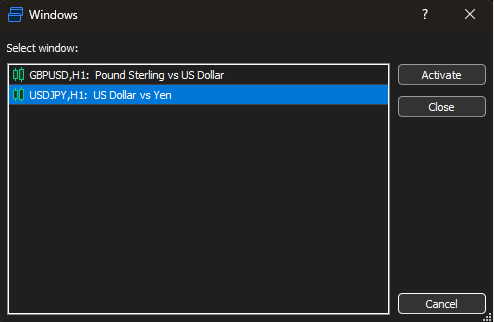
It looks like a recent update broke the ALT-W shortcut key for the chart manager window (described here: https://www.metatrader5.com/en/terminal/help/start_advanced/hotkeys ).
This now brings up the Window menu, and now the official shortcut key documentation is wrong.
Did they at least assign a new shortcut key? If so, could the documentation be updated?
Before:
After:
Best,
Greg