Running 5 terminals of MT5 with EA, just for some reason some of the EA's do not work/stopped working
Hi guys,
Hope that you are well.
I have 5 MT5 terminals running, but for some odd reason in the last two weeks 2 of the terminals with similar EA's have stopped working. I am not getting any bad report or anything...I installed a new Terminal and reinstalled the EA's, it is still not working...all settings are in order, etc. as with the other terminals that are running my EA's.
Anyone have an idea what to do here?
Many thanks, Mark
Hi guys,
Hope that you are well.
I have 5 MT5 terminals running, but for some odd reason in the last two weeks 2 of the terminals with similar EA's have stopped working. I am not getting any bad report or anything...I installed a new Terminal and reinstalled the EA's, it is still not working...all settings are in order, etc. as with the other terminals that are running my EA's.
Anyone have an idea what to do here?
Many thanks, Mark
often you need to recompile the EAs after an update
did not think about this, never the less, all terminals have the same update, what could then be the reason for the EA to work on some of the terminals and not on the others? Could there be a broker issue here? it only is the case for a standard account with a single broker. I have an account running with a standard account on a different broker and there is no issue...
With everything running, check the Task Manager of each MT5 terminal, and then check your Windows Task Manager==>Performance tab. If there's an issue there, it should be readily apparent.
ok thanks, what do i lear from this exactly? I made a screen shot of the task manager. seems to work... 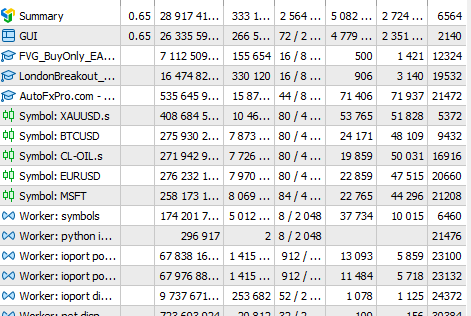 if you see something I am not aware of? windows task manager is not having any issue.... terminals are working fine...also broker connection is fine and I can issue manual trades without a problem. let me know if you see something...
Cheers,
Mark
ok thanks, what do i lear from this exactly? I made a screen shot of the task manager. seems to work... if you see something I am not aware of? windows task manager is not having any issue.... terminals are working fine...also broker connection is fine and I can issue manual trades without a problem. let me know if you see something...
Cheers,
Mark
I do see that I am using about 74% of my memory on the computer. could that be a reason for this?
I do see that I am using about 74% of my memory on the computer. could that be a reason for this?
Hi guys,
Hope that you are well.
I have 5 MT5 terminals running, but for some odd reason in the last two weeks 2 of the terminals with similar EA's have stopped working. I am not getting any bad report or anything...I installed a new Terminal and reinstalled the EA's, it is still not working...all settings are in order, etc. as with the other terminals that are running my EA's.
Anyone have an idea what to do here?
Many thanks, Mark
I do see that I am using about 74% of my memory on the computer. could that be a reason for this?
... then check your Windows Task Manager==>Performance tab.
Yes, it could be. You never want to approach 100%. Some pc's can handle 74% and others can't. If the 74% is constant (not an intermittent spike), then it's more likely the reason.
Laptops (lack of fans, old batteries, etc.) and pc's having poor cooling (lack of fans, etc.) can actually overheat too. You might consider downloading a free temperature monitor application.
If MT5 terminals are using little resources, what other applications might be hogging resources?You did not specify what yours "is not working" mean exactly - what's wrong, what you expect to see what you don't see now, provide settings and logs, explain how the terminals (with working and not working EA) are different to each other, etc.
what i mean is that there are simply no trades activated on these specific terminals...they are all with a specific broker and all on a standard account (so a bit more spread than on an ECN), this might be it as the other three accounts where it is working the spread is a bit smaller. as the broker had an update 2 weeks ago, could this also be a reason? I have run it also through AI, no answer to this, also mentions that it might be spreads......so I increased the spreads within the EA, lets see if this will activate them tomorrow...

- Free trading apps
- Over 8,000 signals for copying
- Economic news for exploring financial markets
You agree to website policy and terms of use
Hi guys,
Hope that you are well.
I have 5 MT5 terminals running, but for some odd reason in the last two weeks 2 of the terminals with similar EA's have stopped working. I am not getting any bad report or anything...I installed a new Terminal and reinstalled the EA's, it is still not working...all settings are in order, etc. as with the other terminals that are running my EA's.
Anyone have an idea what to do here?
Many thanks, Mark