indicators' sets in the latest update of mt5?
[I]n which folder are the indicators' sets located in the latest update of mt5?
Interestingly, I found a set file in the following folder. I don't recall having saved it there because I rarely use set files at all. I've likely received many MT5 updates since then. You might want to check in your similar folder.
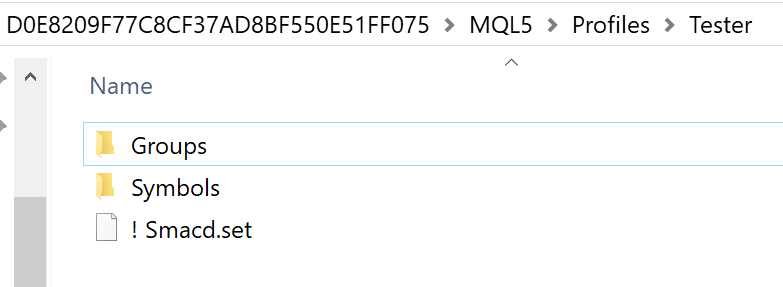
If you remember the specific name of one of your set files, you can do a Windows File Explorer search for that in your MT5 Data Folder.
If you remember the specific name of one of your set files, you can do a Windows File Explorer search for that in your MT5 Data Folder.
I did do a search in my hard drive for " *.set " files, only the ones of MT4 appeared, none of the MT5.
So, it's official: ALL .SET FILES ARE DELETED WHEN YOU UPDATE TO THE LATEST MT5 VERSION. THANK YOU METAQUOTES!!!
I did do a search in my hard drive for " *.set " files, only the ones of MT4 appeared, none of the MT5.
So, it's official: ALL .SET FILES ARE DELETED WHEN YOU UPDATE TO THE LATEST MT5 VERSION. THANK YOU METAQUOTES!!!
Assuming that you haven't been using Windows File Backup, you still might be able to Windows File Recovery:
- support.microsoft.com
in which folder are the indicators' sets located in the latest update of mt5?
thanks

- www.metatrader5.com
in which folder are the indicators' sets located in the latest update of mt5?
thanks
Actually, MetaTrader 5 doesn't always delete these files; it often moves the Data Folder path during major updates or if the installation type changes. Before giving up on your sets, check the hidden MQL5/Presets folder within your current Data Folder.
You can find the active path by going to: File > Open Data Folder
If they aren't there, check the old common path which sometimes survives updates: C:\Users\[YourUser]\AppData\Roaming\MetaQuotes\Terminal\[CommonID]\MQL5\Presets
A quick tip to prevent this in the future: Always use the Common Data Folder for sharing sets between terminals, or as the moderator suggested, switch to /portable mode to keep everything in one place.

- Free trading apps
- Over 8,000 signals for copying
- Economic news for exploring financial markets
You agree to website policy and terms of use
in which folder are the indicators' sets located in the latest update of mt5?
thanks