Wingdings arrows are supposed to be misaligned?
Are they supposed to look like that? The arrows' "body" have 3 pixels of width, so I assume they could very well be better aligned.
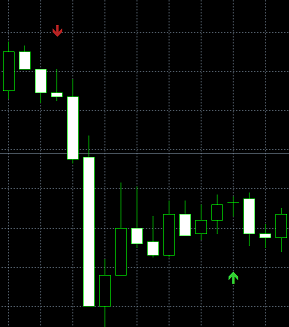
Given that the micro-offset is uniform in your posted image, the issue is likely your computer's display resolution/settings or hardware.
Here are some indicator arrows in Beta Build 5676 (3440 x 1440 resolution):
your computer's display resolution/settings or hardware.
Hmm interesting. I'm using 3 monitors, all of which are in Full HD resolution (1920x1080) and the problem appears in all of them. I also tested in 3 different assets (WIN/WDO/BIT from Brazil's B3) and it happens in every case. My system is:
KO      0       07:57:03.521    Terminal        MetaTrader 5 x64 build 5660 started for MetaQuotes Ltd.
QI      0       07:57:03.521    Terminal        Windows 10 build 19045, 16 x AMD Ryzen 7 1800X Eight-Core, AVX2, 10 / 15 Gb memory, 122 / 237 Gb disk, UAC, GMT-3
Bonus:
LN      0       07:57:05.201    Network '': authorized on XPMT5-DEMO through MT5 DEMO Access Server SP3 02 (ping: 38.08 ms, build 5430)
EO      0       07:57:05.201    Network '': previous successful authorization performed from 189.6.233.107 on 2026.03.10 21:50:14
EQ      0       07:57:06.091    Network '': terminal synchronized with XP Investimentos CCTVM S/A: 0 positions, 0 orders, 58162 symbols, 0 spreads
QM      0       07:57:06.091    Network '': trading has been enabled - hedging mode
Bonus info: Dedicated GPU NVidia GeForce 1060 6Gb MSI.
With all of that in hand, I can't figure out what could be possibly causing this situation. My GPU isn't that old!
Hi again,
bonus info: I remembered I have a notebook, Nitro 5 1920x1080 18" (the 3 monitors mentioned above are 23") and decided to test there. Same problem:
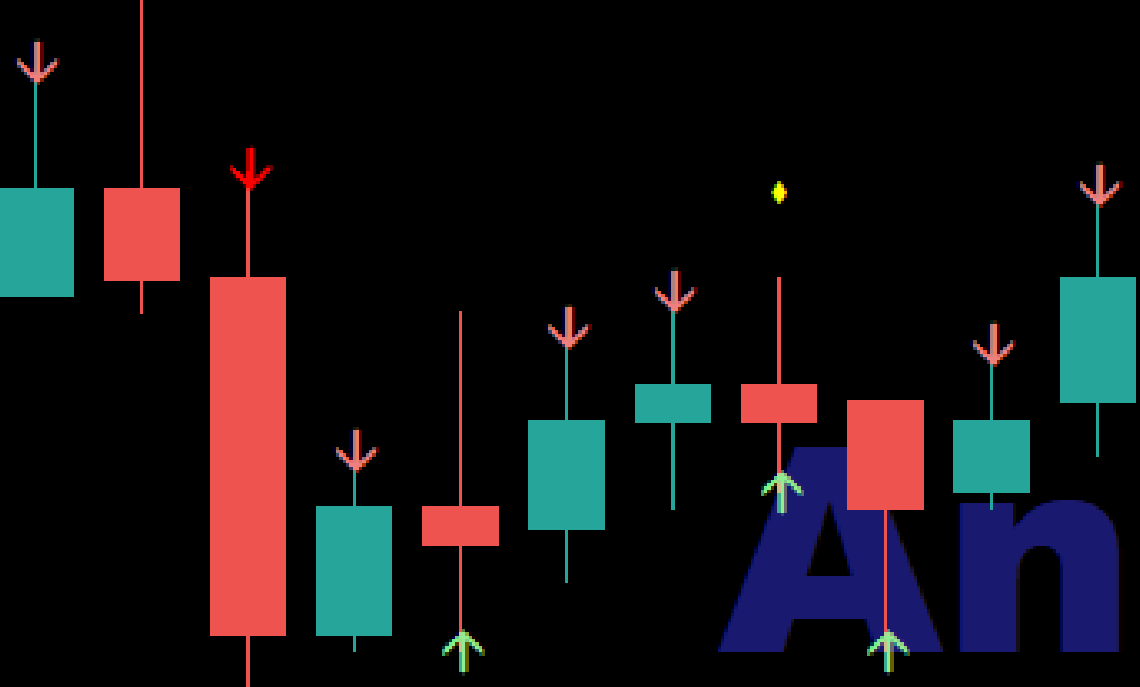
Then I changed the resolution to 800x600 and got the same problem.

- Free trading apps
- Over 8,000 signals for copying
- Economic news for exploring financial markets
You agree to website policy and terms of use
Hi!
I was developing an indicator of DRAW_COLOR_ARROW type and I noticed the arrows I was using looked misaligned. Thinking it could be something of those arrows especifically, I decided to change them to another set, and they still looked misaligned. So I took a print screen, put in Paint, added some zoom in and confirmed: they are, indeed, misaligned with the candles, at least with size 1:
Are they supposed to look like that? The arrows' "body" have 3 pixels of width, so I assume they could very well be better aligned.