How to dock Navigator ...
Anil Varma:
Hi Friends
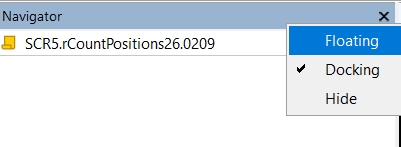
Please help me to fix docking issue on Navigator window.
Try resetting the platform settings:
- File menu -->Open Data Folder
- Double click on "Config" to open the folder
- Close the MT5 terminal
- Delete the file "terminal.ini" (or rename it)
- Restart MT5
Grab the title of the navigator window and move the window to one of the docking controls.


Oleksandr Medviediev #:
Try resetting the platform settings:
- File menu -->Open Data Folder
- Double click on "Config" to open the folder
- Close the MT5 terminal
- Delete the file "terminal.ini" (or rename it)
- Restart MT5
Thanks Oleksandr
Yes I did deleted 'terminal.ini' and then used Sergey suggestion to grab it.
It is resolved now.

You are missing trading opportunities:
- Free trading apps
- Over 8,000 signals for copying
- Economic news for exploring financial markets
Registration
Log in
You agree to website policy and terms of use
If you do not have an account, please register
Hi Friends
Please help me to fix docking issue on Navigator window.