New features and ideas
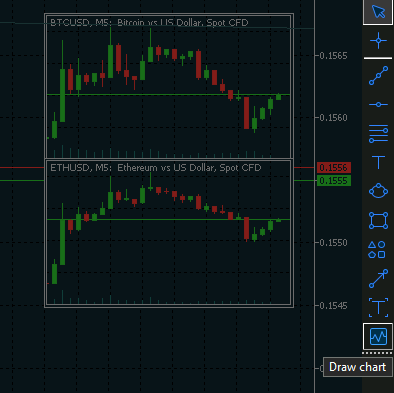
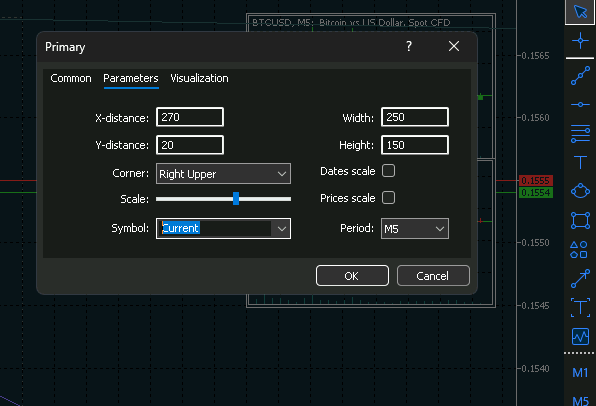
Wouldn't it be great if we could select the 'Current' asset in the 'Draw Chart' tool to create higher-timeframe overlay charts?
I'm not sure what you mean by "the Draw Chart tool". I don't see any such item in the MT5 Tools menu.
Anyway, there are custom chart overlay utilities in the CodeBase and/or the Market if you're willing to go that route.
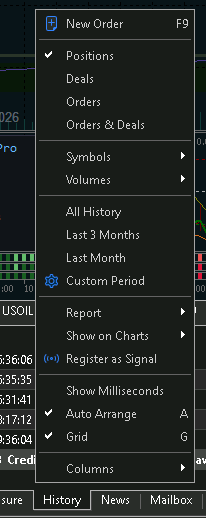
Wouldn't it be awesome if we could intuitively click on buttons such as 'Today', 'Yesterday' or 'Last 3 days' instead of selecting them from the drop-down menu in the History?
Maybe you mean in the Symbols window==>Bars (or Ticks) tabs?
If so, you can set start dates for a chart by creating a custom chart. Again, there custom chart utilities in the CodeBase and/or the Market.
Wouldn't it be great if we could select the 'Current' asset in the 'Draw Chart' tool to create higher-timeframe overlay charts?
Wouldn't it be awesome if we could intuitively click on buttons such as 'Today', 'Yesterday' or 'Last 3 days' instead of selecting them from the drop-down menu in the History?
- The first definitely exist in the codebase. No need to add it to the terminal.
- The second probably exists. If not, code it.
I'm not sure what you mean by "the Draw Chart tool". I don't see any such item in the MT5 Tools menu.
Anyway, there are custom chart overlay utilities in the CodeBase and/or the Market if you're willing to go that route.
Maybe you mean in the Symbols window==>Bars (or Ticks) tabs?
If so, you can set start dates for a chart by creating a custom chart. Again, there custom chart utilities in the CodeBase and/or the Market.
He meant the Chart object (MT5 GUI), or Graph object as it's called in MT5 Help. There is some lack of consistency for sure between the Help file and the GUI.
https://www.metatrader5.com/en/terminal/help/objects/graphical_objects/obj_chart

- www.metatrader5.com
Wouldn't it be awesome if we could intuitively click on buttons such as 'Today', 'Yesterday' or 'Last 3 days' instead of selecting them from the drop-down menu in the History?

- Free trading apps
- Over 8,000 signals for copying
- Economic news for exploring financial markets
You agree to website policy and terms of use
Wouldn't it be great if we could select the 'Current' asset in the 'Draw Chart' tool to create higher-timeframe overlay charts?
Wouldn't it be awesome if we could intuitively click on buttons such as 'Today', 'Yesterday' or 'Last 3 days' instead of selecting them from the drop-down menu in the History?
What other features and implementation would you like to see in Meta Trader 5?