My trade panel has disappeared from my Eur/USD charts!
Hi, can anyone offer any help?
as this is a technical forum, you need to provide as much information as you can, including the version number of your mt and if it is mobile or desktop version of mt -- and the first 3 lines of your journal when you first start up mt -- it will show your computers specs cpu, ram, and drive space.
If you are using mq demo, that is also good to put in your post also.
what trade panel?
is this what you mean?
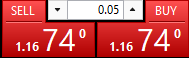
click the pic in yellow circle

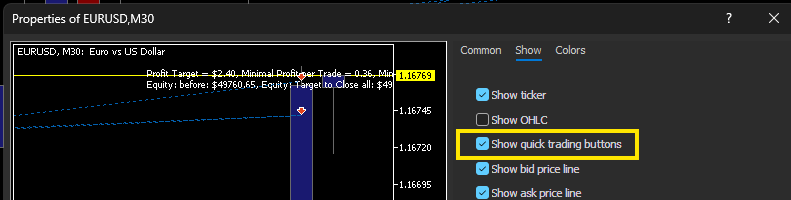
Make sure that this is ticked in "chart properties" right click on the chart select properties.
Hi all, I am fairly new to trading and brand new to this community. I have a simple problem, my trading panel has vanished, how do I get it back? ALT + T is not working. Thanks for your help, Rob x
Strange, I am not aware of a way to enable/disable this independently of the DoM.
Is it happening only on this chart or on all charts ?
What MT5 build are you using ?

- Free trading apps
- Over 8,000 signals for copying
- Economic news for exploring financial markets
You agree to website policy and terms of use
Hi all, I am fairly new to trading and brand new to this community. I have a simple problem, my trading panel has vanished, how do I get it back? ALT + T is not working. Thanks for your help, Rob x