VPS re-connection
- Re Activating a paid subscription.
- Connecting To VPS
- Discussion of article "How to Subscribe to Trading Signals"
Hi there. I had to reinstall my MT5 platform in my PC. I still have some time left in my VPS service. There's any way that I can reconnect with? Or I will have to make a new subscription.
If you login into your MQL5 account in MT5 >> Tools >> Options >> Community, you will find your MQL5 VPS waiting under your trading account number, in the Navigator window.
Hi Eleni, and Thank You for your quick reply. I follow your instructions and find the Community tab, login again, but not changes, I was on a demo account doing some testing and I had to open another one too. Quite a novice here. Is it a question that the VPS was related to the previous account and that one only?
It wasn't a subscription it was a 15$ one off, to try it, and mostly expire. What I'm thinking is if I open a subscription now then I move to a "real" account will I find myself in the same problem? I had to do a cleanup of everything, otherwise MT5 in my PC wouldn't work properly anymore, but I did a backup of all the folders. Is there any file in those folders that may be useful to solve this? Thanks again. Regards. Luca
Hi Eleni, and Thank You for your quick reply. I follow your instructions and find the Community tab, login again, but not changes, I was on a demo account doing some testing and I had to open another one too. Quite a novice here. Is it a question that the VPS was related to the previous account and that one only?
It wasn't a subscription it was a 15$ one off, to try it, and mostly expire. What I'm thinking is if I open a subscription now then I move to a "real" account will I find myself in the same problem? I had to do a cleanup of everything, otherwise MT5 in my PC wouldn't work properly anymore, but I did a backup of all the folders. Is there any file in those folders that may be useful to solve this? Thanks again. Regards. Luca
Your MQL5 VPS subscription is assigned/bound to a specific trading account.
If you've installed a new MT5 terminal and you logged into a new trading account, you will not find your MQL5 VPS under this new account.
You need to login into the trading account that you've used to subscribe to your MQL5 VPS from and then you will find it under it, in the Navigator window, if you login into your MQL5 account in MT5 >> Tools >> Options >> Community.
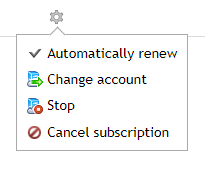
The other thing you can do is use the 'Change account' option in the MQL5 VPS subscription options, to move your MQL5 VPS subscription to another trading account (this option is available once a week).
Another thing you can do, is cancel your MQL5 VPS subscription and the remaining time will be credited to your MQL5 account as free minutes. Then if you try to 'Register a Virtual Server' with your new trading account, you will find these remaining minutes waiting for you as the 'Free minutes' option.
https://www.mql5.com/en/vps/subscriptions

- Free trading apps
- Over 8,000 signals for copying
- Economic news for exploring financial markets
You agree to website policy and terms of use