Computer blacklisted
How do i get my computer whitelisted again? Have no idea what even happened but i keep getting the message.
are you using a vpn? do you have the same issue in metatrader? or is it just in the browser that you have issues?
How do i get my computer whitelisted again? Have no idea what even happened but i keep getting the message.
Let's check something on the affected computer. Press [Win] + [R], type "cmd" (no quotes), and then press [Enter]. In the command window that opens up, type "ping download.mql5.com" and press [Enter]. Post the results here (screenshot, or copy the text and paste into a code box here).
Let's check something on the affected computer. Press [Win] + [R], type "cmd" (no quotes), and then press [Enter]. In the command window that opens up, type "ping download.mql5.com" and press [Enter]. Post the results here (screenshot, or copy the text and paste into a code box here).
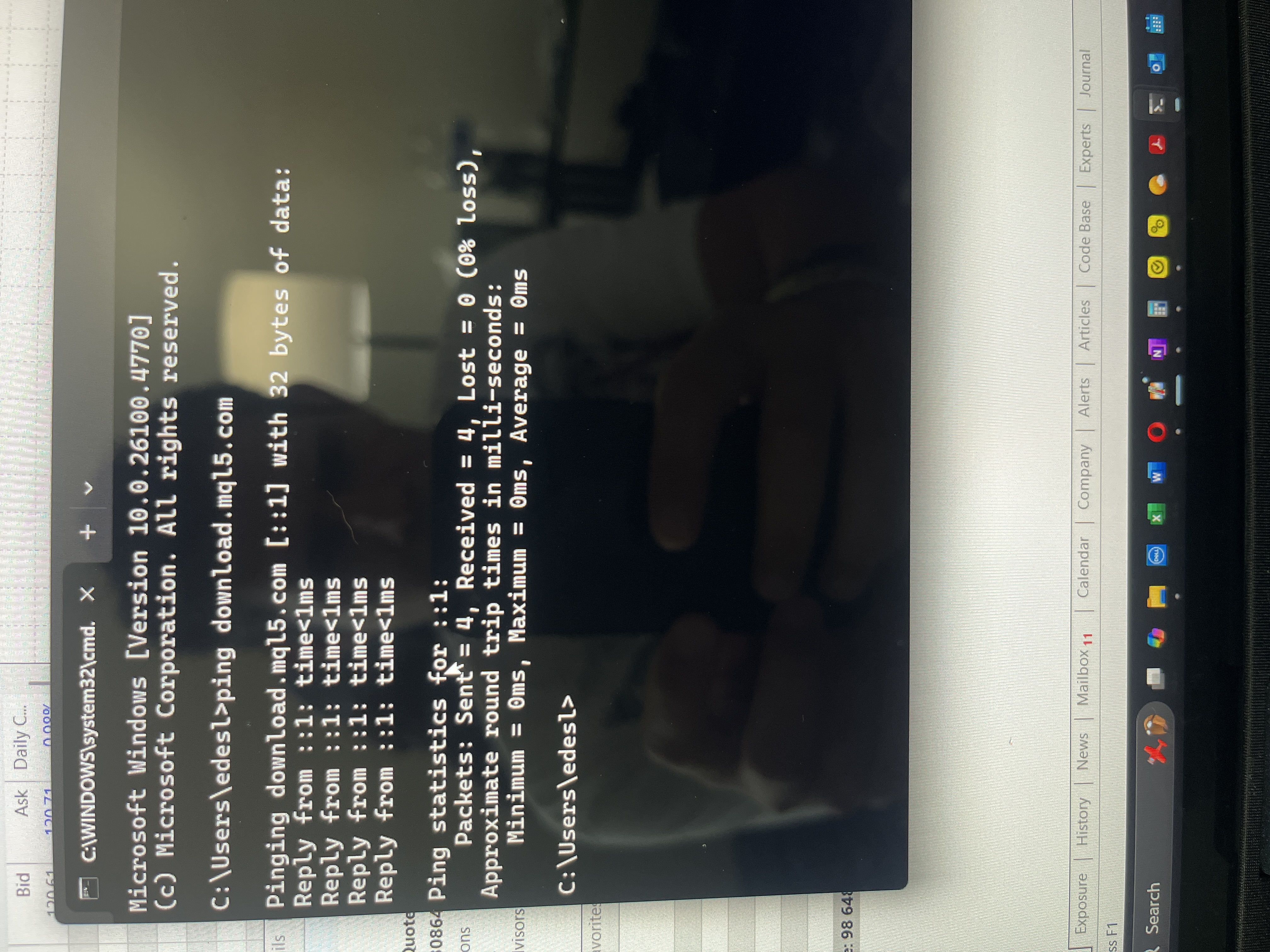
Check it
# Copyright (c) 1993-2009 Microsoft Corp.
#
# This is a sample HOSTS file used by Microsoft TCP/IP for Windows.
#
# This file contains the mappings of IP addresses to host names. Each
# entry should be kept on an individual line. The IP address should
# be placed in the first column followed by the corresponding host name.
# The IP address and the host name should be separated by at least one
# space.
#
# Additionally, comments (such as these) may be inserted on individual
# lines or following the machine name denoted by a '#' symbol.
#
# For example:
#
#      102.54.94.97     rhino.acme.com          # source server
#       38.25.63.10     x.acme.com              # x client host

# localhost name resolution is handled within DNS itself.
#       127.0.0.1       localhost
#       ::1             localhost
If your HOSTS file has entries naming domains like mql5.com or c.mql5.com and directing them to 127.0.0.1, 0.0.0.0, or ::1:, this is the problem. To restore your HOSTS file to default, copy the text in the box above to your clipboard, go back to Notepad, press [Ctrl] + [A], and then [Ctrl] + [V] to replace the contents of the document with the text in the box above. Click File -> Save As, and save the edited HOSTS file to your desktop. Then manually move the saved HOSTS file from your desktop to "C:\Windows\System32\drivers\etc", replacing the existing HOSTS file already there. You will need to grant File Explorer Administrative privileges to complete this operation. As soon as the file is successfully replaced, the issue should be resolved.
That's an issue. It could be blocked higher up (router, company, ISP, etc.), but let's check your computer first. Press [Win] + [R], type "notepad C:\Windows\System32\drivers\etc\hosts" (without quotes—important!), and press [Enter]. Notepad should open, showing the contents of your PC's HOSTS file. Normally, its contents will appear exactly as shown in this box:
If your HOSTS file has entries naming domains like mql5.com or c.mql5.com and directing them to 127.0.0.1, 0.0.0.0, or ::1:, this is the problem. To restore your HOSTS file to default, copy the text in the box above to your clipboard, go back to Notepad, press [Ctrl] + [A], and then [Ctrl] + [V] to replace the contents of the document with the text in the box above. Click File -> Save As, and save the edited HOSTS file to your desktop. Then manually move the saved HOSTS file from your desktop to "C:\Windows\System32\drivers\etc", replacing the existing HOSTS file already there. You will need to grant File Explorer Administrative privileges to complete this operation. As soon as the file is successfully replaced, the issue should be resolved.
And i'm back!!! hahaha
had Chat GPT we me through it and we are good to :
Microsoft Windows [Version 10.0.26100.4770]
(c) Microsoft Corporation. All rights reserved.
C:\Windows\System32>ipconfig /flushdns
Windows IP Configuration
Successfully flushed the DNS Resolver Cache.
C:\Windows\System32>
Boom baby! no that is not ALL i did but the end result, but thanks to those that offered help! woo hoo 🥳🥳🥳
Now you should try to find out what program modified your HOSTS file in the first place, otherwise this could happen again. It could be a virus, trojan, worm, or simply the metatrader installer.
Is this a recent install of metatrader? if so, then, it is documented on a few threads where the brokers installer modified the HOSTS file like so.

- Free trading apps
- Over 8,000 signals for copying
- Economic news for exploring financial markets
You agree to website policy and terms of use