Cannot add commission for custom symbol
I wanted to add commission for the EURUSD custom symbol I had downloaded from tickdatasuite but it didn't let me click "OK" to save and close the window.
Files:
Custom.png
15 kb
Broker.png
32 kb
Sinh Kiet Nguyen:
I wanted to add commission for the EURUSD custom symbol I had downloaded from tickdatasuite but it didn't let me click "OK" to save and close the window.
I wanted to add commission for the EURUSD custom symbol I had downloaded from tickdatasuite but it didn't let me click "OK" to save and close the window.
I'm having exactly the same problem.
Any solutions?
@rezalomalo #: I'm having exactly the same problem. Any solutions?
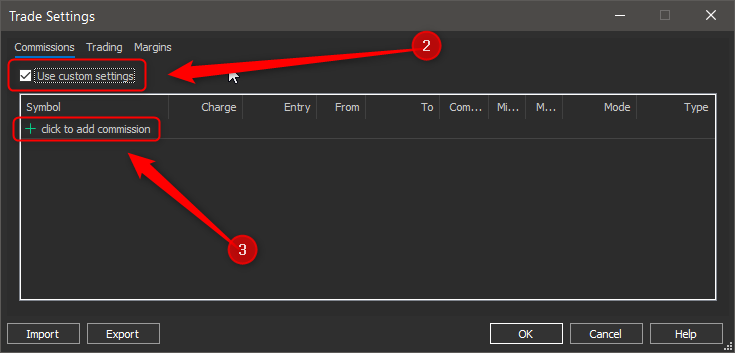
The solution is to select the "Use Custom settings", then click on "+" sign to add your custom settings. 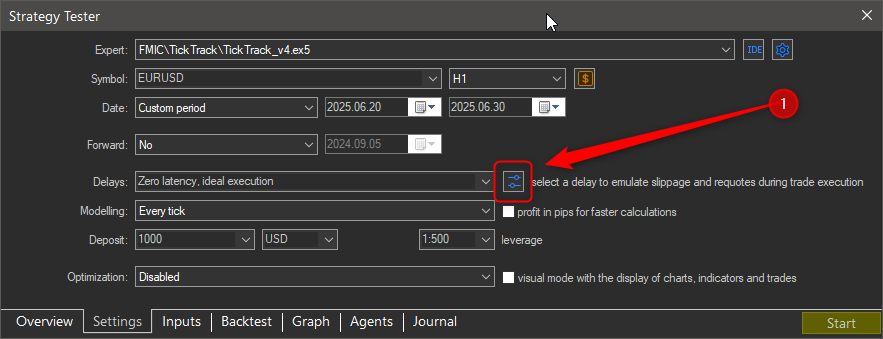
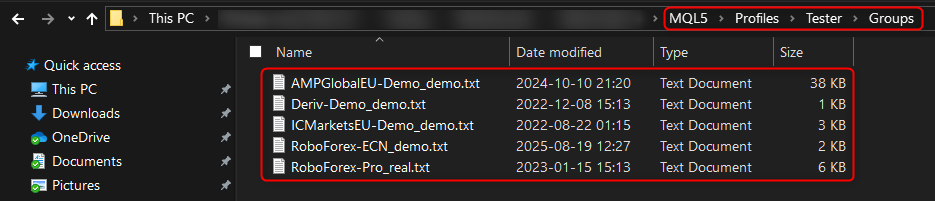
If you want to review the original settings before setting your own, go to the folder ".\MQL5\Profiles\Tester\Groups", and you will find text files with the settings for each of your broker's account types ...

You are missing trading opportunities:
- Free trading apps
- Over 8,000 signals for copying
- Economic news for exploring financial markets
Registration
Log in
You agree to website policy and terms of use
If you do not have an account, please register