PlaySound() no longer plays any .wav files
Hi,
after switching from Win7 to Win10 or since b.3180 the function PlaySound() no longer plays any .wav files. I constantly get the error 5019 = File does not exist.
Can someone check where the Sounds (Path) folder is located?
Thanks a lot!
Calli
Build 3184 - when run ONLINE everything works.
//+------------------------------------------------------------------+
//|                                               Test PlaySound.mq5 |
//|                              Copyright © 2022, Vladimir Karputov |
//|                      https://www.mql5.com/en/users/barabashkakvn |
//+------------------------------------------------------------------+
#property copyright "Copyright © 2022, Vladimir Karputov"
#property link      "https://www.mql5.com/en/users/barabashkakvn"
#property version   "1.00"
//---
enum ENUM_SOUNDS
  {
   alert       = 0,  // alert
   alert2      = 1,  // alert2
   connect     = 2,  // connect
   disconnect  = 3,  // disconnect
   email       = 4,  // email
   expert      = 5,  // expert
   news        = 6,  // news
   ok          = 7,  // ok
   request     = 8,  // request
   stops       = 9,  // stops
   tick        = 10, // tick
   timeout     = 11, // timeout
   wait        = 12, // wait
  };
//--- input parameters
input ENUM_SOUNDS sound=alert2;
//---
string filename="";
//+------------------------------------------------------------------+
//| Expert initialization function                                   |
//+------------------------------------------------------------------+
int OnInit()
  {
//--- create timer
   EventSetTimer(3);
   switch(sound)
     {
      case 0:
         filename="alert.wav";
         break;
      case 1:
         filename="alert2.wav";
         break;
      case 2:
         filename="connect .wav";
         break;
      case 3:
         filename="disconnect.wav";
         break;
      case 4:
         filename="email.wav";
         break;
      case 5:
         filename="expert.wav";
         break;
      case 6:
         filename="news.wav";
         break;
      case 7:
         filename="ok.wav";
         break;
      case 8:
         filename="request.wav";
         break;
      case 9:
         filename="stops.wav";
         break;
      case 10:
         filename="tick.wav";
         break;
      case 11:
         filename="timeout.wav";
         break;
      case 12:
         filename="wait.wav";
         break;
     }
//---
   return(INIT_SUCCEEDED);
  }
//+------------------------------------------------------------------+
//| Expert deinitialization function                                 |
//+------------------------------------------------------------------+
void OnDeinit(const int reason)
  {
//--- destroy timer
   EventKillTimer();
  }
//+------------------------------------------------------------------+
//| Expert tick function                                             |
//+------------------------------------------------------------------+
void OnTick()
  {
//---
  }
//+------------------------------------------------------------------+
//| Timer function                                                   |
//+------------------------------------------------------------------+
void OnTimer()
  {
//---
   PlaySound(filename);
  }
//+------------------------------------------------------------------+
Slightly changed into an indicator, I get every 3rd second:
2022.02.04 15:16:14.415 test_sound_Indi (GBPUSD,D1)     Play alert2.wav failed, e: 5019
2022.02.04 15:16:17.399 test_sound_Indi (GBPUSD,D1)     Play alert2.wav failed, e: 5019
2022.02.04 15:16:20.412 test_sound_Indi (GBPUSD,D1)     Play alert2.wav failed, e: 5019
2022.02.04 15:16:23.410 test_sound_Indi (GBPUSD,D1)     Play alert2.wav failed, e: 5019
2022.02.04 15:16:26.424 test_sound_Indi (GBPUSD,D1)     Play alert2.wav failed, e: 5019
There are no errors. Plays sounds.
filename="connect .wav"; There is no such file; remove the space.
Even this version (no blanks in the names) is completely silent :(
2022.02.04 15:32:29.300 test_sound_Indi (GBPUSD,D1)     Play[5]  expert.wav failed, e: 5019
2022.02.04 15:32:32.291 test_sound_Indi (GBPUSD,D1)     Play[2]  connect.wav failed, e: 5019
2022.02.04 15:32:35.310 test_sound_Indi (GBPUSD,D1)     Play[0]  alert.wav failed, e: 5019
2022.02.04 15:32:38.301 test_sound_Indi (GBPUSD,D1)     Play[2]  connect.wav failed, e: 5019
2022.02.04 15:32:41.307 test_sound_Indi (GBPUSD,D1)     Play[3]  disconnect.wav failed, e: 5019
Can you tell me the path of the sound folder?
Even this version (no blanks in the names) is completely silent :(
Can you tell me the path of the sound folder?
TerminalInfoString(TERMINAL_PATH) + \Sounds
     string terminal_path=TerminalInfoString(TERMINAL_PATH)+"\\Sounds";
     Print(terminal_path);
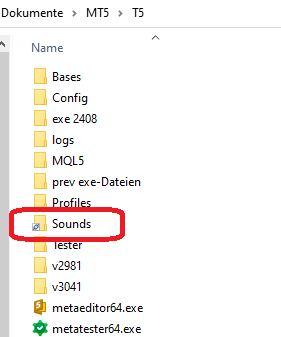
The sound folder is a junction which works perfectly for Experts\, Indicators\, ...
In it are (more) sound files which can all be played by e.g. the VLC player.
and this is the terminal path:
2022.02.04 16:36:46.904 test_sound_Indi (GBPUSD,D1)     Play[8]  request.wav failed, e: 5019  termPath: C:\Users\cas\Documents\MT5\T5
2022.02.04 16:36:49.914 test_sound_Indi (GBPUSD,D1)     Play[10]  tick.wav failed, e: 5019  termPath: C:\Users\cas\Documents\MT5\T5
2022.02.04 16:36:52.906 test_sound_Indi (GBPUSD,D1)     Play[5]  expert.wav failed, e: 5019  termPath: C:\Users\cas\Documents\MT5\T5
2022.02.04 16:36:55.925 test_sound_Indi (GBPUSD,D1)     Play[0]  alert.wav failed, e: 5019  termPath: C:\Users\cas\Documents\MT5\T5
2022.02.04 16:36:58.901 test_sound_Indi (GBPUSD,D1)     Play[0]  alert.wav failed, e: 5019  termPath: C:\Users\cas\Documents\MT5\T5
The sound folder is a junction which works perfectly for Experts\, Indicators\, ...
In it are (more) sound files which can all be played by e.g. the VLC player.
and this is the terminal path:
Are you sure you did not disable sounds in the "Events" tab of the settings?
I ONLY use portable mode and your indi test code is playing the sounds just fine on my setups.
EDIT: I just ran your code as is and it worked just fine. I made no changes to folders or anything.

Hi,
after switching from Win7 to Win10 or since b.3180 the function PlaySound() no longer plays any .wav files. I constantly get the error 5019 = File does not exist.
Can someone check where the Sounds (Path) folder is located?
Thanks a lot!
Calli