Experts: Sprut
Lot is multiplied only in the second pending order from the whole grid, then it is added to all other orders.
Because of this, it is impossible to set the same lot for all pending orders. Even if the coefficient stop/limit parameter is set to 1.0, the lot still increases starting from the 3rd order. If the value is 0, the grid is not built
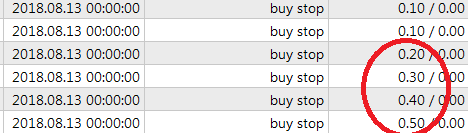
Coefficient for volume increase does not work correctly(Coefficient stop and Coefficient limit).
Lot is multiplied only in the second pending order from the whole grid, then it is added to all other orders.
Because of this, it is also impossible to set the same lot for all pending orders. Even if the coefficient stop/limit parameter is set to 1.0, the lot still increases starting from the 3rd order. If the value is 0, the grid is not built
Please provide: symbol name on MetaQuotes-Demo server, account type (netting or hedge), timeframe, testing time (dates from and to), full EA settings.
Vladimir, good day
EURUSD
Hedge
H1
I am testing on the interval 2018.08.01-2018.08.02, I set only buy stop trades. But in other time intervals and with other types of orders the same is true
All default settings of the Expert Advisor, except for the following:
Use buy stop - true
First volume stop - 0.1
Coefficient stop - 1
Expiration (in minutes) - 0.
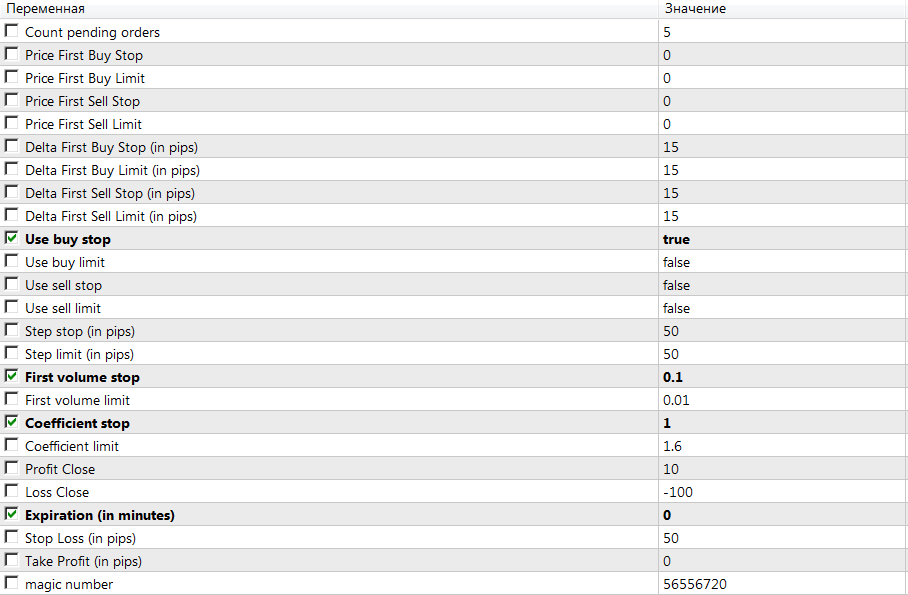
Different configurations of settings were tried, but the result is the same
What is the opening balance? In what currency?
Are you testing in what tick generation mode?
(Screenshot: Strategy Tester - Settings tab).

- www.metatrader5.com
Vladimir, thank you. Everything works :)
And thank you for the tests and for the message about inaccuracy in the code.
Vladimir, thank you. Everything works :)
please show me the stats
it is interesting to see the result of testing for 2008
Would you show me the steith, please?
It is interesting to see the result of testing for 2008
Everyone is interested to see the result, but more recent)

- Free trading apps
- Over 8,000 signals for copying
- Economic news for exploring financial markets
You agree to website policy and terms of use
Sprut:
Grid of Stop and Limit pending orders.
Grid features: the first pending grid order can be placed at the Firstxxxx price or at a certain DeltaFirstxxxx distance from the current price. If Firstxxxx exceeds zero, the DeltaFirstxxxx parameter is not considered, and vice versa, when Firstxxxx is equal to zero, the DeltaFirstxxxx parameter is activated.
You can:
Author: Vladimir Karputov