How can I check if the VPS on my Metatrader 5 has been set up correctly
Read this article about: HOW TO PREPARE A TRADING ACCOUNT FOR MIGRATION TO VIRTUAL HOSTING
I mean: you are making synchronization (execute "Synchronize Environment" command )every time you are making the changes in your MT5 (related to the indicators or EA or any), and -
- the data is recorded in the client terminal's log,
- open the virtual terminal's main journal to examine the actions performed on it.
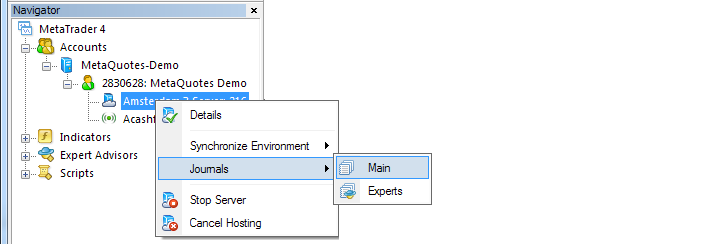
Read this article about: HOW TO PREPARE A TRADING ACCOUNT FOR MIGRATION TO VIRTUAL HOSTING
I mean: you are making synchronization (execute "Synchronize Environment" command )every time you are making the changes in your MT5 (related to the indicators or EA or any), and -
- the data is recorded in the client terminal's log,
- open the virtual terminal's main journal to examine the actions performed on it.
Thank you Sergey for your instructions. I have followed that and I got a green message saying "migration successful"; so I hope this is now working.
we will see after I close down my laptop if the trades continue...
Thanks
An update from me about the VPS.
After setting it up and geting it synchronised I switched off my computer, leaving the VPS to take over, which is what it does right?
I opened my laptop today and decided to synchronise again...and noticed that after the synchronisation process it switches off the "AutoTrading" button in my Meta Trader.
I switched it on again...to allow Autotrading..is this correct ? or should I leave it off?
Please advise anyone...thanks in advance for your help.
As far as I remember - autotrading feature is always 'on' in VPS irrespective we switch it off on our Metatrader or not.
From this article - How to Prepare a Trading Account for Migration to Virtual Hosting :
"Regardless of whether autotrading is allowed or forbidden in your client terminal or in the properties of a launched Expert Advisor, any trading robot is allowed to trade after being moved to the virtual terminal."
As far as I remember - autotrading feature is always 'on' in VPS irrespective we switch it off on our Metatrader or not.
From this article - How to Prepare a Trading Account for Migration to Virtual Hosting :
"Regardless of whether autotrading is allowed or forbidden in your client terminal or in the properties of a launched Expert Advisor, any trading robot is allowed to trade after being moved to the virtual terminal."
I see. Thanks for that information. I appreciate your advice.
do not leave your eas running on you local computer, as you will get double opening and closing of trades. or errors if autotrade is off, which is should be.
i recommend after you have migrated your working setup to the vps -- to then save your local profile as a new name, for example "Vps_Migrated".
...and then change the profile on your local mt5 to default so that your vps profile is not showing in your local mt5, unless you want to edit your settings on the vps. and after you have migrated your settings to the vps, then do the same thing again, save, and then change your profile again.

- Free trading apps
- Over 8,000 signals for copying
- Economic news for exploring financial markets
You agree to website policy and terms of use
I have just set up the VPS through the instructions given in MQL5. How can I check and see if it is running correctly?
Thanks.