Where are logs now?
Right click in the Experts Tab and click Open
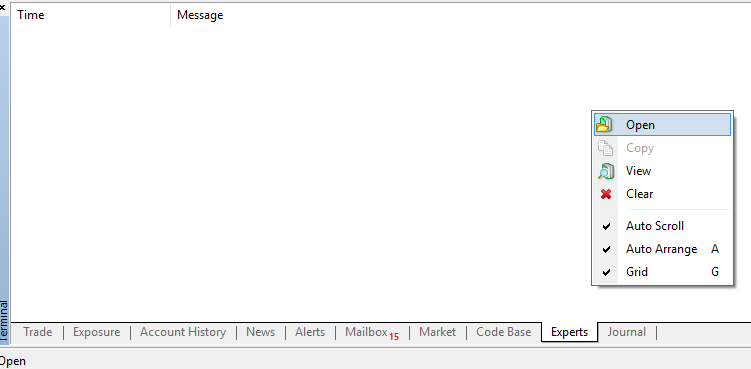
Sorry, I forgot link in my previous mesage. This is what I see.
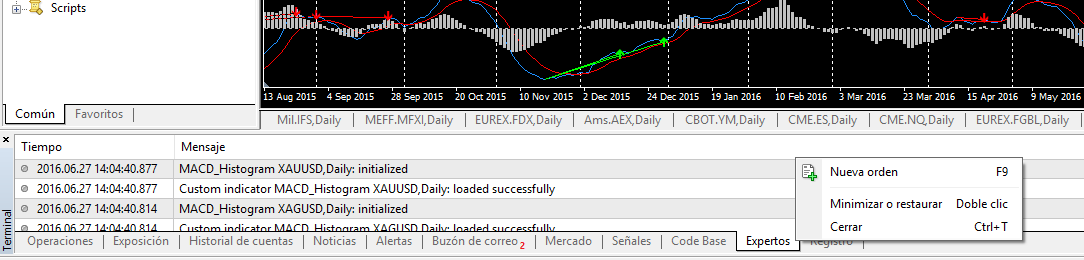
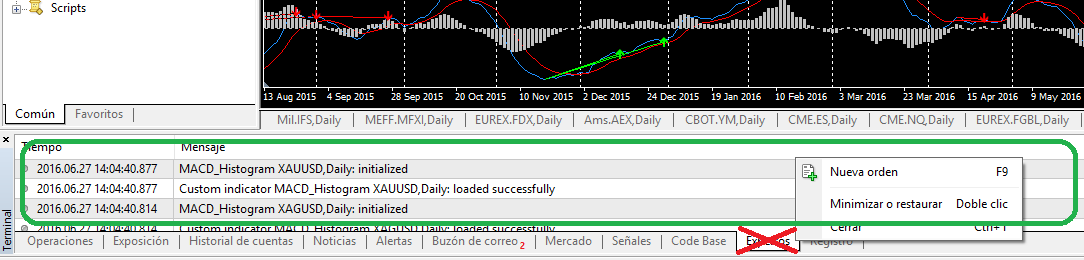
You are clicking in the wrong place. Right-click inside the area of the logs (green area in attached image), NOT on the tabs (red area)!
|
landmeister: . Sadly I see log files in MT4 are not in the same place they used to be in the past. I create log files to identify erros and/or malfunctions and I used to finding them at:
My PC / Metaquotes / Terminal / Alotofnumbersandletters / logs | Data Structure in MetaTrader 4 Build 600 and Higher - MQL4 Articles 17.02.2014 |
You are clicking in the wrong place. Right-click inside the area of the logs (green area in attached image), NOT on the tabs (red area)!
Got it! Thank you. Unfortunately, I can confirm that's the same folder I identified in my first message. For a reason I don't understand, my log file isn't there. I can see all logs created by MT4 everyday except mine. Any help?
Thank you all in advance
Got it! Thank you. Unfortunately, I can confirm that's the same folder I identified in my first message. For a reason I don't understand, my log file isn't there. I can see all logs created by MT4 everyday except mine. Any help?
Thank you all in advance
Got it! Thank you. Unfortunately, I can confirm that's the same folder I identified in my first message. For a reason I don't understand, my log file isn't there. I can see all logs created by MT4 everyday except mine. Any help?
Thank you all in advance
How did you create your log file?
Did you check "MQL4\Files" folder?
Close and Restart the Application (or even reboot your PC)!
Tried and didn't work. :(

- Free trading apps
- Over 8,000 signals for copying
- Economic news for exploring financial markets
You agree to website policy and terms of use
Dear all,
After some years without touching mql code I decided to create an easy EA to help my current strategy. Sadly I see log files in MT4 are not in the same place they used to be in the past. I create log files to identify erros and/or malfunctions and I used to finding them at:
My PC / Metaquotes / Terminal / Alotofnumbersandletters / logs
But apparently they are in a different folder. Could someone please help me?
Thank you very much in advance.