how to locating a symbol quickly?
many symbols in Market Watch and how to locating a symbol quickly? thx

Documentation on MQL5: Standard Constants, Enumerations and Structures / Environment State / Symbol Properties
- www.mql5.com
Standard Constants, Enumerations and Structures / Environment State / Symbol Properties - Documentation on MQL5
See documentation, if the symbol you enter already exist, then it will be selected :
Fast Adding of Symbols
In order to quickly add a symbol to the "Market Watch" window you should double-click with the left mouse button anywhere outside the list of turned on symbols. After that a field where you should type a symbol name will appear:
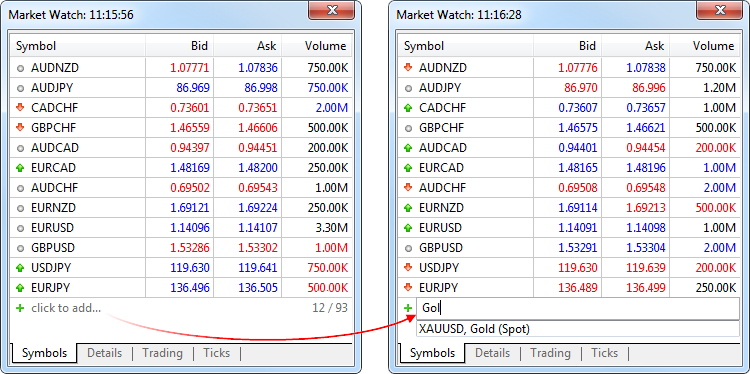
Then you should press the "Enter" key. As soon as you do it, the symbol will be added to the "Market Watch" window.
angevoyageur:
thank you.
