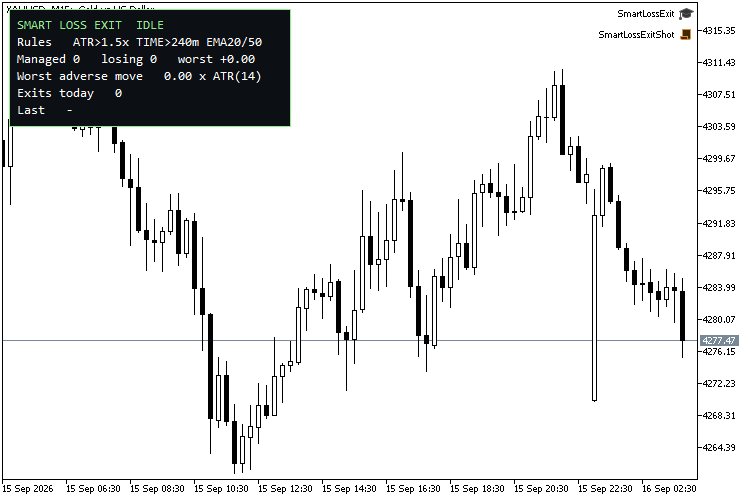
Smart Loss Exit is not a trading strategy. It never opens a position. Attach it to one chart and it watches the positions you point it at — manual trades or another EA's, filtered by symbol and magic number — and closes the ones that are floating in loss when one of five rules fires. A position in profit is never touched, whatever the rules say.
The idea comes from a common backtest shape: a high win rate with a profit factor that is still low, because the few losers run all the way to the stop-loss. The question is not "exit losers earlier" but "exit the ones that were going to hit the stop, and leave the ones that recover alone". That is why every rule is an input, why there is a grace period, and why every exit is written to a journal — the journal is what tells you which rule separates the two.
Grace period. No rule is evaluated until the position is N minutes old (default 5), so a normal entry drawdown is not cut.
Observe-only mode. Journals what would have been closed, and why, without closing anything — run it this way first, then switch the rules on once the journal shows which ones earn their keep.
Rule 1 — ATR adverse excursion. The price has moved against the entry by more than N x ATR (default 1.5 x ATR(14) on the chosen timeframe).
Rule 2 — Time in trade. The position is older than N minutes (default 240) and still losing.
Rule 3 — EMA trend invalidation. On the last closed bar the fast EMA is below the slow EMA for a buy, or above it for a sell (default 20/50).
Rule 4 — RSI momentum. On the last closed bar RSI is below a level for a losing buy, or above a level for a losing sell (default off, 35/65).
Rule 5 — Money cap. The floating loss, including swap and commission, is larger than a fixed amount (default off).
Rules 1 and 2 are tested on every tick; rules 3 and 4 read the closed bar, so they never repaint. Rules are checked in the order above and the first one that fires is the one recorded.
Journal. Every exit appends a line to MQL5\Files\SmartLossExit_journal.csv: time, symbol, ticket, type, volume, open and close price, profit, age in minutes, maximum adverse excursion in pips and in ATR units, and the rule that fired. Open it in a spreadsheet after a week and you can see, for example, that every trade that reached 1.2 x ATR against you went on to the full stop — that is the number to set rule 1 to.
Panel. Rules in force, positions managed, how many are losing, the worst one, the worst adverse move in ATR units, exits today and the last exit.
Every exit is written to the Experts log and, optionally, raised as a terminal Alert.
Inputs
Scope: Only manage this chart's symbol (true) · Magic number to manage, 0 = all, -1 = manual only (0) · Timeframe for ATR / EMA / RSI (M15) · Grace period in minutes (5) · Observe only (false)
Rule 1 — ATR: Enable (true) · ATR period (14) · Multiple (1.5)
Rule 2 — Time: Enable (true) · Minutes (240)
Rule 3 — EMA: Enable (true) · Fast (20) · Slow (50)
Rule 4 — RSI: Enable (false) · Period (14) · Close a losing buy below (35) · Close a losing sell above (65)
Rule 5 — Money: Enable (false) · Max loss in account currency (50)
Journal and display: Write CSV journal (true) · File name (SmartLossExit_journal.csv) · Pop-up alert on every exit (true) · Show panel / corner / font size (true / left-upper / 10)
A pip is 10 points on 3- and 5-digit quotes and 1 point otherwise.
Recommended: attach to the chart the trades are taken on; M15 for the indicator timeframe suits intraday systems on XAUUSD and forex majors. Works on hedging and netting accounts.
Verified
Strategy Tester, EURUSD M1, MetaQuotes-Demo, 10,000 USD, hedging account, grace 0:
step 1: ATR rule only (0.05 x ATR), 1.00 lot buy
Smart Loss Exit: EURUSD #2 BUY 1.00 closed at -4.00 loss - ATR 0.11x > 0.05x (0 min, MAE 0.4 pips) ok
step 2: MONEY rule only (cap 3), 1.00 lot buy
Smart Loss Exit: EURUSD #4 BUY 1.00 closed at -25.00 loss - MONEY 25.00 > 3.00 (0 min, MAE 2.5 pips) ok
step 3: TIME rule only (2 min), buy + sell
Smart Loss Exit: EURUSD #7 SELL 0.10 closed at -2.50 loss - TIME 2 min >= 2 (2 min, MAE 3.0 pips) ok
Smart Loss Exit: EURUSD #6 BUY 0.10 closed at -2.50 loss - TIME 2 min >= 2 (2 min, MAE 3.4 pips) ok
PASS: no losing position left open, 0 profitable kept
PASS: journal has header + 4 rows
SELFTEST DONE: 8 pass, 0 fail
Journal written by that run:
time,symbol,ticket,type,volume,open,close,profit,age_min,mae_pips,mae_atr,reason
2026.06.02 00:00:00,EURUSD,2,BUY,1.00,1.16317,1.16313,-4.00,0,0.4,0.11,ATR 0.11x > 0.05x
2026.06.02 00:03:00,EURUSD,4,BUY,1.00,1.16336,1.16311,-25.00,0,2.5,0.79,MONEY 25.00 > 3.00
2026.06.02 00:08:00,EURUSD,7,SELL,0.10,1.16304,1.16329,-2.50,2,3.0,0.95,TIME 2 min >= 2
2026.06.02 00:08:00,EURUSD,6,BUY,0.10,1.16329,1.16304,-2.50,2,3.4,1.07,TIME 2 min >= 2
Compiled with 0 errors, 0 warnings (build 6198).
Notes
- Pairs with Risk Guard (same author): Risk Guard sizes and caps the risk going in, Smart Loss Exit trims the losers on the way out.
- "Only manage this chart's symbol" off + magic 0 manages the whole account from one chart; indicator handles are created per symbol on first sight.
- The journal file is opened in shared mode, so it can be read in a spreadsheet while the EA is running.
- To tune: run for a week with Observe only = true. Nothing is closed; each time a rule would have fired, one journal line is written with the reason prefixed OBSERVE. Compare those tickets with how they actually ended, keep the rules that caught full-stop losers, loosen the ones that caught recoveries, then switch observe-only off.
 MetaTrader 5
 Experts
 Indicators
 Scripts
 Libraries
 Storage


 You are missing trading opportunities:
 Need a robot or indicator based on this code? Order it on Freelance
Go to Freelance
Need a robot or indicator based on this code? Order it on Freelance
Go to Freelance

 Heiken Ashi ATR Blend
 Position sizing from risk, using the broker's own tick value and volume step