 MetaTrader 5
 Experts
 Indicators
 Scripts
 Libraries
 Storage
Join our fan page

- Views:
- 724
- Rating:
- Published:
- Updated:
-
 You are missing trading opportunities:
- Free trading apps
- Over 8,000 signals for copying
- Economic news for exploring financial markets
Registration Log inYou agree to website policy and terms of use
If you do not have an account, please register -
 Need a robot or indicator based on this code? Order it on Freelance
Go to Freelance
Need a robot or indicator based on this code? Order it on Freelance
Go to Freelance
CRiskCalculator is an object-oriented MQL5 header library designed to handle risk management and volume calculations for Expert Advisors and trading tools . It calculates monetary pip values and precise lot sizes based on a specific account risk amount and Stop Loss distance in pips .
A common issue in automated trading is calculating position sizing on cross-currency pairs (for example, trading GBPJPY on an EUR-denominated account) . This class addresses that challenge by combining native MetaTrader 5 symbol properties with a fallback conversion system for cross-currency pairs .
Key Features
-
Dual-Engine Calculation: Uses native broker properties ( SYMBOL_TRADE_TICK_VALUE and SYMBOL_TRADE_TICK_SIZE ) as the primary calculation method . If those parameters are unavailable or uninitialized by the broker, it automatically falls back to manual base/quote currency extraction and conversion rate queries .
-
Broker Parameter Normalization: Automatically clamps calculated volumes between SYMBOL_VOLUME_MIN and SYMBOL_VOLUME_MAX , and aligns them to SYMBOL_VOLUME_STEP to avoid broker rejection errors (such as TRADE_RETCODE_INVALID_VOLUME ) .
-
Clean OOP Design: Encapsulated inside the CRiskCalculator class with no global scope clutter, making it easy to drop into existing EA projects or custom indicators .
-
Self-Configuring: Automatically detects the current account base currency ( ACCOUNT_CURRENCY ) upon initialization .
Integration Example
To use this class in your Expert Advisor or script, place CRiskCalculator.mqh inside your MQL5/Include/ directory and instantiate the object :
#include <CRiskCalculator.mqh>

// Helper function to render a high-contrast panel on the chart
void DrawChartPanel(const string &lines[])
  {
   int x = 20, y = 30;
   int width = 280, lineHeight = 18;
   int height = (ArraySize(lines) * lineHeight) + 20;

   // 1. Create Background Box (Visible on white, black, or custom charts)
   string bgName = "RiskCalc_BG";
   if(ObjectFind(0, bgName) < 0)
      ObjectCreate(0, bgName, OBJ_RECTANGLE_LABEL, 0, 0, 0);

   ObjectSetInteger(0, bgName, OBJPROP_CORNER, CORNER_LEFT_UPPER);
   ObjectSetInteger(0, bgName, OBJPROP_XDISTANCE, x);
   ObjectSetInteger(0, bgName, OBJPROP_YDISTANCE, y);
   ObjectSetInteger(0, bgName, OBJPROP_XSIZE, width);
   ObjectSetInteger(0, bgName, OBJPROP_YSIZE, height);
   ObjectSetInteger(0, bgName, OBJPROP_BGCOLOR, clrDarkSlateGray);
   ObjectSetInteger(0, bgName, OBJPROP_BORDER_COLOR, clrDodgerBlue);
   ObjectSetInteger(0, bgName, OBJPROP_BORDER_TYPE, BORDER_FLAT);
   ObjectSetInteger(0, bgName, OBJPROP_SELECTABLE, false);

   // 2. Render Text Lines inside the panel
   for(int i = 0; i < ArraySize(lines); i++)
     {
      string lblName = "RiskCalc_Lbl_" + IntegerToString(i);
      if(ObjectFind(0, lblName) < 0)
         ObjectCreate(0, lblName, OBJ_LABEL, 0, 0, 0);

      ObjectSetInteger(0, lblName, OBJPROP_CORNER, CORNER_LEFT_UPPER);
      ObjectSetInteger(0, lblName, OBJPROP_XDISTANCE, x + 12);
      ObjectSetInteger(0, lblName, OBJPROP_YDISTANCE, y + 10 + (i * lineHeight));
      ObjectSetString(0, lblName, OBJPROP_TEXT, lines[i]);
      ObjectSetString(0, lblName, OBJPROP_FONT, "Segoe UI");
      ObjectSetInteger(0, lblName, OBJPROP_FONTSIZE, 9);
      ObjectSetInteger(0, lblName, OBJPROP_COLOR, (i == 0) ? clrYellow : clrWhite);
      ObjectSetInteger(0, lblName, OBJPROP_SELECTABLE, false);
     }

   ChartRedraw(0);
  }

void OnStart()
  {
   // Instantiate the risk calculator
   CRiskCalculator riskCalc;

   string symbol     = _Symbol;
   double riskAmount = 100.0; // Target risk in account currency
   double slPips     = 25.0;  // Stop Loss distance in pips

   // Calculate parameters
   double lotSize      = riskCalc.CalculateLotSize(symbol, riskAmount, slPips);
   double pipValPerLot = riskCalc.GetPipValuePerLot(symbol);

   // Prepare output lines
   string info[6];
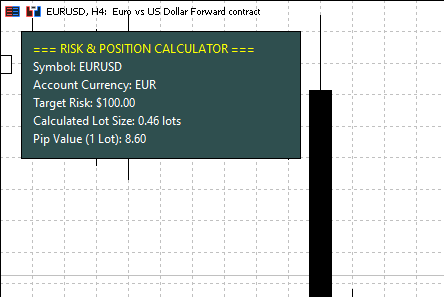
   info[0] = "=== RISK & POSITION CALCULATOR ===";
   info[1] = "Symbol: " + symbol;
   info[2] = "Account Currency: " + AccountInfoString(ACCOUNT_CURRENCY);
   info[3] = "Target Risk: $" + DoubleToString(riskAmount, 2);
   info[4] = "Calculated Lot Size: " + DoubleToString(lotSize, 2) + " lots";
   info[5] = "Pip Value (1 Lot): " + DoubleToString(pipValPerLot, 2);

   // Display GUI panel on chart
   DrawChartPanel(info);
  }
Class Reference
| Method | Return Type | Description |
| GetPipValuePerLot(string symbol) | double | Returns the monetary value of 1 pip for 1 standard lot in the account currency . |
| GetPipValue(string symbol, double volume) | double | Returns the total monetary value of 1 pip for a specified volume . |
| CalculateLotSize(string symbol, double riskAmount, double slPips) | double | Calculates and normalizes the lot size for a target cash risk and Stop Loss in pips . |
 GDS Renko Replay Trainer
GDS Renko Replay Trainer is a free educational tool for practising manual decisions on historical Renko charts in MetaTrader 5. Load a historical interval, replay it forward and place virtual BUY or SELL trades. You can pause, advance one tick or move to the next completed Renko brick. Each virtual position has a stop loss and take profit, and the trainer records the results of your session. The tool builds fixed-size Renko bricks from historical Bid/Ask ticks, with a classic two-brick reversal. Future ticks are not used to draw the visible chart or execute virtual trades. Buy trades use Ask for entry and Bid for exit; sell trades use the opposite sides. Orders entered on the panel wait for the next replayed valid tick. Stops and targets are checked on every tick, including price gaps.
 VSA Glossary
Built on Wyckoff Volume Spread Analysis (VSA) principles, it decodes smart money accumulation, distribution, absorption, and trend direction with zero repainting and a strict 2,000-bar performance limit.
Gueta Position Sizer: Risk and Lot Guard HUD
Real-time risk calculator and lot size guard HUD for MT5. Computes exact lot sizing based on account balance, target risk %, and dynamic ATR Stop Loss with minimum lot overshoot warning.
RJO Daily Pivot Levels Classic and Fibonacci for MT5
Daily Pivot Points indicator for MetaTrader 5 with Classic and Fibonacci methods. Displays PP, R1-R3 and S1-S3 using the previous completed daily candle.