 MetaTrader 5
 Experts
 Indicators
 Scripts
 Libraries
 Storage
Join our fan page

Contract Sizer: ladder, floor and a breaker that survives a deposit - library for MetaTrader 5

- Views:
- 593
- Rating:
- Published:
- Updated:
-
 You are missing trading opportunities:
- Free trading apps
- Over 8,000 signals for copying
- Economic news for exploring financial markets
Registration Log inYou agree to website policy and terms of use
If you do not have an account, please register -
 Need a robot or indicator based on this code? Order it on Freelance
Go to Freelance
Need a robot or indicator based on this code? Order it on Freelance
Go to Freelance
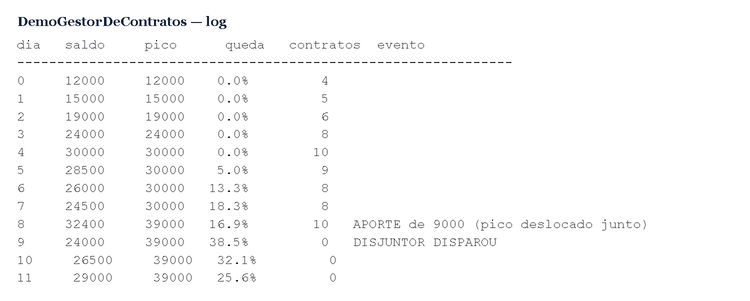
ContractSizer.mqh sizes contracts from the account balance with three separate protections: a ladder (one contract per factor of balance, always a cap), a floor (no trading below the minimum capital) and a breaker (stops at a fraction of the balance peak and does not rearm by itself).
Deposits and withdrawals are read from the deal history (DEAL_TYPE_BALANCE) and shift the peak by the same amount, so a deposit made during a drawdown does not hide the drawdown. The peak is persisted under MQL5\Files and survives a terminal restart.
Constructor: CContractSizer(factor = 3000.0, maxContracts = 500, minContracts = 1, minCapital = 1500.0, maxDD = 0.0, peakFile = "contract_sizer_peak.txt") . Use: call ContractsToday(TimeLocal()) on every tick; it recomputes only at the day change. CapByBalance() holds even with manual lots. Rearm() is a manual decision.
Demo inputs: InpBalancePerContract = 3000, InpMinCapital = 1500, InpMaxDrawdown = 0.20, InpDemoDeposit = true.
The demo prints a 12-day simulated path (balance / peak / drop / contracts / event) with a deposit at the bottom of the drawdown, then runs the real class on the open account. Run it with InpDemoDeposit on and off and compare the "drop" column.
Limit: position sizing does not create an edge; it only multiplies whatever edge exists. Nothing is traded.
 Safe Logger: why your log lines vanish while FileOpen keeps returning success
Four EAs writing to the same file, all with FILE_SHARE_READ|FILE_SHARE_WRITE, FileSeek(SEEK_END), FileWrite, FileClose. Looks correct. Every FileOpen returns success. No error in the log. And the lines vanish. Reason: FILE_SHARE_WRITE lets all four open at the same time. All four call FileSeek(SEEK_END) and get THE SAME offset, because none has written yet. All four write at the same position. Whoever closes last wins. Three lines vanish silently. In my case: 12 events expected, 8 in the file. The fix is to open EXCLUSIVELY (no FILE_SHARE_WRITE) and retry while another EA holds the file. And to shout in the log when the retries run out: a log that fails silently is worse than no log at all, because you trust it. The demo script reproduces both modes. To see the loss, drag it onto four charts at the same time with safe mode off and count the lines in the CSV. On a single chart the defect does not show up - which is why it passes in testing and breaks in production.
 Clock Diagnostic: TimeCurrent() freezes and steps backwards
TimeCurrent() is not a clock. It is the stamp of the LAST TICK. Two consequences break robots in production: 1. It freezes. With no tick it does not move: illiquid instrument, end of session, unstable connection - and any rule based on it stops with it. 2. It steps backwards: on a symbol switch, a reconnection or a tick from another instrument, the value can go back. The case that cost me a whole protection: I compared the date of a daily decision with TimeCurrent() to reject an expired one. The server clock stepped back to the previous day, the comparison matched, and four EAs accepted YESTERDAY's decision as valid. The gate that should have failed closed failed open - without a single error in the log. Rule: TimeLocal() for timestamps, dates, day changes, expiry - all that must always move forward; TimeCurrent() for session hours and market data. The script measures the divergence in your environment and reports both symptoms live. Run it with the market closed.
 Extract information from the MT5 broker
This MT5 EA is a diagnostic tool that does not execute trades, but collects and displays technical specifications relating to the broker and the trading environment. The code is structured into four main blocks: Data Collection (CollectAll): Retrieves information on the account (leverage, currency), the symbol (digits, spread, swap, volumes, stop levels), latency (ping) and time zone (Server-UTC difference). Calculates the swap in real currency. Sampling (OnTick): Updates spread statistics (minimum, average, maximum) in real time. Output: Prints the data to the ‘Experts’ log, saves it to a CSV file and displays it on a graphical panel on the chart (UpdatePanel). Helper: Functions such as CalcSwapInCurrency and various *ToStr functions convert the broker’s raw numerical data into readable strings.
RiskPilot Pro — Drag-to-Trade Risk Panel with Break-Even, Trailing and a Daily Loss Guard
Drag your stop loss where you actually want it, hit Buy or Sell, and the lot size is already correct — no calculator, no spreadsheet. Handles break-even, trailing, and shuts trading down for the day if you hit your loss limit.