 MetaTrader 5
 Experts
 Indicators
 Scripts
 Libraries
 Storage
Join our fan page

Session Sweep Reversal Detector - indicator for MetaTrader 5

- Views:
- 1727
- Rating:
- Published:
- Updated:
-
 You are missing trading opportunities:
- Free trading apps
- Over 8,000 signals for copying
- Economic news for exploring financial markets
Registration Log inYou agree to website policy and terms of use
If you do not have an account, please register -
 Need a robot or indicator based on this code? Order it on Freelance
Go to Freelance
Need a robot or indicator based on this code? Order it on Freelance
Go to Freelance
Session Sweep Reversal Detector
Author: Adeolu Gbadebo
The idea behind it
Every trading session leaves behind a range — a high and a low that the market respects, tests, or eventually breaks. A large share of intraday reversals happen right around those boundaries: price pokes above the prior session's high or below its low, triggers the stops sitting there, and then snaps back inside the range. That behavior is usually described as a liquidity sweep, and it tends to mark short-term exhaustion rather than the start of a genuine breakout.
The Session Sweep Reversal Detector automates the two things a trader would otherwise do by eye: it draws the completed session's high and low as reference lines, and it watches everything that happens afterward for a qualifying sweep. A sweep is only confirmed when price penetrates the range by more than a configurable buffer and then closes back inside the range within a limited number of bars. If price breaks out and keeps going without closing back inside in time, no signal fires — the tool is built to filter noise, not to flag every wick that pokes past a line.
It works on any symbol and any intraday timeframe, though it's most useful on M5 to M30 charts where session structure is still visible without excessive noise. A common setup is to run it on EURUSD or GBPUSD with the session window aligned to London or New York hours, since those sessions tend to produce the cleanest range-and-sweep behavior.
How to interpret it
- Session High / Session Low (dotted lines) — while the session window is open, these two lines track the running high and low of that session in real time. Once the session closes, they freeze at their final values and extend forward as flat reference lines until swept or replaced by the next session.
- Sweep detection logic — after a session ends, the indicator watches for price to trade beyond the frozen high or low by more than the SweepBufferPips distance. From that moment it counts bars; if price closes back on the inside of the level within ReversalBars bars, the sweep is confirmed. If the reversal doesn't happen in time, the breach is discarded and treated as a genuine breakout instead.
- Bullish Sweep (green arrow, below the bar) — the low was swept and price closed back above the session low within the allowed window. This flags a possible move back up toward the session range or beyond.
- Bearish Sweep (red arrow, above the bar) — the high was swept and price closed back below the session high within the allowed window. This flags a possible move back down.
- Practical usage — treat a sweep arrow as a trigger to look for confirmation, not as a standalone entry. Many traders pair it with a lower-timeframe structure shift or a candle close back through a key level before entering, and use the opposite side of the session range as an initial target.
External variables (inputs)
| Input | Default | Purpose |
|---|---|---|
| InpSessionStartHour | 7 | Broker-time hour at which the session range begins forming. |
| InpSessionEndHour | 16 | Broker-time hour at which the session closes and its high/low freeze. |
| InpSweepBufferPips | 2.0 | Minimum penetration beyond the session high/low, in points, required to register as a breach. |
| InpReversalBars | 2 | Number of bars allowed for price to close back inside the range after a breach; otherwise the breach is discarded. |
| InpMaxSessionsToShow | 5 | Number of most recent days' session ranges and signals kept visible on the chart. |
Recommended use
Load the indicator on a chart with the session window matched to the market you trade — for example 7–16 broker time for a London-session bias, or shift it to cover the New York open. Keep SweepBufferPips tight enough to catch genuine stop-hunts but wide enough to ignore ordinary spread noise on your symbol; 2–3 points is a reasonable starting point on major FX pairs. Use the arrows as a shortlist of moments worth reviewing rather than an auto-trade signal, and combine them with price-action confirmation — a strong rejection candle or a break of a minor trendline back into the range adds real weight to the sweep signal.
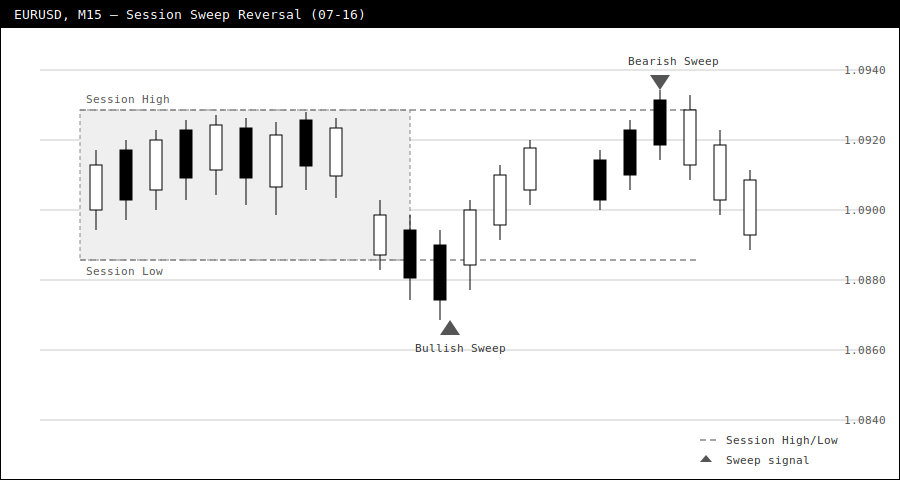
Fig. 1. EURUSD M15 chart showing the frozen session high/low (dashed gray lines), a bullish sweep of the session low with a confirmed close back inside the range (green arrow), and a later bearish sweep of the session high (red arrow).
 Broker Execution Diagnostics MT5
Read-only MT5 script reporting broker volume, price, stops, freeze, spread and execution constraints.
Order Block Mitigation Tracker
An MT5 indicator that detects ATR-filtered institutional order blocks and tracks, in real time, whether each zone has been mitigated by returning price.
Multi-Timeframe FVG Depth Meter
Scans multiple timeframes for unfilled Fair Value Gaps, plots them as zones directly on your chart, and tracks local bull/bear imbalance depth with a histogram and live dashboard.
 Trade Transaction Trace Logger MT5
Read-only OnTradeTransaction logger that records MT5 order, deal and position lifecycle events to local CSV and the Experts Journal.