Victor Christiaanse / Profil
- Information
|
8+ Jahre
Erfahrung
|
11
Produkte
|
165
Demoversionen
|
|
2
Jobs
|
0
Signale
|
0
Abonnenten
|
Buy any of my product today, and I give you a PinBar scanner (with RSI trend filter) for free!
This action is only today due to Easter. Send me a PM when you have purchased a product.
The new version will have the following additional features:
- There is now a dashboard available. This is a new feature to show the latest alerts on the chart. When you click on an alert, it will open a new chart for the applicable symbol and time frame. You can turn it on or off in the settings, you can also change colors and define how many alerts you want to see.
- Ability to clear the dashboard each new trading day
- The moving average settings can now be specified for each MA separately (Fast MA, Medium MA and Slow MA)
- You can now specify the MA Shift for each moving average
https://www.mql5.com/en/market/product/35375
The new version will have the following additional features:
- There is now a dashboard available. This is a new feature to show the latest alerts on the chart. When you click on an alert, it will open a new chart for the applicable symbol and time frame. You can turn it on or off in the settings, you can also change colors and define how many alerts you want to see.
- Ability to clear the dashboard each new trading day
- The moving average settings can now be specified for each MA separately (Fast MA, Medium MA and Slow MA)
- You can now specify the MA Shift for each moving average
Link to the product page: https://www.mql5.com/en/market/product/35375
Do you use Resistance and Support Trendlines? Then this EA will be very useful for you!
Draw the Resistance and Support trendlines on the chart, and this EA will create pending orders when the price touch the trendline.
The following pending orders will be created when the price touch the trendline:
1. Pending order in case the price breaks the trendline
2. Pending order in case the price bounce back from the trendline and reverse
https://www.mql5.com/en/market/product/36920
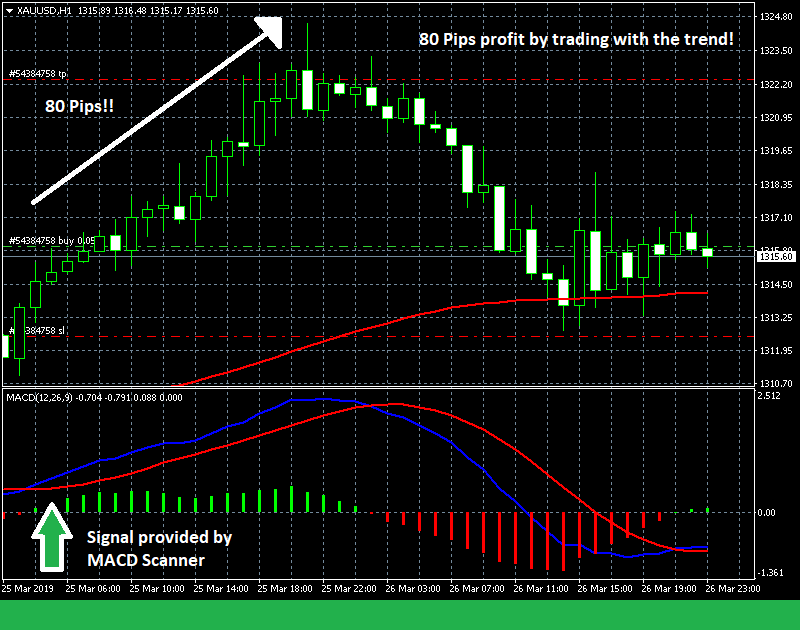
80 pips profit for this example...
MACD Scanner: https://www.mql5.com/en/market/product/35542#
The 3MA Scanner is the most popular scanner in the MQL Market and designed to scan all symbols, for all time frames, to find a cross of the 3 moving averages. When a cross is found, an alert is send to your mobile so you never miss a trade opportunity!
See an overview of the Three Moving Average Scanner in this VIDEO: https://youtu.be/95xqS7En5DM
https://www.mql5.com/en/market/product/35375

Wenn Sie Widerstands- und Unterstützungstrendlinien in Ihrem Handel verwenden, wird dieses Tool sehr nützlich für Sie sein! Der Trendline Trading EA ist ein intelligentes und einfaches Tool, das Ihnen bei Ihrem Handel mit Trendlinien auf Ihrem Chart hilft. Erstellen Sie einfach eine Trendlinie für den Widerstand und die Unterstützung, und der EA wird schwebende Aufträge erstellen, wenn der Preis die Trendlinie berührt. Die folgenden Aufträge werden erstellt, wenn der Kurs die Trendlinie berührt
https://www.mql5.com/en/market/product/36716
https://www.mql5.com/en/market/product/35542
Dieser Scanner überwacht den gesamten Markt auf Handelsmöglichkeiten für alle Symbole und für alle Zeitrahmen. Dieser Scanner alarmiert Sie auf Ihrem Computer oder auf Ihrem Handy, wenn eine Handelsmöglichkeit gefunden wurde. Drei gleitende Durchschnittsstrategien Die Strategie der drei gleitenden Durchschnitte ist eine sehr beliebte und bewährte Strategie. Der langsamste gleitende Durchschnitt wird verwendet, um die Richtung des Trends zu bestimmen. Wenn der Kurs über dem langsamsten gleitenden
Handel mit der Tastatur Eröffnen und schließen Sie Aufträge mit Ihrer Tastatur. Mit diesem Tool können Sie Aufträge mit Ihrer Tastatur öffnen und schließen. Da das Öffnen und Schließen von Aufträgen mit der Tastatur schneller geht als mit der Maus, ist dieses Tool für Scalper sehr nützlich. Wie funktioniert es? Wenn Sie die Taste "b" drücken, wird ein Kaufauftrag mit Losgröße, SL und TP, wie in den Einstellungen angegeben, geöffnet. Wenn Sie die Taste "s" drücken, wird ein Verkaufsauftrag mit
https://www.mql5.com/en/market/product/35542
This week only $30...
https://www.mql5.com/en/market/product/35542