Vladimir Pastushak / 个人资料
- 信息
|
13+ 年
经验
|
50
产品
|
850
演示版
|
|
0
工作
|
0
信号
|
0
订阅者
|
👋 我叫弗拉基米尔·帕斯图沙克(Vladimir Pastushak)。我是一名交易员和程序员,拥有20多年的金融市场交易经验,并长期从事交易自动化软件解决方案的开发。
💻 在此期间,我开发了大量交易算法、Expert Advisor(EA)和 MetaTrader 4、MetaTrader 5 工具,并持续在实际环境中测试和验证自己的交易理念。
📊 对我而言,工作中重要的不是夸张的承诺,而是算法逻辑、代码质量、交易系统的详细配置能力,以及在不同市场环境下客观评估系统运行表现的能力。
🔍 我的所有产品都基于个人实际经验开发,并在发布前进行测试。
⚙️ 我致力于开发让交易者能够理解运行逻辑、查看可用设置,并能够自行判断某个解决方案是否适合自己的交易工具。
提供 Set 文件以及产品演示版本,演示版本可使用30天。
VR Proton - https://trading-go.net/mqp_proton_zip
VR Smart Grid - https://trading-go.net/mqp_smart_grid_zip
VR Lollipop - https://trading-go.net/mqp_lollipop_zip
VR Locker - https://trading-go.net/mqp_locker_zip
VR Black Box - https://trading-go.net/mqp_black_box_zip
VR Watch list and Linker – https://trading-go.net/mqp_watch_list_and_linker_zip
VR Trade Panel - https://trading-go.net/mqp_trade_panel_zip
与我合作的经纪人:
RoboForex https://trading-go.net/mqrb
🔥 关于交易的一切 + Telegram 教学: https://t.me/tgforexen
💥 从官方渠道购买产品,您将获得:
1️⃣ 礼品、奖励以及其他程序。
2️⃣ 免费使用程序的机会。
3️⃣ 免费获得设置参数和 Set 文件。
4️⃣ 免费技术支持。
5️⃣ 所有更新均免费提供。
💥 欢迎访问我的个人网站: https://trading-go.net/
💻 在此期间,我开发了大量交易算法、Expert Advisor(EA)和 MetaTrader 4、MetaTrader 5 工具,并持续在实际环境中测试和验证自己的交易理念。
📊 对我而言,工作中重要的不是夸张的承诺,而是算法逻辑、代码质量、交易系统的详细配置能力,以及在不同市场环境下客观评估系统运行表现的能力。
🔍 我的所有产品都基于个人实际经验开发,并在发布前进行测试。
⚙️ 我致力于开发让交易者能够理解运行逻辑、查看可用设置,并能够自行判断某个解决方案是否适合自己的交易工具。
提供 Set 文件以及产品演示版本,演示版本可使用30天。
VR Proton - https://trading-go.net/mqp_proton_zip
VR Smart Grid - https://trading-go.net/mqp_smart_grid_zip
VR Lollipop - https://trading-go.net/mqp_lollipop_zip
VR Locker - https://trading-go.net/mqp_locker_zip
VR Black Box - https://trading-go.net/mqp_black_box_zip
VR Watch list and Linker – https://trading-go.net/mqp_watch_list_and_linker_zip
VR Trade Panel - https://trading-go.net/mqp_trade_panel_zip
与我合作的经纪人:
RoboForex https://trading-go.net/mqrb
🔥 关于交易的一切 + Telegram 教学: https://t.me/tgforexen
💥 从官方渠道购买产品,您将获得:
1️⃣ 礼品、奖励以及其他程序。
2️⃣ 免费使用程序的机会。
3️⃣ 免费获得设置参数和 Set 文件。
4️⃣ 免费技术支持。
5️⃣ 所有更新均免费提供。
💥 欢迎访问我的个人网站: https://trading-go.net/
Vladimir Pastushak
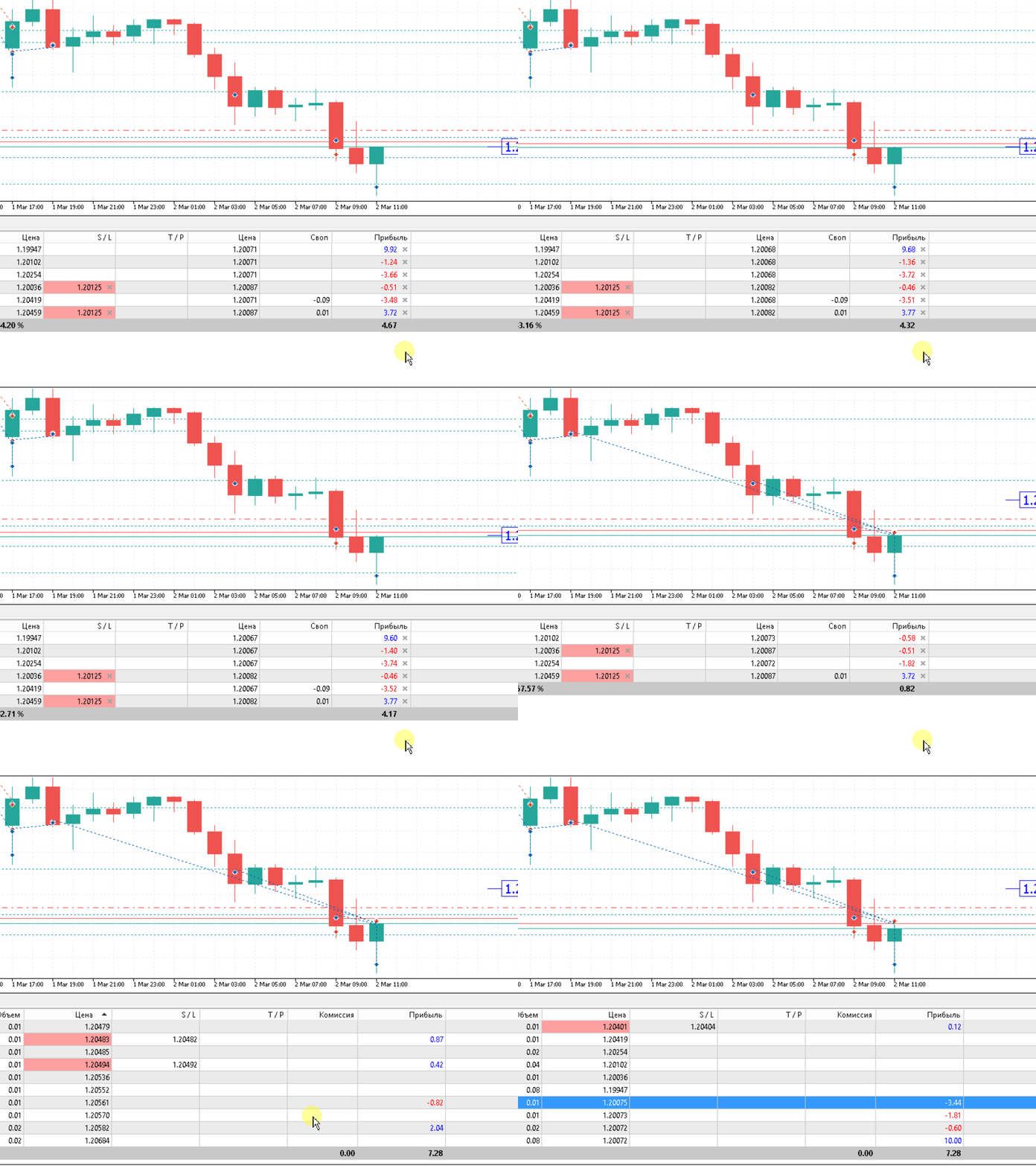
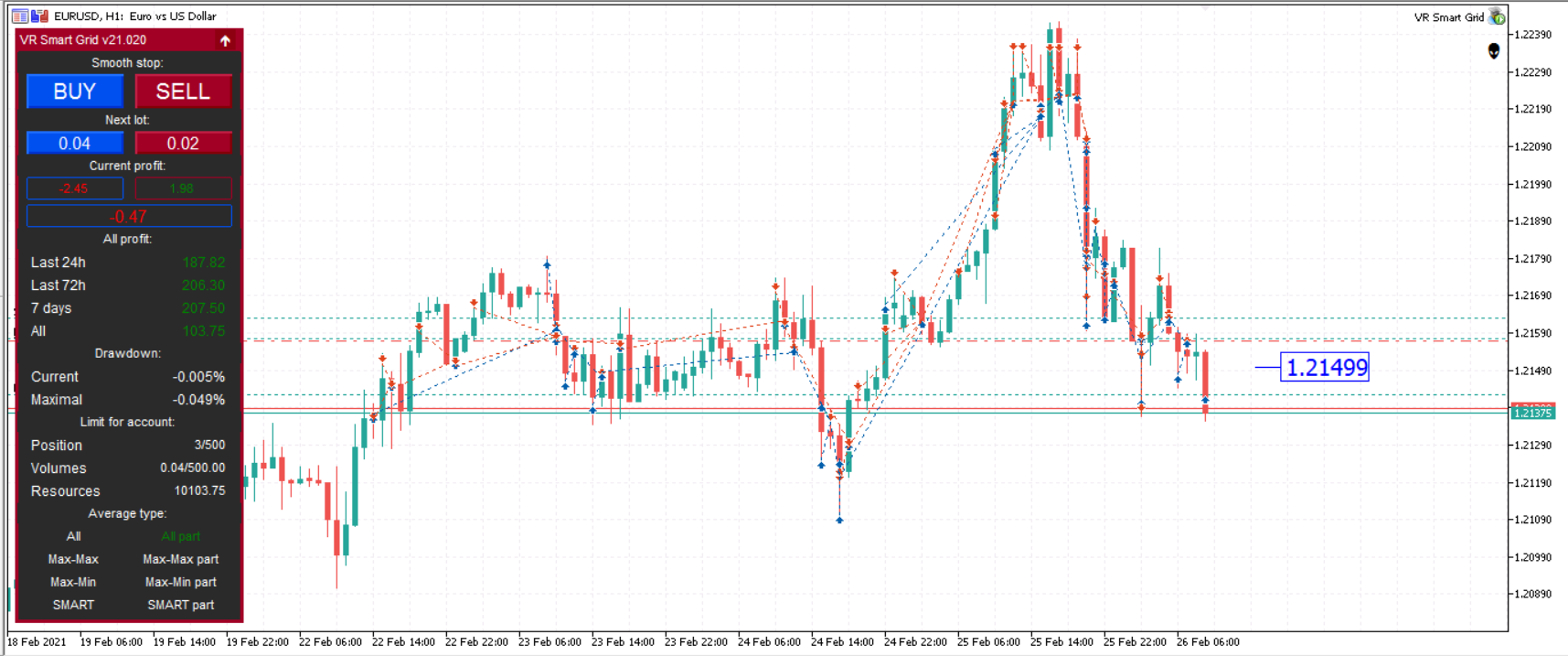
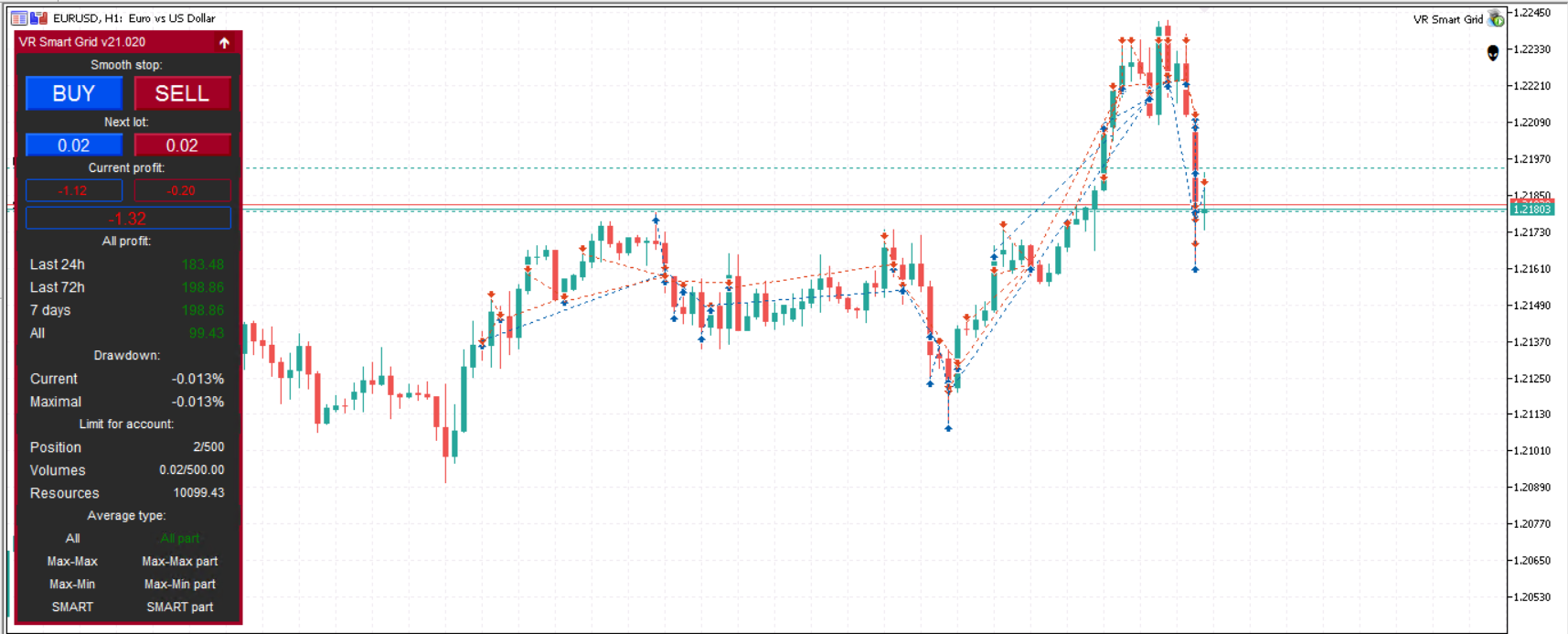
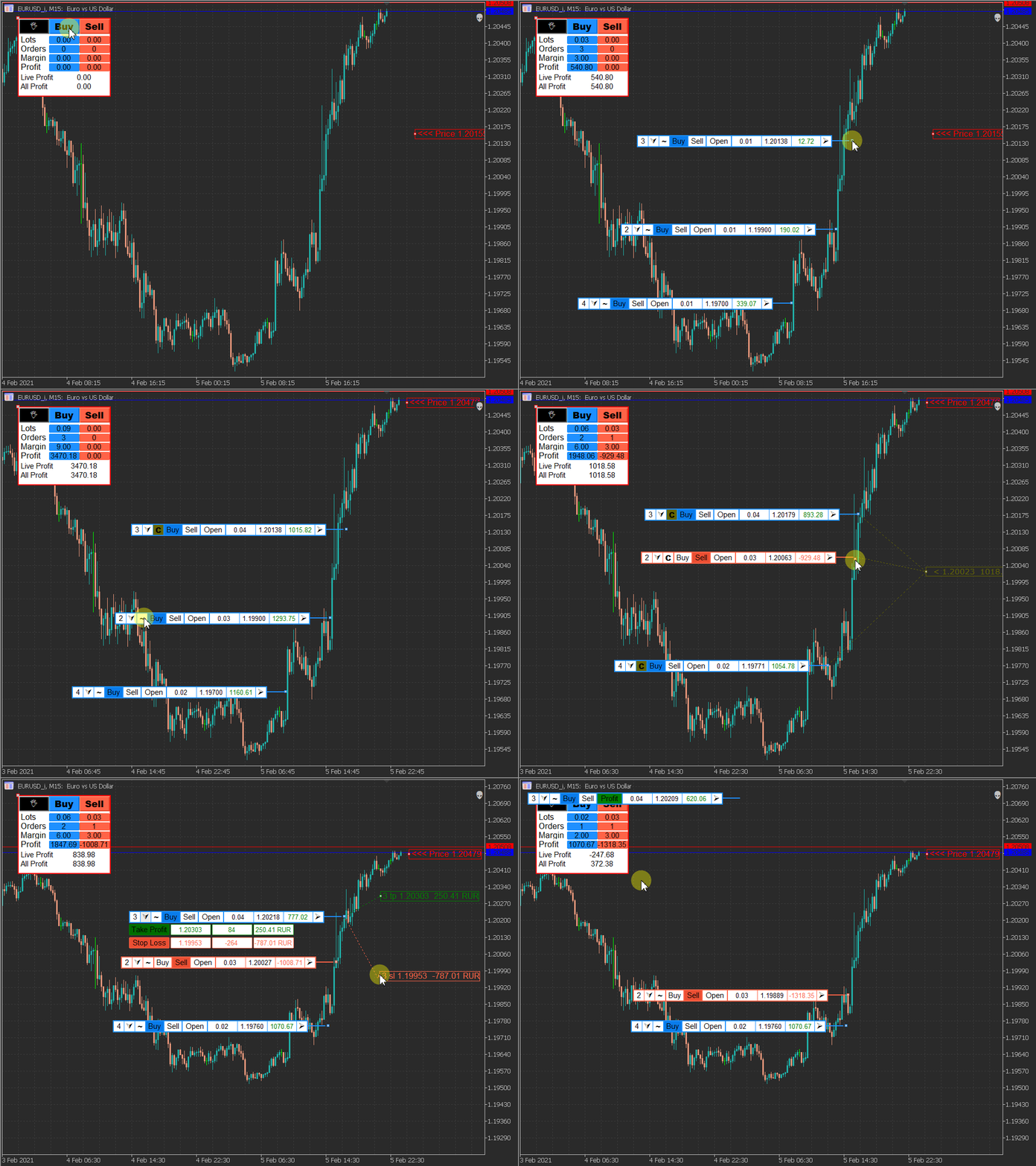
😜An example of the VR Smart Grid Expert Advisor. Method of partial closing of a group of orders. Video gif 😎
4️⃣ For MetaTrader 4 https://www.mql5.com/en/market/product/28140 5️⃣ For MetaTrader 5 https://www.mql5.com/en/market/product/38626
分享社交网络 ·
2
Vladimir Pastushak
❗❗❗ Important update! VR Smart Grid New version 21.030❗❗❗
We strongly recommend that you update your version of the program!
Fixed:
Display and calculation of profit in the information panel.
Grammatical errors in the description of the settings.
Calculation of average prices for partial closing of positions, now all calculations are done more accurately.
Added:
Smartphone notification, to receive messages from the advisor, you need to enable the option in the MetaTrader terminal settings.
Turn off the notification about trade and trade operations.
4️⃣ For MetaTrader 4 https://www.mql5.com/en/market/product/28140
5️⃣ For MetaTrader 5 https://www.mql5.com/en/market/product/38626
We strongly recommend that you update your version of the program!
Fixed:
Display and calculation of profit in the information panel.
Grammatical errors in the description of the settings.
Calculation of average prices for partial closing of positions, now all calculations are done more accurately.
Added:
Smartphone notification, to receive messages from the advisor, you need to enable the option in the MetaTrader terminal settings.
Turn off the notification about trade and trade operations.
4️⃣ For MetaTrader 4 https://www.mql5.com/en/market/product/28140
5️⃣ For MetaTrader 5 https://www.mql5.com/en/market/product/38626
分享社交网络 ·
1
RobotGrail
2021.03.01
Очень люблю твой советник ! Запускаю по тренду который по своему определяю. Правда сделай кнопки на панели для указания тренда пожалуйста :)

Vladimir Pastushak
Не зная ни сна и ни отдыха,
при лунном и солнечном свете,
Мы делаем деньги из воздуха,
что б снова пустить их на ветер...
при лунном и солнечном свете,
Мы делаем деньги из воздуха,
что б снова пустить их на ветер...
分享社交网络 ·
2
Vladimir Pastushak
🟢🟢🟢 Fine? 🟢🟢🟢
for mt 4 https://www.mql5.com/en/market/product/28140
for mt 5 https://www.mql5.com/en/market/product/38626
for mt 4 https://www.mql5.com/en/market/product/28140
for mt 5 https://www.mql5.com/en/market/product/38626
分享社交网络 ·
3
Vladimir Pastushak
Telegram group from developer Trading-Go join us! Be aware of new developments! https://t.me/tradinggoen
分享社交网络 ·
1
Vladimir Pastushak
https://youtu.be/pYgENbaviBw
Пятница 19 00 по Москве...
Пройдемся по валютам, акциям, криптовалютам.
Рассмотрим Ваши тиккеры!
Работаем с MetaTrader
Ссылка в телеграмм группу https://t.me/tradinggoea
Партнёрская ссылка на брокера Just2Trade + весь софт
https://www.finam.eu/ref/npa92UdcJm
Прямая ссылка на брокера Just2Trade без софта
https://just2trade.online
Посмотрим и подумаем над финансовыми инструментами.
Ссылка на заявку https://crm.trading-go.ru/zayavka
Ссылка на наш VPS https://vps.trading-go.ru/auth/login цены от 4,68$
#forex #forextrader #forexexpert #forexstrategy #forexindicator #tradinggo
Пятница 19 00 по Москве...
Пройдемся по валютам, акциям, криптовалютам.
Рассмотрим Ваши тиккеры!
Работаем с MetaTrader
Ссылка в телеграмм группу https://t.me/tradinggoea
Партнёрская ссылка на брокера Just2Trade + весь софт
https://www.finam.eu/ref/npa92UdcJm
Прямая ссылка на брокера Just2Trade без софта
https://just2trade.online
Посмотрим и подумаем над финансовыми инструментами.
Ссылка на заявку https://crm.trading-go.ru/zayavka
Ссылка на наш VPS https://vps.trading-go.ru/auth/login цены от 4,68$
#forex #forextrader #forexexpert #forexstrategy #forexindicator #tradinggo
分享社交网络 ·
2
Vladimir Pastushak
发布截图

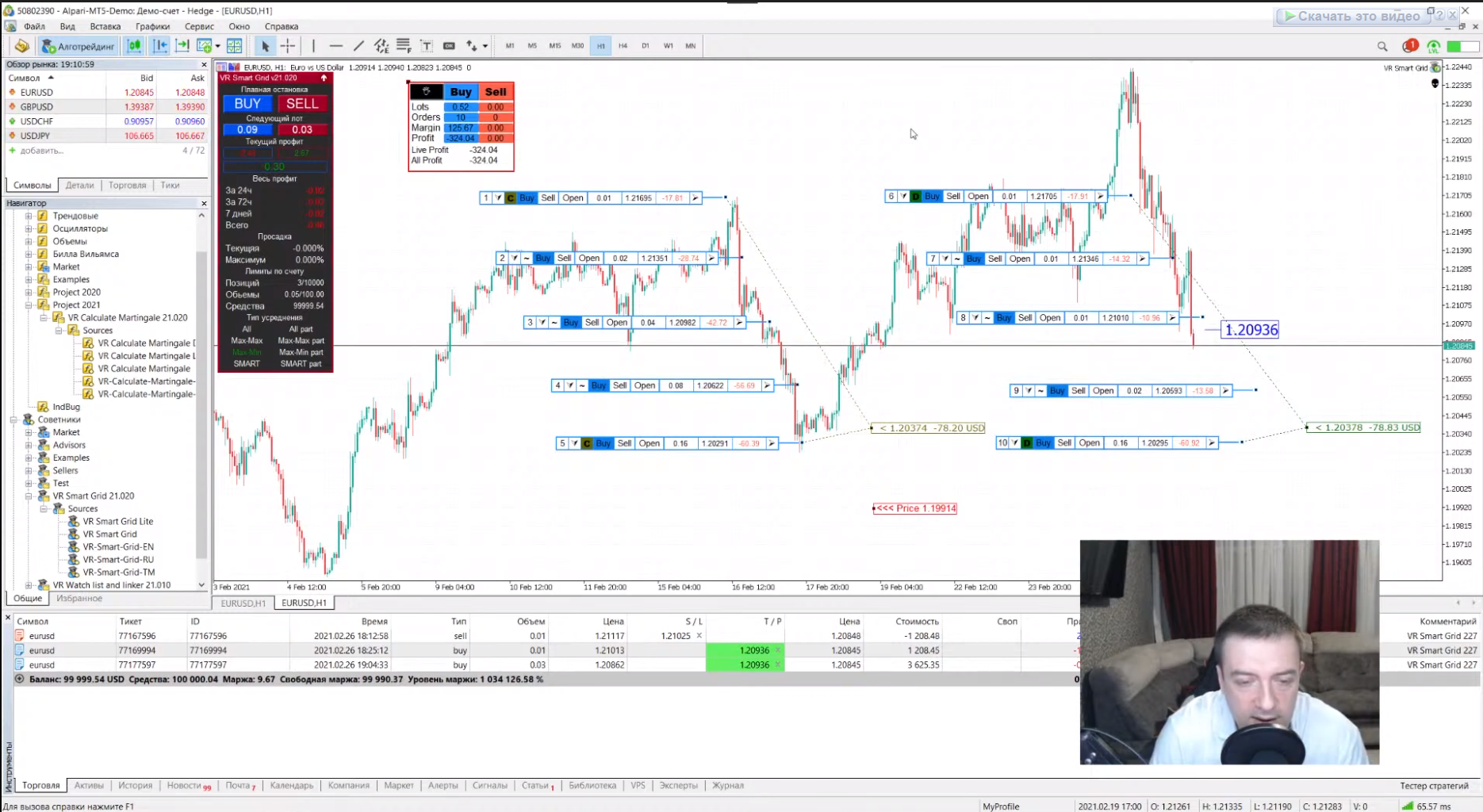
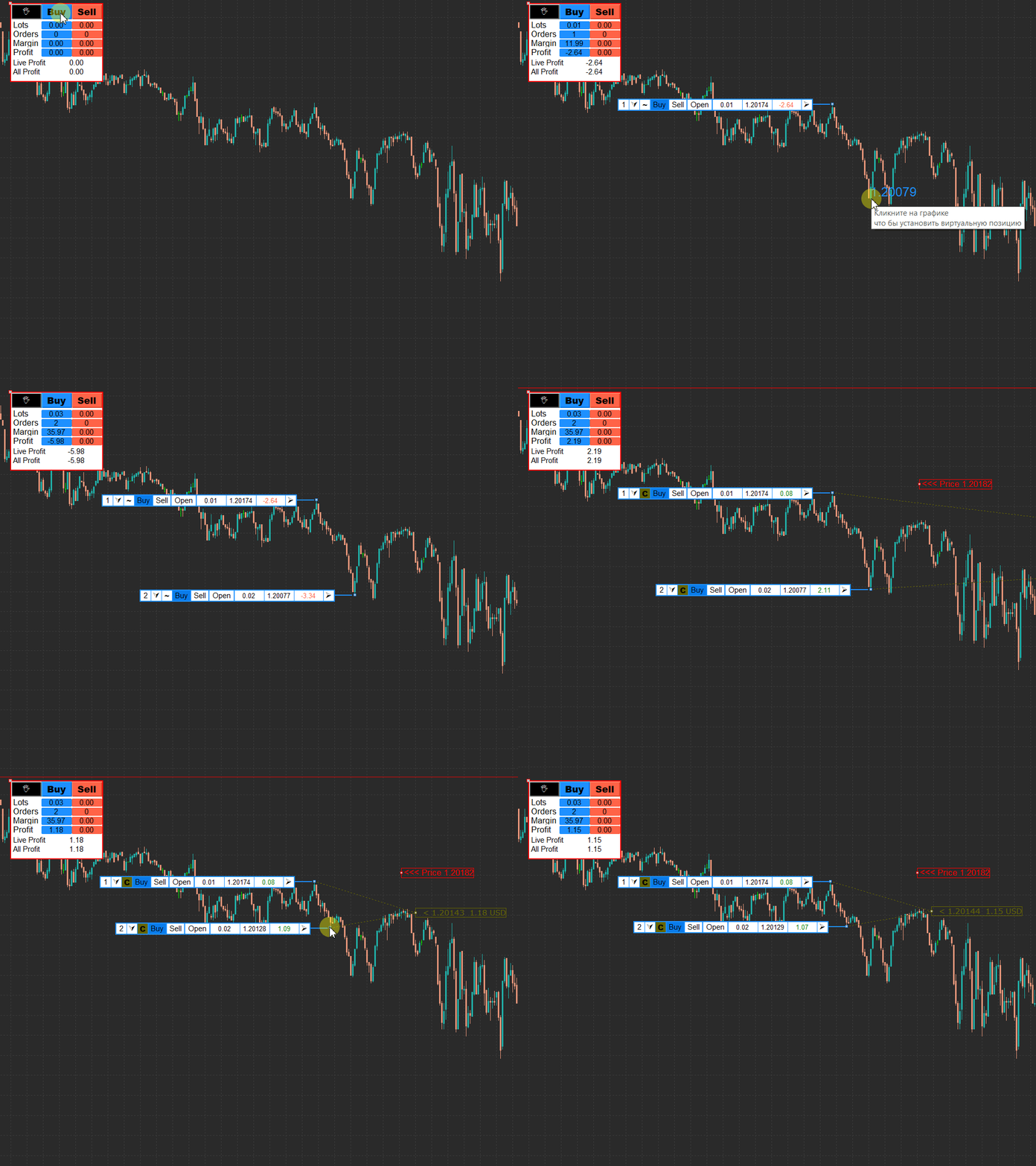
EURUSD, M5RoboForex LtdDemoДелаю рассчеты на калькуляторе для умной сети. Подбираю наиболее прибыльный и менее рискованные варианты.
分享社交网络 ·
2
746
Vladimir Pastushak
分享社交网络 ·
4
LIONEL PEREZ
2021.02.04
woahhhhhhhhhhh.....your a GOD to me right now lol........ I just started learning how to pyramid trades and knew it would takes weeks to a month to figure out how to calculate each position to find the total and what your created is unbelievable .. im going to message you in a few .. Thanks
Vladimir Pastushak
https://www.mql5.com/ru/market/product/13628 Mt 4
https://www.mql5.com/ru/market/product/42860 Mt 5
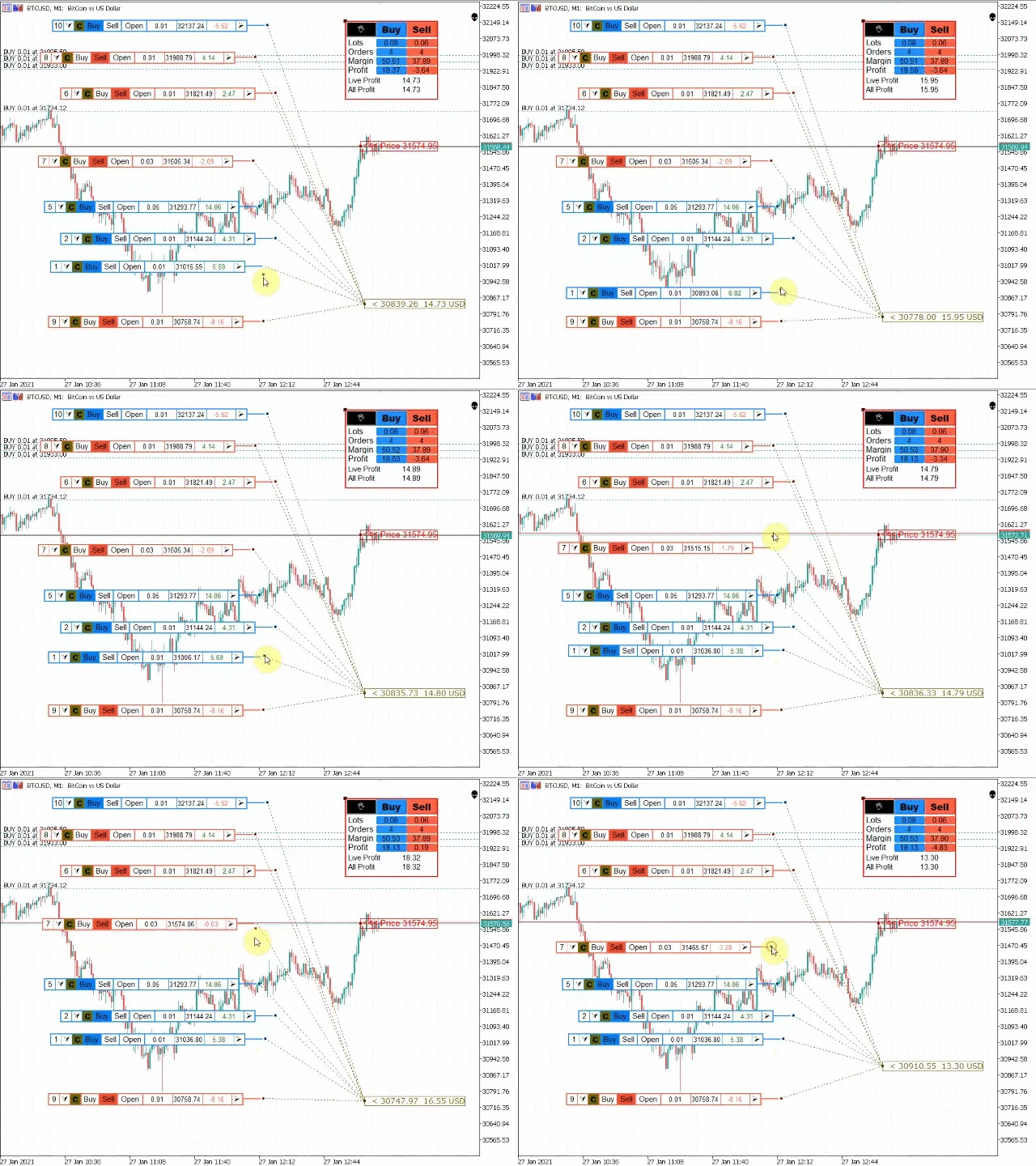
Forex Trader Risk Calculator VR-calculate Martingale
The main Forex currencies have two important differences from other exchange-traded instruments: high volatility and a stable average trading volume. These features are used in the grid strategy, which allows traders to conduct profitable trading over a long period of time.
The application of the grid can be easily recognized by a "nice" profit growth line of the Forex trader's account. The picture below shows examples of the seven best real trading accounts managed by the Alpari broker investment service. At least three of them, marked with arrows, trade different types of grids, earning tens of thousands of dollars in profit for themselves and their investors.
The main secret of the grid strategy is that the results do not depend so much on the correctness of the currency pairs trends prediction. When making a loss, traders use the volatility of the Forex market, which guarantees frequent reversals of the exchange rate.
By adding new positions for averaging, sometimes increasing their size, the trader covers previous losses, gaining a minimum profit without even guessing the market movement or closing all trades at break-even.
In Forex textbooks, the Martingale strategy has become a household name for guaranteed account loss. In reality, it is used by up to 75% of the best Forex investment management services.
Criticism of the strategy is justified by the fact that its durability depends on the ability to calculate the lot, the correct choice of the number of averages and the size of the increase in positions. The trader may not have enough deposit to maintain the margin of open positions, then the broker will forcibly close his account by a margin call.
VR-calculate Martingale is a trader's calculator that allows even a beginner to calculate all the risks in advance, based on the stability of the average trading range. Professional traders can use VR-calculate Martingale as a position calculator to model future order grids on the chart using complex tactics, such as "Swing", "Tumbler", and program the opening of "locks".
Main features of the VR-calculate Martingale position calculator
The VR-calculate Martingale indicator is a calculator for MetaTrader 4 and 5, which you can download and use for free to calculate the average position price of in the Forex market.
The tool works on all timeframes and asset types, including the stock market as an averaging calculator for stocks supported by Metatrader. When working in the stock or cryptocurrency calculator mode, the trader should take into account that these instruments may have limited leverage. Pay attention to the trading conditions and specifications.
VR-calculate Martingale is a trading indicator that allows you to calculate the margin, the average value. potential gains and losses of specific positions or in total. With it, you can simultaneously run up to 7 independent grids on a single chart.
The algorithm of the VR-calculate Martingale calculator for Forex strategies
VR-calculate Martingale displays its own price tag on the chart. By moving it on the chart, a trader can calculate positions relative to any given currency pair rate or select the current market value.
Future trades on the grid are displayed as a set of marks on the chart. They have their own menu and informers with the results of profit/loss, relative to the price tag set, the future exchange rate of the currency pair. The overall result of the trades is visible in a separate window, displayed in any place on the chart that is convenient for the trader.
Knowing the average trading range or automatically calculating its levels on the chart using the free VR Atr Pro indicator, the trader can:
Pre-determine the number of trades for averaging, based on the support or resistance levels
Calculate the margin of the total position, simulate the Martingale, estimating the size of the increase in positions at the points of the maximum price movement, calculated via VR Atr Pro
Determine the potential profit/loss by setting the total profit/stop loss level, find the breakeven level of the entire grid
Build several multidirectional networks for modeling locks, calculate the lot for the locked position
Downloading, installing, and configuring the indicator
VR-calculate Martingale is downloaded via the link at the beginning of the description of the work of this Forex calculator. In the archive, the trader should select the trading calculator file corresponding to the version of the Metatrader (ex4 for MT4, ex5 for MT5). The RU and EN indexes indicate the Russian and English versions of the indicator menu.
The selected version of the VR-calculate Martingale trader's calculator is installed in the Indicators folder, which you need to find through the "Data Directory" option via the "File" menu in the pre-launched Metatrader terminal.
If the calculator file is copied correctly, the indicator can be seen in the "Navigator" window, it is displayed after pressing the shortcut key, as shown in the figure.
By dragging the VR-calculate Martingale risk calculator with the right mouse button onto any chart, the trader will get access to the indicator settings window.
Setting up the VR-calculate Martingale Forex Calculator indicator
The main settings of VR-calculate Martingale are located on the "Input Parameters" tab of the "Settings" window. It opens at the first launch of the indicator or via the right mouse button menu when the trading indicator is already attached to the chart.
Indicator prefix – a unique grid label, which allows each copy of the indicator to calculate only its own orders and set different price labels
Start lots – the lot size in the position window, set by default when you click the Buy/Stop buttons
Take Profit and Stop Loss by default will automatically calculate the levels of profit/loss (in points)
Menu X and Y position - coordinates of the main indicator window on the chart. It can be dragged manually with the mouse
The rest of the menu functions determine the color scheme of the windows and buttons of VR-calculate Martingale, without directly affecting the operation of the Forex calculator.
https://www.mql5.com/ru/market/product/42860 Mt 5
Forex Trader Risk Calculator VR-calculate Martingale
The main Forex currencies have two important differences from other exchange-traded instruments: high volatility and a stable average trading volume. These features are used in the grid strategy, which allows traders to conduct profitable trading over a long period of time.
The application of the grid can be easily recognized by a "nice" profit growth line of the Forex trader's account. The picture below shows examples of the seven best real trading accounts managed by the Alpari broker investment service. At least three of them, marked with arrows, trade different types of grids, earning tens of thousands of dollars in profit for themselves and their investors.
The main secret of the grid strategy is that the results do not depend so much on the correctness of the currency pairs trends prediction. When making a loss, traders use the volatility of the Forex market, which guarantees frequent reversals of the exchange rate.
By adding new positions for averaging, sometimes increasing their size, the trader covers previous losses, gaining a minimum profit without even guessing the market movement or closing all trades at break-even.
In Forex textbooks, the Martingale strategy has become a household name for guaranteed account loss. In reality, it is used by up to 75% of the best Forex investment management services.
Criticism of the strategy is justified by the fact that its durability depends on the ability to calculate the lot, the correct choice of the number of averages and the size of the increase in positions. The trader may not have enough deposit to maintain the margin of open positions, then the broker will forcibly close his account by a margin call.
VR-calculate Martingale is a trader's calculator that allows even a beginner to calculate all the risks in advance, based on the stability of the average trading range. Professional traders can use VR-calculate Martingale as a position calculator to model future order grids on the chart using complex tactics, such as "Swing", "Tumbler", and program the opening of "locks".
Main features of the VR-calculate Martingale position calculator
The VR-calculate Martingale indicator is a calculator for MetaTrader 4 and 5, which you can download and use for free to calculate the average position price of in the Forex market.
The tool works on all timeframes and asset types, including the stock market as an averaging calculator for stocks supported by Metatrader. When working in the stock or cryptocurrency calculator mode, the trader should take into account that these instruments may have limited leverage. Pay attention to the trading conditions and specifications.
VR-calculate Martingale is a trading indicator that allows you to calculate the margin, the average value. potential gains and losses of specific positions or in total. With it, you can simultaneously run up to 7 independent grids on a single chart.
The algorithm of the VR-calculate Martingale calculator for Forex strategies
VR-calculate Martingale displays its own price tag on the chart. By moving it on the chart, a trader can calculate positions relative to any given currency pair rate or select the current market value.
Future trades on the grid are displayed as a set of marks on the chart. They have their own menu and informers with the results of profit/loss, relative to the price tag set, the future exchange rate of the currency pair. The overall result of the trades is visible in a separate window, displayed in any place on the chart that is convenient for the trader.
Knowing the average trading range or automatically calculating its levels on the chart using the free VR Atr Pro indicator, the trader can:
Pre-determine the number of trades for averaging, based on the support or resistance levels
Calculate the margin of the total position, simulate the Martingale, estimating the size of the increase in positions at the points of the maximum price movement, calculated via VR Atr Pro
Determine the potential profit/loss by setting the total profit/stop loss level, find the breakeven level of the entire grid
Build several multidirectional networks for modeling locks, calculate the lot for the locked position
Downloading, installing, and configuring the indicator
VR-calculate Martingale is downloaded via the link at the beginning of the description of the work of this Forex calculator. In the archive, the trader should select the trading calculator file corresponding to the version of the Metatrader (ex4 for MT4, ex5 for MT5). The RU and EN indexes indicate the Russian and English versions of the indicator menu.
The selected version of the VR-calculate Martingale trader's calculator is installed in the Indicators folder, which you need to find through the "Data Directory" option via the "File" menu in the pre-launched Metatrader terminal.
If the calculator file is copied correctly, the indicator can be seen in the "Navigator" window, it is displayed after pressing the shortcut key, as shown in the figure.
By dragging the VR-calculate Martingale risk calculator with the right mouse button onto any chart, the trader will get access to the indicator settings window.
Setting up the VR-calculate Martingale Forex Calculator indicator
The main settings of VR-calculate Martingale are located on the "Input Parameters" tab of the "Settings" window. It opens at the first launch of the indicator or via the right mouse button menu when the trading indicator is already attached to the chart.
Indicator prefix – a unique grid label, which allows each copy of the indicator to calculate only its own orders and set different price labels
Start lots – the lot size in the position window, set by default when you click the Buy/Stop buttons
Take Profit and Stop Loss by default will automatically calculate the levels of profit/loss (in points)
Menu X and Y position - coordinates of the main indicator window on the chart. It can be dragged manually with the mouse
The rest of the menu functions determine the color scheme of the windows and buttons of VR-calculate Martingale, without directly affecting the operation of the Forex calculator.
分享社交网络 ·
2
Vladimir Pastushak
分享的产品
指标 VR Calculate Martingale 是一个强大的工具,可以无风险地初步计算任何交易策略。由于该指标使用虚拟订单,交易者可以提前计算交易账户上事件的任何发展。您不再需要EXCEL表格和计算器,您不需要了解不同交易手数的多向头寸的平均公式。一切都会帮助你计算 VR Calculate Martingale. 设置、设置文件、演示版本、说明、问题解决,可以从以下位置获取 [博客] 您可以在以下位置阅读或撰写评论 [关联] 版本为 [MetaTrader 4] 该指标于 2015 年开发,旨在计算头寸网络中的交易,现已在全球范围内进行了重大更新。感谢大量的评论和建议,该指标得到了改进和更新。 计算器的基本功能 VR Calculate Martingale 创建虚拟订单,无交易风险 直接在图表上方便地编辑虚拟订单 网络上的仓位分组,最多可以创建 7 组订单 将虚拟订单附加到现有市场头寸 按订单组单独核算利润 止盈和止损水平的损益分开核算 虚拟市价订单和已平仓订单的利润分开计算 抵押品要求的计算 追加保证金水平显示 按价格和时间均匀分布持仓
分享社交网络 ·
1
Vladimir Pastushak
Happy new Year to you!
Time for discounts -30%!
https://www.mql5.com/en/users/voldemar/seller
C наступающим вас Новым Годом!
Время скидок -30%!
https://www.mql5.com/ru/users/voldemar/seller
Time for discounts -30%!
https://www.mql5.com/en/users/voldemar/seller
C наступающим вас Новым Годом!
Время скидок -30%!
https://www.mql5.com/ru/users/voldemar/seller
分享社交网络 ·
1
: