Evgeniy Scherbina / 个人资料
- 信息
|
12+ 年
经验
|
33
产品
|
598
演示版
|
|
0
工作
|
0
信号
|
0
订阅者
|
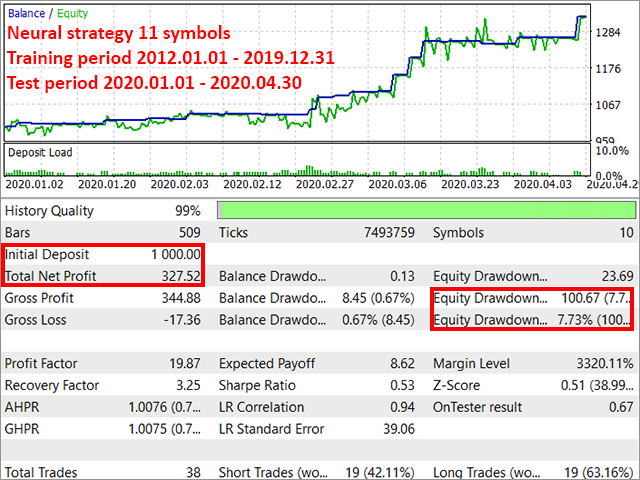
The good news is that you can now get your real drawdown when you do a visual test with my advisors. Like the following picture for the training period of January 2019 - January 2020. Check it in the history log of the tester subterminal for a visual test of the advisor with defaults.
The advisor NewsCatcher Free opens trades when the price makes a reversal move from support and resistance levels. Market entries should be confirmed by the Relative Strength Index (RSI). The RSI is implemented as a tachometer. It is recommended to use this advisor in a highly volatile market after a political event or a release of major economic data. You can use this advisor in the semi-automated mode (the RSI performs an information role) or in the fully automated mode (the RSI decides when
The advisor NewsCatcher Visual automatically downloads actual data from the mql5.com calendar. The advisor can work in the "autoclick" mode, that is it can open trades automatically by comparing actual and forecast values. It also allows to manually open both instant and pending orders with a set volume. Recommendations By default the advisor NewsCatcher Visual applies the "autoclick" strategy to all events of high volatility. This allows the advisor to work in the fully automatic mode. However
The advisor NewsCatcher Visual automatically downloads actual data from 2 economic calendars: investing.com or mql5.com . The advisor can work in the "autoclick" mode, that is it can open trades automatically by comparing actual and forecast values. It also allows to manually open both instant and pending orders with a set volume. Recommendations By default the advisor NewsCatcher Visual applies the "autoclick" strategy to all events of high volatility. This allows the advisor to work in the
NewsCatcher Pro opens both pending and market orders based on data from the mql5.com calendar. In live mode, NewsCatcher Pro automatically downloads the calendar, opens orders, trails and closes orders. NewsCatcher Pro can trade any event from the calendar with any symbol available in MetaTrader, including Gold, Oil and cross-rates. To change the default symbol, go to the event view you want to change it for. NewsCatcher Pro uses two strategies: Strategy 1 (pending orders): the advisor opens two
High Trend Pro - https://www.mql5.com/en/market/product/34485
(MT5 https://www.mql5.com/en/market/product/34460)
and TradeKeeper Pro - https://www.mql5.com/en/market/product/34434
(MT5 https://www.mql5.com/en/market/product/34433)
High Trend Lite - https://www.mql5.com/en/market/product/34878
(MT5 https://www.mql5.com/en/market/product/34879)
and TradeKeeper Lite - https://www.mql5.com/en/market/product/34405
(MT5 https://www.mql5.com/en/market/product/34404)