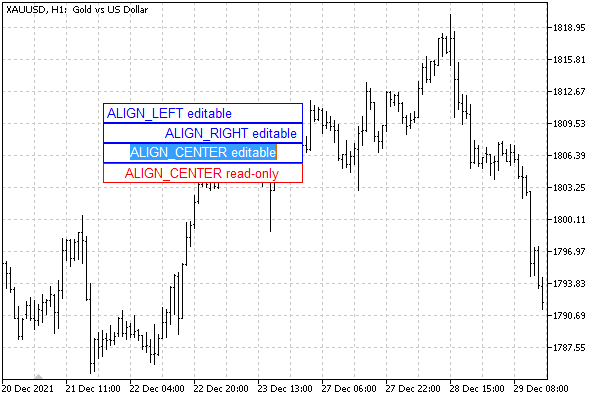
#include "ObjectPrefix.mqh"
void SetupEdit(const int x, const int y, const int dx, const int dy,
const ENUM_ALIGN_MODE alignment = ALIGN_LEFT, const bool readonly = false)
{
// create an object with a description of the properties
const string props = EnumToString(alignment)
+ (readonly ? " read-only" : " editable");
const string name = ObjNamePrefix + "Edit" + props;
ObjectCreate(0, name, OBJ_EDIT, 0, 0, 0);
// position and size
ObjectSetInteger(0, name, OBJPROP_XDISTANCE, x);
ObjectSetInteger(0, name, OBJPROP_YDISTANCE, y);
ObjectSetInteger(0, name, OBJPROP_XSIZE, dx);
ObjectSetInteger(0, name, OBJPROP_YSIZE, dy);
// specific properties of input fields
ObjectSetInteger(0, name, OBJPROP_ALIGN, alignment);
ObjectSetInteger(0, name, OBJPROP_READONLY, readonly);
// colors (different depending on editability)
ObjectSetInteger(0, name, OBJPROP_BGCOLOR, clrWhite);
ObjectSetInteger(0, name, OBJPROP_COLOR, readonly ? clrRed : clrBlue);
// content
ObjectSetString(0, name, OBJPROP_TEXT, props);
// tooltip for editable
ObjectSetString(0, name, OBJPROP_TOOLTIP,
(readonly ? "\n" : "Click me to edit"));
}
void OnStart()
{
SetupEdit(100, 100, 200, 20);
SetupEdit(100, 120, 200, 20, ALIGN_RIGHT);
SetupEdit(100, 140, 200, 20, ALIGN_CENTER);
SetupEdit(100, 160, 200, 20, ALIGN_CENTER, true);
}
|