In the indicator is added reset button the boundaries calculate in the zone of visibility schedule. Build chart when you change the time-frame has become much more convenient.
В индикатор добавлена кнопка возврата границ расчета в зону видимости графика. Строить диаграммы при смене тайм-фрейма стало значительно удобнее.
For example, i want to load 100 days back daily profile, instead of moving the blue line , it load for me the 100 days? thanks.
Ask a question ... Want diurnal profiles on the period of 100 days. If so, this is a completely different indicators. I have it there, but not published. If you want to display the profile of a particular day, then select it on the daily chart, and then go to work time-frame and press profiling. It's simple.
Сегодня вышло обновление индикатора ProfileVolumesMarket.
1. Оптимизирован алгоритм расчета индикатора. 2. Проверка целостности исторических данных производится в автоматическом режиме и выбираются оптимальные для данного периода параметры. 3. Расчет индикатора теперь производится по сигналам генерируемым системным таймером, что позволяет работать с ним даже при закрытии рынка.
Индикатор позволяет точно прогнозировать уровни входа в рынок и уровни закрытия позиций. Функционал индикатора предоставляет трейдеру возможность анализировать профиль объема на любом временном отрезке, что является отличительной особенностью ProfileVolumesMarket от аналогов.
- additional button for (1)placing the indicator calculation range borders outside the chart ex. 100-bars ahead OR (2) making them in-visible. It is not highly critical however probably usefull at least for some users.
- additional button for (1)placing the indicator calculation range borders outside the chart ex. 100-bars ahead OR (2) making them in-visible. It is not highly critical however probably usefull at least for some users.
Thank you for option of changing the corner.
Regards,
Hi.
Levels calculated by volume are determined not by a clear number of bars, but by extremes. Therefore, in your proposal, I see no reason.
Здравствуйте Сергей, скажите в чем может быть причина, скачал демо версию, а в тестере не отображается ничего кроме вертикальных линий, пробовал переустановить терминал не помогло.
Здравствуйте Сергей, скажите в чем может быть причина, скачал демо версию, а в тестере не отображается ничего кроме вертикальных линий, пробовал переустановить терминал не помогло.
Привет! Эта версия индикатора не тестируется в тестере стратегий, так как сигнал генерируется внутренним системным таймером. Скоро выйдет версия, где этот недостаток будет устранен. Пока рекомендую скачать демо-версию. http://www.mql5.com/ru/market/product/9447. Функционал урезан, но для ознакомления вполне достаточный.
Изменения: 1. Введен параметр Set_Mode. - В режиме ModeTimer расчет индикатора производится по сигналам генерируемым внутренним системным таймером, что позволяет работать с ним даже при закрытии рынка. - В режиме ModeTick перерасчет индикатора производится ежеминутно, что позволяет отслеживать текущие изменения объема и проверить работу индикатора в режиме тестирования. 2. Введен параметр ShiftBars, который позволяет при необходимости смещать диаграмму по горизонтали влево.
Changes: 1. Added the Set_Mode parameter. - In the ModeTimer mode, the indicator calculation is based on the signal generated by the internal system timer, which allows working with it even when the market is closed. - In the ModeTick mode, the indicator is recalculated every minute, which allows tracking the current changes in the volume and checking the indicator operation in test mode. 2. Added the ShiftBars parameter, which allows shifting the histogram horizontally to the left, if necessary.
Теперь при установке параметра Set_Mode = ModeTick в режиме тестирования можно не только проверить работу индикатора, но и создавать собственные стратегии на его основе.

Interest product
Question Can use in renko chart
And another Question
This product calculate same Volume Ticks ResSup but different at ProfileVolumesMarket can look in the past and Select duration right ?
Interest product
Question Can use in renko chart
And another Question
This product calculate same Volume Ticks ResSup but different at ProfileVolumesMarket can look in the past and Select duration right ?
Hi, could you add an option to change the corner of the buuton ?
In the indicator is added reset button the boundaries calculate in the zone of visibility schedule. Build chart when you change the time-frame has become much more convenient.
В индикатор добавлена кнопка возврата границ расчета в зону видимости графика. Строить диаграммы при смене тайм-фрейма стало значительно удобнее.
Can you make the option to select XX days back ?
For example, i want to load 100 days back daily profile, instead of moving the blue line , it load for me the 100 days? thanks.
Can you make the option to select XX days back ?
For example, i want to load 100 days back daily profile, instead of moving the blue line , it load for me the 100 days? thanks.
Hi,
I have downloaded the demo version of the indicator and tried to run it on the strategy tester with Renko charts, but nothing is diplayed ?
Roberto Zendrini
Hi,
I have downloaded the demo version of the indicator and tried to run it on the strategy tester with Renko charts, but nothing is diplayed ?
Roberto Zendrini
Siergiej indicator is very good. Thank you.
Pls consider option to place buttons in different corners. It is important :) Yes it is. No need to prove it just believe me ;)
Testing demo on EurUSD, I can not change the boundary range. Does it work on Demo?
Сегодня вышло обновление индикатора ProfileVolumesMarket.
1. Оптимизирован алгоритм расчета индикатора.
2. Проверка целостности исторических данных производится в автоматическом режиме и выбираются оптимальные для данного периода параметры.
3. Расчет индикатора теперь производится по сигналам генерируемым системным таймером, что позволяет работать с ним даже при закрытии рынка.
Индикатор позволяет точно прогнозировать уровни входа в рынок и уровни закрытия позиций.
Функционал индикатора предоставляет трейдеру возможность анализировать профиль объема на любом временном отрезке, что является отличительной особенностью ProfileVolumesMarket от аналогов.
Sergey pls consider additional feature :
- additional button for (1)placing the indicator calculation range borders outside the chart ex. 100-bars ahead OR (2) making them in-visible. It is not highly critical however probably usefull at least for some users.
Thank you for option of changing the corner.
Regards,
Sergey pls consider additional feature :
- additional button for (1)placing the indicator calculation range borders outside the chart ex. 100-bars ahead OR (2) making them in-visible. It is not highly critical however probably usefull at least for some users.
Thank you for option of changing the corner.
Regards,
Hi.
Levels calculated by volume are determined not by a clear number of bars, but by extremes. Therefore, in your proposal, I see no reason.
Здравствуйте Сергей, скажите в чем может быть причина, скачал демо версию, а в тестере не отображается ничего кроме вертикальных линий, пробовал переустановить терминал не помогло.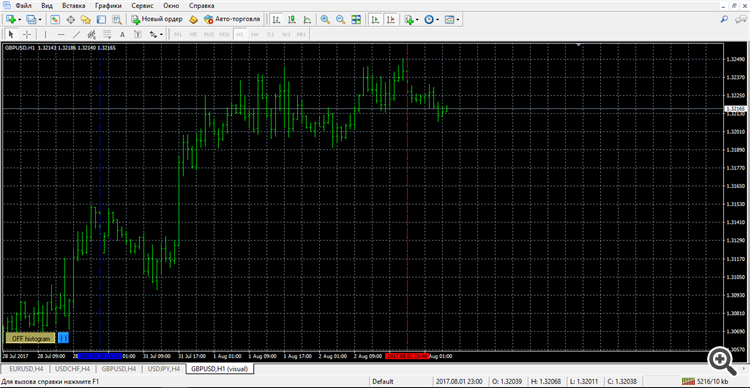
Здравствуйте Сергей, скажите в чем может быть причина, скачал демо версию, а в тестере не отображается ничего кроме вертикальных линий, пробовал переустановить терминал не помогло.
Привет! Эта версия индикатора не тестируется в тестере стратегий, так как сигнал генерируется внутренним системным таймером. Скоро выйдет версия, где этот недостаток будет устранен. Пока рекомендую скачать демо-версию. http://www.mql5.com/ru/market/product/9447. Функционал урезан, но для ознакомления вполне достаточный.
Опубликована Версия 4.0
Изменения:
1. Введен параметр Set_Mode.
- В режиме ModeTimer расчет индикатора производится по сигналам генерируемым внутренним системным таймером, что позволяет работать с ним даже при закрытии рынка.
- В режиме ModeTick перерасчет индикатора производится ежеминутно, что позволяет отслеживать текущие изменения объема и проверить работу индикатора в режиме тестирования.
2. Введен параметр ShiftBars, который позволяет при необходимости смещать диаграмму по горизонтали влево.
Changes:
1. Added the Set_Mode parameter.
- In the ModeTimer mode, the indicator calculation is based on the signal generated by the internal system timer, which allows working with it even when the market is closed.
- In the ModeTick mode, the indicator is recalculated every minute, which allows tracking the current changes in the volume and checking the indicator operation in test mode.
2. Added the ShiftBars parameter, which allows shifting the histogram horizontally to the left, if necessary.
Теперь при установке параметра Set_Mode = ModeTick в режиме тестирования можно не только проверить работу индикатора, но и создавать собственные стратегии на его основе.