Velox Node Trade Copier Pro
- 유틸리티
- 버전: 1.10
- 활성화: 5

VeloxNode Trade Copier PRO
Advanced Local MT5 Trade Copying with Socket Communication
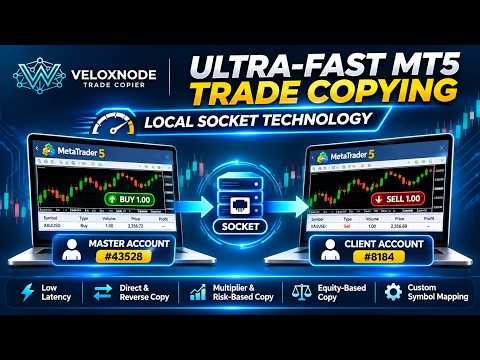
VeloxNode Trade Copier PRO is an advanced MetaTrader 5 trade copying solution designed to replicate trading activities between a Master account and multiple Client accounts running on the same PC or VPS.
Using Local Socket Technology, PRO supports direct communication between trading terminals without relying on an external cloud server. It also supports file-based communication as an alternative transport method.
With direct and reverse copying, flexible position sizing, symbol mapping and automated trade synchronisation, VeloxNode PRO provides configurable trade replication for traders managing multiple accounts.
Key Features
1. Local Socket Communication
Use TCP socket communication to transfer trade information directly between MT5 terminals running on the same PC or VPS.
A file-based transport option is also available, providing an alternative communication method.
2. Direct and Reverse Copying
Choose how trades are replicated:
- Direct Copy: Master Buy becomes Client Buy, and Master Sell becomes Client Sell.
- Reverse Copy: Master Buy becomes Client Sell, and Master Sell becomes Client Buy.
Reverse mode also supports corresponding Stop Loss and Take Profit distance adjustments relative to the Client's actual entry price.
3. Multiple Client Accounts
Connect multiple Client accounts to a Master account using the configured communication channels.
Each Client can have its own copying preferences and position-sizing configuration.
4. Flexible Position Sizing
Select the method that suits your account management requirements:
- Multiplier: Adjust the Master's trade volume using a selected multiplier.
- Fixed Lot: Use a predefined volume for copied trades.
- Balance Ratio: Calculate volume based on the relative account balances.
- Equity Ratio: Calculate volume based on the relative account equities.
- Risk Percentage: Calculate position size using the configured risk percentage.
A maximum lot-size limit is also available to control copied trade volume.
5. Smart Symbol Mapping
Copy trades between instruments with different broker naming conventions.
Configure prefixes, suffixes or individual symbol mappings.
Examples:
- EURUSD → EURUSD.pro
- XAUUSD → GOLD
- NAS100 → USTEC
6. Automated Synchronisation and Recovery
The Client EA monitors Master trade information and synchronises copied positions.
Following a terminal restart, the Client can reconcile its open positions against the current Master account state to identify and correct differences.
A configurable data-age protection setting also allows the Client to pause copying when Master information becomes outdated.
Supported Trading Operations
VeloxNode PRO supports the replication of:
- Market Buy and Sell orders.
- Buy Limit and Sell Limit orders.
- Buy Stop and Sell Stop orders.
- Buy Stop Limit and Sell Stop Limit orders.
- Stop Loss and Take Profit modifications.
- Position volume changes.
- Partial position closures.
- Pending order modifications and cancellations.
Additional Configuration
PRO provides additional controls for managing trade replication, including:
- Maximum permitted slippage.
- Stop Loss and Take Profit handling.
- Absolute-price or distance-based Stop Loss and Take Profit copying.
- Configurable communication channels and socket ports.
- Trade identification using Magic Numbers and comment tags.
- Communication and synchronisation logging.
- Master connection monitoring.
How It Works
Step 1 – Configure the Master
Install the Master EA on the MT5 account from which trades will be distributed. Configure the communication channel and enable trade publishing.
Step 2 – Configure the Clients
Install the Client EA on the receiving MT5 accounts. Enter the corresponding Master account information and communication channel.
Step 3 – Select Your Preferences
Choose your preferred transport method, direct or reverse copying, position-sizing method, symbol mapping and trade management settings.
Step 4 – Start Copying
Once the terminals are correctly configured and connected, the Client EAs receive Master trade information and replicate supported operations according to their individual settings.
STARTER or PRO?
VeloxNode is available in two editions.
STARTER
- One Master and one Client.
- Local file-based communication.
- Direct trade copying.
- Flexible position sizing.
- Symbol mapping.
- Trade modification and partial-close copying.
- Position reconciliation after terminal restarts.
PRO
Includes the STARTER capabilities, with additional support for:
- Local TCP socket communication.
- Multiple Client accounts.
- Reverse trade copying.
- Extended communication and copying configurations.
Choose STARTER for straightforward local trade replication, or PRO for more advanced multi-account trade copying requirements.
Important Information
VeloxNode Trade Copier is a trade replication utility. It does not generate trading signals or guarantee trading results.
Both Master and Client terminals must be running on the same PC or VPS for local communication.
Actual trade execution is subject to broker conditions, spreads, liquidity, slippage, symbol specifications and account restrictions.
For technical assistance, please contact the developer through the MQL5 Market messaging system.